上古卷轴5:重置版MOD Berserk 种族 - 种族兼容
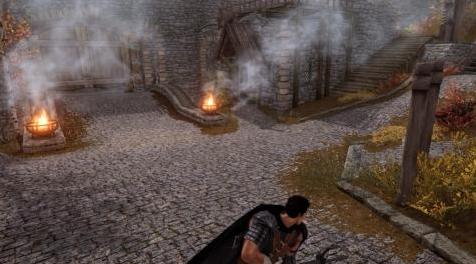
MOD介绍:
问题
如果你是一个狂暴的粉丝,Bagserk的狂暴种族模型对于最初的Skyrim来说是一个很好的模型。然而,最初的mod现在已经很旧了,它是在一些种族改进库之前编写的,最显著的是racecompatibility mod,它可以防止自定义种族出现某些问题。它也是le的一个mod,因此不能直接在se上工作。
解决方案
请遵循以下说明:
去Bagserk的网站(备用镜像)下载“狂暴竞赛0.6”和“guts更新”。
提取数据文件夹的内容(而不是数据文件夹本身!)在狂暴竞赛0.6到一个新的文件夹,这将是狂暴竞赛mod的主文件夹。别合上7zip!这个新文件夹应该包含网格、脚本、声音、纹理和berserkraces.esm。
在可选文件夹中,将x117骨架/数据的内容提取到刚刚创建的Berserk Races文件夹中。这是“森林女巫”比赛正确进行的必要条件,如果没有它,当你选择“森林女巫”时,游戏将启动。
在步骤3中提取的berserk races mod上提取guts更新(文件为“更新guts(0.61).7z”)中的数据文件夹内容。此处应覆盖文件。此时,该文件夹中应该只有四个文件夹和berserkraces.esm。
下载racecompatibility,因为它是这个mod的一个要求。
打开建筑工具包中的berserkraces.esm作为激活的mod,然后保存它,将其转换为44格式。这将允许它与SSE一起工作。请注意,您将无法直接打开ESM,因为构建工具包不允许您打开ESM进行编辑。您必须使用WyreBash或Xedit将其更改为esp,保存它,然后重新更改。详见下文。或者,您可以从备用镜像中获取保存的ESM。
下载这个mod,然后安装racecompatibility,上面的berserk races文件夹的内容,然后按这个顺序安装这个mod。
玩得高兴!我建议使用种族兼容性对话SSE,享受在Skyrim受到歧视的感觉!
有人不可避免地会问,“为什么不建议在这些文件上运行NIF优化器/大教堂优化器?”简单的答案是,每次我这样做,然后试图创建一个角色使用狂暴种族,我得到了一个即时的CTD。所以我建议暂时不要这样做。
将ESM更改为ESP
威尔巴什
打开Wyre bash并找到berserkraces.esm。
右键单击并选择“将此文件复制到ESP”。
这将为您提供一个名为berserkraces.esp的文件。这是您应该保存在构建工具包中的文件。
删除berserkraces.esm,因为您将在下一步中替换它。
保存berserkraces.esp后打开wyre bash,右键单击它。然后选择“esmify file”。这将重新创建berserkraces.esm,但格式为sse。
删除berserkraces.esp。
XEDIT
打开xedit中的berserkraces.esm,并找到其标题部分。
在文件头中有一个称为“记录标志”的部分。其中应包含“ESM”。右键单击ESM上方和“记录标志”旁边的空间,以获取可用标志的清单。
取消选中“esm”,然后关闭xedit,在退出时保存berserkraces.esm。
将berserkraces.esm重命名为berserkraces.esp。
在构建工具包中打开该文件并保存它,然后在Xedit中重新打开它。
再次,找到“记录标志”部分,然后右键单击该空间以获取清单。这次,检查ESM。
如前所述保存并退出,然后将文件重命名为berserkraces.esm。
——————————————————————————————————————————
The Problem
Bagserk's Berserk Races mod is a great mod for the original Skyrim, if you're a Berserk fan. The original mod, however, is now very old, and was written before a number of race improvement libraries, most notably the RaceCompatibility mod that prevents certain problems with custom races. It's also a mod for LE, and thus won't work directly on SE.
The Solution
Just follow these instructions:
Go to Bagserk's site (alternate mirror) and download both "Berserk Races 0.6" and "Guts Update".
Extract the contents of the Data folder (not the Data folder itself!) in Berserk Races 0.6 to a new folder, which will be the main folder for the Berserk Races mod. Don't close 7zip yet! This new folder should contain meshes, scripts, sound, textures and berserkraces.esm.
In the Optional folder, extract the contents of x117 skeleton/Data into the Berserk Races folder you just created. This is necessary for the "Witch of the Forest" race to work correctly; without it, the game will CTD when you select "Witch of the Forest".
Extract the contents of the Data folder in the Guts update (file is "update for Guts (0.61).7z") over the Berserk Races mod extracted in step 3. Files should be overwritten here. At this point, there should only be four folders and berserkraces.esm in this folder.
Download RaceCompatibility , as it is a requirement for this mod.
Open berserkraces.esm in the Construction Kit as your active mod and then save it, to convert it to Form 44. This will allow it to work with SSE. Note that you won't be able to open the ESM directly, as the Construction Kit does not allow you to open ESM's for editing. You'll have to use either Wyre Bash or xEdit to change it to an ESP, save it, and then change it back. See section below for details. Alternatively, you can get the saved ESM from the alternate mirror.
Download this mod, and then install RaceCompatibility, the contents of the Berserk Races folder above, and then this mod, in that order.
Have fun! I suggest using Race Compatibility Dialogue SSE , to enjoy the feeling of being discriminated against in Skyrim!
Someone will inevitably ask, "Why don't you advise running the NIF Optimizer/Cathedral Optimizer on these files?". The easy answer is, every time I have done so, then tried to create a character using the Berserk Races, I've gotten an instant CTD. So I advise against it for now.
Changing an ESM to an ESP
Wyre Bash
Open Wyre Bash and locate berserkraces.esm.
Right click and select "copy this file to an ESP".
This will give you a file called berserkraces.esp. This is the file you should save in Construction Kit.
Delete berserkraces.esm, as you're going to replace it in the next step.
Open Wyre Bash after you've saved berserkraces.esp, and right click on it. Then select "ESMify file". This will recreate berserkraces.esm, but in SSE format.
Delete berserkraces.esp.
xEdit
Open berserkraces.esm in xEdit, and locate the header section for it.
In the file header, there's a section called "Record Flags". This should contain "ESM". Right click on the above ESM and next to "Record Flags" to get a checklist of available flags.
Uncheck "ESM", and then close xEdit, saving berserkraces.esm on the way out.
Rename berserkraces.esm to berserkraces.esp.
Open that file in the Construction Kit and save it, then reopen it in xEdit.
Once again, locate the Record Flags section and right click in the to get the checklist. This time, check ESM.
Save & exit as before, then rename the file back to berserkraces.esm.
资源查找:
最新文章
点击热榜
推荐问答
- [问答]情商课一般几岁孩子去学比较好?
- [问答]怎么看自己孩子情商低不低?孩子情商低的10大特征是真的吗?
- [问答]我想提高情商和说话要看什么书?
- [问答]顾三月情感课程pdf谁有?
- [问答]谁有情感培训课程资源?
- [问答]如何看卖情感课程正规还是不正规?
实时热榜
回复区
昵称:
邮箱:
内容: