上古卷轴5:重置版MOD 武器伤害UI
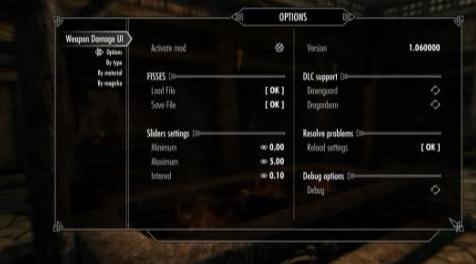
MOD介绍:
描述
mod允许你按照标准改变武器和法术的伤害。
特征:
由SkyUI提供支持(仅限MCM)
NPC和PC的个人设置
武器,材料和魔法的乘数,包括符文
FISSES支持
要求
SKSE 2#0#6或更新版本
SkyUI 5.2SE
FISSES是可选的
DLC支持(选择您的版本):
没有DLC - 没有DLC播放
Dawnguard - 仅与Dawnguard DLC一起玩
Dragonborn - 仅与Dragonborn DLC一起玩
全面玩Dragonborn和Dawnguard DLC(主版)
UPDATING
只是覆盖文件和播放。
在版本之间切换
如果您在没有DLC支持的版本之间切换到支持DLC,反之亦然,您可以使用mod的“选项”页面上的“重新加载设置”按钮。
从版本1.06开始,mod支持FISSES。它比上面描述的解决方案好得多^ _ ^
FISSES支持信息
目前,mod正在使用硬编码文件来保存您的设置:
数据\ SKSE \插件\ FISS \ WeaponDamageUI.xml
当您在此mod的版本之间切换时,您必须自己监视它。因为上面提到的文件是在mod的存档中发布的,它默认包含设置。
进行备份并经常:-)
关于徒手格斗的说明
此版本支持更改非武装伤害,请参阅“按类型”页面对其进行设置。
目前的实施有点奇怪。几乎同时应用PC的更改。另一方面,将完成接下来的步骤以更改NPC的非武装伤害值:
你会得到一个完整的力量。在此之后,该法术将在NPC上施放(射击),持续时间等于60秒。
在此法术开始在NPC上工作的那一刻,它将改变你定义的NPC的非武装伤害演员值。
经过60秒后,NPC的非武装伤害值将恢复到原始值。
如果有必要,那个效果将在那段时间后在NPC上重新应用,之后你的角色会受到新的打击。
为什么这么复杂你可能会问我?
好吧,因为测试表明,当你第一眼看到它时,这不是一项简单的任务。游戏中的两种形式类型都表示非武装伤害:它是武器和演员价值,如健康,魔法,耐力,speedmult等。
此外,检查手中挥舞武器的条件功能也是错误的。这是我没有通过Perk +入口点实现此功能的原因之一(实际上这是我的第一次尝试)。
也许我稍后会改变这种行为,但不能保证。
问题和问题
问:箭头?螺栓?
答:好的,没有箭头和螺栓。我试过,没有成功。如果有人知道该怎么做,请告诉我,谢谢。
问:弓和材料......没有用木头做的弓?
A.实际上,很多弓都有关键词“钢”,同时人们可能认为它是用木头制成的。发现这个时我很惊讶。
问:毒药怎么样?
答:我也希望实现此功能,但游戏中不包含此类关键字变量。这是可能的,但是工作太多了。
问:生物怎么样?
答:我认为可以做到。可能会在下一个版本中实现此功能。
接受任何建议。
兼容性
mod必须与任何其他mod兼容。
新的或改装的武器,魔法效果等只需要从香草游戏中获得正确的关键词。例如,游戏中的每个武器都有自己的关键词,如“WeapMaterialSteel”(武器是用钢制造的)或“WeapTypeWarAxe”(这是一个waraxe)。
如果你的mod包含武器或魔法效果而没有来自香草游戏的关键词,或者它使用不同的关键词,那么这个mod将无法正常使用这些武器和/或法术。你必须要求武器模型的作者来解决这个问题。不要问我这个,我帮不了你!
安装
对于NMM,Wrye Bash / Smash用户:
下载,安装和激活mod任何其他。
按照以下第3页的说明操作
对全部:
将存档内容解压缩到“Skyrim Special Edition / Data”文件夹。
检查mod管理器中的WeaponDamageUI.esp文件。
通过SKSE运行Skyrim特别版
进入“MOD CONFIGURATION”菜单并退出:Esc - > MOD CONFIGURATION - > TAB - > TAB
等待大约5-10秒,直到您收到消息“禁用武器伤害UI”
再次进入“MOD CONFIGURATION”并根据您的口味进行自定义
UNINSTALLING
在Mod Settings中禁用mod。
保存游戏。
在Mod Manager中取消激活mod。
如果您没有使用任何Mod Manager,请从“Skyrim Special Edition / Data”文件夹中删除文件。
——————————————————————————————————————————————
DESCRIPTION
The mod allows you to change a damage of weapons and spells by the criteria.
Features:
Powered by SkyUI (for MCM only)
Individual settings both for NPC and PC
Multipliers for weapons, materials and magicka, including runes
FISSES support
REQUIREMENTS
SKSE 2#0#6 or newer
SkyUI 5.2SE
FISSES is optional
DLC support (choose your version):
No DLC - play without DLCs
Dawnguard - play with Dawnguard DLC only
Dragonborn - play with Dragonborn DLC only
Full - play with Dragonborn and Dawnguard DLCs (main version)
UPDATING
Just overwrite files and play.
Switching between versions
If you switching between version without DLC support to with DLC support and vice versa, you may use "Reload Settings" button at the "Options" page of the mod.
Starting from version 1.06, the mod is supporting FISSES. It is much better than the solution has been described above ^_^
FISSES support information
At the moment the mod is using the hardcoded file to keep your settings:
Data\SKSE\Plugins\FISS\WeaponDamageUI.xml
You have to watch over it yourself when you are switching between the versions of this mod. Because the file mentioned above is shipping in the archive of the mod and it contains settings by default.
Make backups and often :-)
Notes about Unarmed Combat
This version is supporting changing an unarmed damage, see settings for it at "By Type" page.
The current implementation is a bit weird. Changes for PC are applied almost simultaneously. On other hand, the next steps will be completed to change a value of unarmed damage for a NPC:
You will get first hit with a full force. Right after that the spell will be casted (fired) on the NPC with a duration equals to 60 seconds.
At the moment when this spell is started working on the NPC it will change the NPC's unarmed damage actor value as you defined.
After passing 60 seconds the unarmed damage value of the NPC will be restored to the original value.
If it will be a necessary the effect will be reapplied on the NPC after that period and later your character get a new hit.
Why is so complicated you may ask me?
Well, because tests showed that it is not a simple task as you look at it at the first glance. The unarmed damage is represented by both form types in the game: it is a weapon and an actor value, like health, magicka, stamina, speedmult, etc.
Also, the condition functions to checking a wielding weapon in hands are buggy. This was one of the reasons why I did not implemented this feature via Perk + Entry Point (actually it was my first attempt).
Maybe I will change this behavior later but no guarantees.
Questions and issues
Q. Arrows? Bolts?
A. Ok, there are no arrows & bolts. I tried, no success. If somebody know how to do that, let me know, thanks.
Q. Bows and materials... Are there no bows made from a wood?
A. Actually, many bows have the keyword "steel", meanwhile a human may think that it was made from a wood. I was surprised when found this too.
Q. How about poison?
A. I wanted to implement this feature too, but the game does not contain such keywords variables. It is possible, but too much work.
Q. How about creatures?
A. As I see it is possible to be done. May be in the next version this feature will be implemented.
Any suggestions accepted.
COMPATIBILITY
The mod must be compatible with any other mods.
New or modded weapons, magic effects and so on only required to have correct keywords from vanilla game. For instance, each weapon in the game has own keywords like "WeapMaterialSteel" (weapon was made from a steel) or "WeapTypeWarAxe" (this is a waraxe).
If your mod has include weapons or magic effects without keywords from vanilla game or it uses different keywords then this mod will NOT working properly with these weapons and/or spells. You have to ask authors of weapon's mods to fix this issue. Do not ask me about that, I can not help you!
INSTALLATION
For NMM, Wrye Bash/Smash users:
Download, install and activate the mod as any other.
Follow instructions below from p.3
For all:
Unpack the contents of the archive to your "Skyrim Special Edition/Data" folder.
Check WeaponDamageUI.esp file in your mod manager.
Run Skyrim Special Edition via SKSE
Enter to "MOD CONFIGURATION" menu and exit: Esc -> MOD CONFIGURATION -> TAB -> TAB
Wait about 5-10 seconds until you'll receive the message "Weapon Damage UI disabled"
Enter to "MOD CONFIGURATION" again and customize it on your taste
UNINSTALLING
In Mod Settings disable the mod.
Save the game.
Deactivate the mod in the Mod Manager.
Delete files from the "Skyrim Special Edition/Data" folder if you are not using any Mod Manager.
资源查找:
最新文章
点击热榜
推荐问答
- [问答]情商课一般几岁孩子去学比较好?
- [问答]怎么看自己孩子情商低不低?孩子情商低的10大特征是真的吗?
- [问答]我想提高情商和说话要看什么书?
- [问答]顾三月情感课程pdf谁有?
- [问答]谁有情感培训课程资源?
- [问答]如何看卖情感课程正规还是不正规?
回复区
昵称:
邮箱:
内容: