上古卷轴5:重置版MOD 陶笛
MOD介绍:
MaGlas使用他的Zelda mod及其资产
Ryugahta为他的Ocarina modder的资源
SKSE(Skyrim Script Extender)团队
Incompetech的“东方思想”免版税图书馆
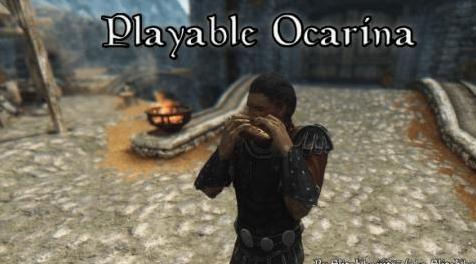
这个mod的目的是添加一个可玩的Ocarina,其功能与Ocarina of Time中使用的非常类似。我不想只是施放咒语或按某些东西来播放一首歌,我希望能够播放每个音符以播放一首歌并复制在Ocarina of Time中播放ocarina的体验。
这个mod需要SKSE
手动安装
1.)转到文件部分,单击“手动下载”
2.)将mod存档的内容解压缩到数据文件夹
3.)如果提示覆盖,则可能提示您覆盖的唯一文件应为“animobjectflutelong.hkx”,“animobjectfluteshort.hkx”和“animobjectflute.nif”。如果您已经有一个替换这些文件的mod,您可以保留其动画或使用mod。由你决定。
4.)在您的加载订单中启用“Playable Ocarina.esp”
Nexus Mod Manager安装
1.)转到文件部分,单击“使用经理下载”
2.)在NMM中激活mod
3.)如果提示覆盖,则可能提示您覆盖的唯一文件应为“animobjectflutelong.hkx”,“animobjectfluteshort.hkx”和“animobjectflute.nif”。如果您已经有一个替换这些文件的mod,您可以保留其动画或使用mod。由你决定。
4.)确保esp已启用(NMM应自动完成)
手动卸载
1.)在启用mod的情况下加载游戏
2.)打开控制台(点击“〜”键),输入“stopquest 00ocarinaquest”,不带引号。如果你尚未获得Ocarina,你还需要输入“stopquest 00ocarinadungeonquest”而不加引号。
3.)保存你的游戏并退出天际
4.)从数据文件夹中删除所有可播放的Ocarina mod文件(文件夹标记为“PlayableOcarina.esp”,脚本以“oca”为前缀)
5.)再次启动“天际”,然后再次保存
Nexus Mod Manager
1.)在启用mod的情况下加载游戏
2.)打开控制台(点击“〜”键),输入“stopquest 00ocarinaquest”,不带引号。如果你尚未获得Ocarina,你还需要输入“stopquest 00ocarinadungeonquest”而不加引号。
3.)保存你的游戏并退出天际
4.)双击NMM中的mod进行卸载
5.)再次启动“天际”,然后再次保存
我正在努力确定兼容性,因为我在更新mod时继续前进。
改变Wayward Pass上方区域的修改(在CK中的aprox。坐标18,18)将与地牢所在的地方发生冲突。
相机模块可能是一个问题。但是,增强型相机的问题似乎已得到修复。
请详细告诉我您遇到的任何不兼容性。
安装完成后,你应该让快递员给你一封信,开始一个任务。这个任务是一个懒洋洋的设计,带有一个短划线地牢。
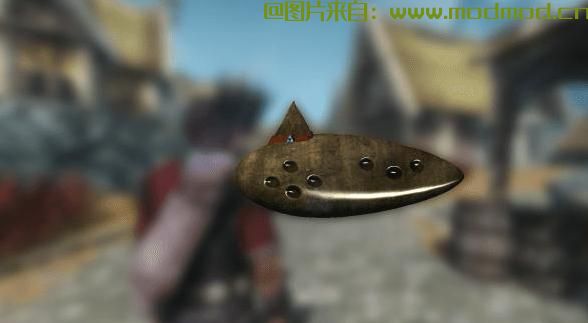
就游戏而言,Ocarina在技术上是盔甲。要使用它,只需装备它。如果您从库存菜单中装备它,它将自动退出,您将准备好玩。如果您已经收藏了该项目并且正在从收藏夹菜单中进行装配,则您需要退出收藏夹菜单以便开始播放动画并进行播放。
mod将检测您是使用控制器还是鼠标和键盘。要在键盘上弹奏音符,请按下用于移动的键(默认WASD)和用于激活的键(充当Nintendo 64上的A按钮)。要使用控制器演奏音符,请使用D-pad和A按钮。使用你用来装护武器的钥匙或按钮,将陶笛放好。
我会在添加更多歌曲时更新此列表。每个三个音符序列需要播放两次才能激活效果。
展开扰流板进行查看!
剧透:显示
- 陶笛动画将把陶笛置于人物口中,然后再举起手来演奏它。
这是因为您演奏的Ocarina是一个可动画的对象,与动画相结合。陶笛固定在角色的头上,这样我就可以轻松地将它与嘴巴对齐。这可以通过将Ocarina animobject锚定到另一个骨骼来解决,但是这会使陶笛衬在嘴上很痛。我绝不是动画师,我在动画方面实际上非常糟糕。这是我计划修复的东西,但它在我的优先级列表中较低,因为它功能齐全,看起来很尴尬。
- “陶笛相机”的位置永远不会是一个常数,可能会出现在奇怪角度的怪异地方。
无论相机如何出现,即使你听不到音符播放,Ocarina仍然可以正常运作。不幸的是,我用来允许这种摄像机角度的方法本质上是有缺陷的,并且会受到一些打嗝的影响。实际上有一个“摄像师”在装备陶笛时被放置。他处于一定的距离和角度。然而,由于NPC的规则适用于他,因此会有一些问题(即 - 面对悬崖边缘时扮演Ocarina,这将使他脱离边缘)。
我不确定有任何具体方法可以解决这个问题。最终(虽然不是优先考虑),我将考虑在动画中更改相机的位置和旋转。如果你知道通过Papyrus做到这一点的方法,我全都耳朵。
- 地牢navmesh似乎有一些问题。坏人喜欢它,Kharjo没有。
Kharjo(很可能是其他任何随从)不会踏入那里。地牢中的敌人会按照自己的意愿移动,所以我猜测(导航经验非常有限)这是一个通向地牢的门和人行道的问题。
——————————————————————————————————————————————————————
MaGlas for use of his Zelda mod and its assets
Ryugahta for his Ocarina modder's resource
SKSE (Skyrim Script Extender) team
Incompetech's royalty-free library for 'Eastern Thought'
The aim of this mod is to add a playable Ocarina that functions very similarly to the one used in Ocarina of Time. I didn't want to just cast a spell or press something to play a song, I wanted to be able to play each note in order to play a song and replicate the experience of playing the ocarina in Ocarina of Time.
This mod requires SKSE
Manual Install
1.) Go to the files section, click "Download manually"
2.) Unpack the contents of the mod's archive to your data folder
3.) If prompted to overwrite, the only files you may be prompted to overwrite should be "animobjectflutelong.hkx", "animobjectfluteshort.hkx", and "animobjectflute.nif". If you already have a mod that replaces these files, you can either keep its animation or use the mod's. It's up to you.
4.) Enable "Playable Ocarina.esp" in your load order
Nexus Mod Manager Install
1.) Go to the files section, click "Download with manager"
2.) Activate the mod in NMM
3.) If prompted to overwrite, the only files you may be prompted to overwrite should be "animobjectflutelong.hkx", "animobjectfluteshort.hkx", and "animobjectflute.nif". If you already have a mod that replaces these files, you can either keep its animation or use the mod's. It's up to you.
4.) Make sure the esp is enabled (NMM should have automatically done so)
Manual Uninstall
1.) Load your game with the mod enabled
2.) Open up the console (hit the "~" key) and type "stopquest 00ocarinaquest" without the quotation marks. If you haven't obtained the Ocarina yet, you will also need to type "stopquest 00ocarinadungeonquest" without quotes.
3.) Save your game and exit Skyrim
4.) Delete all the Playable Ocarina mod files from your data folder (folders are labeled "PlayableOcarina.esp", scripts are prefixed with "oca")
5.) Launch Skyrim again, then save again
Nexus Mod Manager
1.) Load your game with the mod enabled
2.) Open up the console (hit the "~" key) and type "stopquest 00ocarinaquest" without the quotation marks. If you haven't obtained the Ocarina yet, you will also need to type "stopquest 00ocarinadungeonquest" without quotes.
3.) Save your game and exit Skyrim
4.) Double-click the mod within NMM to uninstall
5.) Launch Skyrim again, then save again
I'm working on determining compatibility as I move forward in updating the mod.
Mods that alter the area just above Wayward Pass (aprox. coordinates 18,18 in the CK) will conflict as that's where the dungeon is.
Camera mods may be an issue. An issue with Enhanced Camera seems to have been fixed, though.
Please let me know of any incompatibilities that you encounter, in detail.
After installing, you should have a courier deliver you a letter, which starts a quest. The quest is a lazily designed one with a slap-dash dungeon.
The Ocarina is technically armor as far as the game is concerned. To use it, just equip it. If you equip it from the inventory menu, it will automatically exit out and you'll be ready to play. If you have favorited the item and are equipping it from the favorites menu, you'll need to back out of the favorites menu in order for the animation to start and for you to play.
The mod will detect whether you are using a controller or a mouse and keyboard. To play notes on the keyboard, hit the keys you use for movement (default WASD) and the key you use to activate (acts as the A button would on the Nintendo 64). To play notes with a controller, use the D-pad and A button. Put the Ocarina away by using whichever key or button you use to sheathe your weapon.
I will update this list as I add more songs. Each sequence of three notes needs to be played twice in order to activate the effect.
Expand the spoiler to view!
Spoiler:
Show
- The Ocarina animation will place the Ocarina in the characters mouth before they bring their hands up to play it.
This is because the Ocarina that you play is an animatable object that is coupled with the animation. The Ocarina is anchored to the character's head so that I could easily align it to the mouth. This can be fixed by anchoring the Ocarina animobject to another bone, however this makes lining the Ocarina up to the mouth a pain. I am by no means an animator, I'm actually pretty terrible at animating. It's something that I plan on fixing, but it's lower on my priority list as it's fully functional, just awkward looking.
- The "Ocarina camera" location is never a constant and can appear in weird places at weird angles.
No matter how the camera appears, even if you can't hear the notes play, the Ocarina still functions as it should. Unfortunately, the method I used to allow such a camera angle is inherently flawed and subject to some hiccups. There is actually a "cameraman" who is placed while equipping the Ocarina. He is at a set distance and angle. However because of the fact that the rules of an NPC apply to him, there will be some issues (i.e. - playing the Ocarina while facing the edge of a cliff, which will spawn him off of the edge).
I'm not sure of any concrete ways to fix this. Eventually (though not a priority), I will look into changing the camera's location and rotation in the animation. If you know of a way to do this via Papyrus, I'm all ears.
- The dungeon navmesh seems to have some issues. Bad guys like it, Kharjo doesn't.
Kharjo (and most likely any other follower) won't step foot in there. The enemies within the dungeon move around as they should, so I'm guessing (with extremely limited navmesh experience) that it's an issue with the door and walkway leading up to the dungeon.
演示截图:
资源查找:
最新文章
点击热榜
推荐问答
- [问答]情商课一般几岁孩子去学比较好?
- [问答]怎么看自己孩子情商低不低?孩子情商低的10大特征是真的吗?
- [问答]我想提高情商和说话要看什么书?
- [问答]顾三月情感课程pdf谁有?
- [问答]谁有情感培训课程资源?
- [问答]如何看卖情感课程正规还是不正规?
回复区
昵称:
邮箱:
内容: