上古卷轴5:重置版MOD 自定义难度UI
MOD介绍:
描述
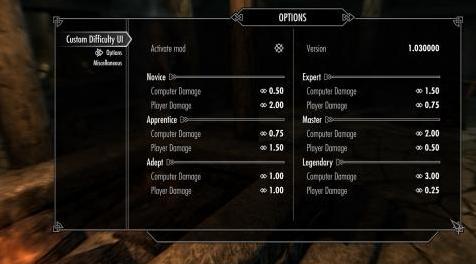
mod允许你为每种游戏难度改变伤害乘数。
例如,在“传奇”难度下,你将产生一个伤害x0.25的命中,而NPC会以x3乘数击中你。
特征:
由SkyUI提供支持(仅限MCM)
没有计划添加新功能
要求
SKSE 2#0#6或更新版本
SkyUI 5.2SE
兼容性
与通过SKSE执行相同操作的mod冲突。
安装
对于NMM,Wrye Bash / Smash用户:
像其他任何人一样下载,安装和激活mod。
按照以下第3页的说明操作
对全部:
将存档内容解压缩到“Skyrim Special Edition / Data”文件夹。
在Mod Manager中检查CustomDifficultyUI.esp文件。
通过SKSE运行Skyrim特别版。
进入“MOD CONFIGURATION”菜单并退出:Esc - > MOD CONFIGURATION - > TAB - > TAB
等待5-10秒,直到收到“自定义难度UI禁用”消息。
进入“MOD CONFIGURATION”菜单并根据您的喜好自定义。
UNINSTALLING
在Mod Settings中禁用mod。
保存游戏。
在Mod Manager中取消激活mod。
如果您没有使用任何Mod Manager,请从“Skyrim Special Edition / Data”文件夹中删除文件。
——————————————————————————————————————————————
DESCRIPTION
The mod allows you change damage multipliers for each kind of the game difficulty.
For instance, at the "Legendary" difficulty you will produce a hit with a damage x0.25, while NPCs will hit you with x3 multiplier.
Features:
Powered by SkyUI (MCM only)
No plans to add new features
REQUIREMENTS
SKSE 2#0#6 or newer
SkyUI 5.2SE
COMPATIBILITY
Conflicts with mods that do the same thing via SKSE.
INSTALLATION
For NMM, Wrye Bash/Smash users:
Download, install and activate mod as any other.
Follow instructions below from p.3
For all:
Unpack the contents of the archive to your "Skyrim Special Edition/Data" folder.
Check CustomDifficultyUI.esp file in Mod Manager.
Run Skyrim Special Edition via SKSE.
Enter to "MOD CONFIGURATION" menu and exit: Esc -> MOD CONFIGURATION -> TAB -> TAB
Wait 5-10 seconds until you receive message "Custom Difficulty UI disabled".
Enter to "MOD CONFIGURATION" menu and customize it on your taste.
UNINSTALLING
In Mod Settings disable the mod.
Save the game.
Deactivate the mod in the Mod Manager.
Delete files from the "Skyrim Special Edition/Data" folder if you are not using any Mod Manager.
资源查找:
最新文章
点击热榜
推荐问答
- [问答]情商课一般几岁孩子去学比较好?
- [问答]怎么看自己孩子情商低不低?孩子情商低的10大特征是真的吗?
- [问答]我想提高情商和说话要看什么书?
- [问答]顾三月情感课程pdf谁有?
- [问答]谁有情感培训课程资源?
- [问答]如何看卖情感课程正规还是不正规?
回复区
昵称:
邮箱:
内容: