上古卷轴5:重置版MOD 真实再生 - RealRegen
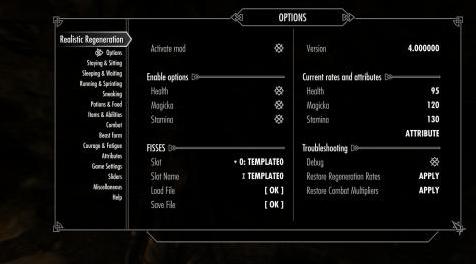
MOD介绍:
描述
该mod使您能够自定义Health,Magicka和Stamina的再生率。
特征:
由SkyUI提供支持(仅限MCM)
支持模式:睡觉,等待,坐着,跑步,短跑,偷偷摸摸
支持药水和食物
支持战斗模式
支持勇气和疲劳模式
支持物品,魔法效果和能力
FISSES支持
要求
SKSE 2#0#6
SkyUI 5.2SE
FISSES 1#3#1是可选的,强烈推荐
UPDATING
只需覆盖文件并继续播放。
这是你的MOD吗?
mod被认为是一个构造函数,一个[你自己的现实]的构建器,你可以命名它,而不是作为你游戏的预定义预设。因为有很多东西可能会改变游戏的平衡,所以这个mod遵循下一个规则:
有人说,蝴蝶翅膀的颤动最小的东西最终会导致世界各地的台风。
- 混沌理论
该mod使您能够控制游戏中大多数情况下的再生率。不过,还有很多工作要做。
如果你喜欢玩自己的规则,那么这个mod适合你。
如果你正在寻找一个大胆的平衡模式,你必须看一些大修,主要是因为它们涵盖的不仅仅是再生率。
MOD的所作所为
该mod基于根据情况修改下一个actor值:HealRate,MagickaRate和StaminaRate。
此外,它还可以处理战斗模式中的下一个值:CombatHealthRegenMult,fCombatMagickaRegenRateMult和fCombatStaminaRegenRateMult。
注意:如果您不知道上述内容,请阅读模式中包含的HOWTO文件以获取详细信息。
此外,该模式正在观察你正在做什么以及有什么效果,例如:坐着,跑步,冲刺,偷偷摸摸,战斗,再生药水的积极效果,食物;控制睡眠,等待的速度;当PC处于狼人状态时改变演员价值。
和更多。
兼容性
该mod旨在与所有东西兼容。
您必须启用或禁用选项,并查看您的mod是否正常使用真实再生。
此mod修改了玩家变量(通过ForceAv和MagicEffects):
HealRate
MagickaRate
StaminaRate
此外,它可能会根据玩家的决定修改此类变量:
CombatHealthRegenMult
fCombatMagickaRegenRateMult
fCombatStaminaRegenRateMult
修改Magic Effects以修复与再生率相关的错误:
没有努力的力量
火内
恢复耐力[FoodRestoreStaminaDuration]
恢复魔法[FoodRestoreMagickaDuration]
Sinderion的意外发现[NN01PerkEffect]
mod不会更改任何NPC值。
mod不会改变任何种族价值。
mod不会改变魔药,食物等的任何变量。
如果您与某些mod发生冲突而您不知道该怎么做,那么只需在MCM内部将选项保留为DISABLED即可进行逼真再生。
加载订单
最好将RealisticRegeneration.esp文件保存在加载列表的底部,因为香草游戏中的魔法效果会发生变化。请参阅上述“兼容性”部分中的详细信息。
问题
问题#1
当你在睡觉后醒着时,你可能会注意到几秒钟后的健康状况(magicka,stamina)已经增加(减少)到更高(更低)的值。
回答:
一切都好,按照预期。
问题#2
疲劳的影响和快速旅行会导致一些奇怪的结果。
当您执行下一步操作时,您的属性Magicka或Stamina(如您在选项中定义的)可能会减少。
让我们举一个运行时Stamina疲劳效果的例子。重现错误的步骤(并不总是,但经常):
你在跑步。
此时你打开地图并快速旅行。
到达目的地后,你会看到Stamina已经减少了。
我目前不知道如何解决这个问题。
解:
在打开地图之前停止,这将停止疲劳效果。
也可以看看
Skyrim Skill Uncapper:我正在使用它作为这个mod的补充
常问问题。
问:现实,你说?这不太现实!
答:现实并不存在。我们每个人都有自己的感受。
问:数字......我不明白他们!
A.此mod控制下一个actor值,下面显示默认数字:
HealRate = 0.7
MagickaRate = 3.0
StaminaRate = 5.0
值越高意味着再生速度越快。
请阅读此版本mod中包含的HOWTO文件以获取更多信息。这个F#A#Q.很难解释所有细节。
问:什么是魔药,食物?
A.支持。请记住,药水或食物应该提高再生率,而不仅仅是恢复你的属性。
问:药水,食物等的确切设置如何?
答:简而言之,药水的设置具有最高优先级。
默认再生率位于“保持”设置下。它有一个特别的优先权。
优先级从高到低:
等待/睡觉/狼人*
能力 *
药水
餐饮
战斗
项目
潜行/短跑/跑步/坐姿
住*
这意味着魔药设置会覆盖任何其他设置,但会在有限的时间内完成。
*这些设置具有特殊优先级,请参阅下面的列表。
特别优先事项
保持<----所谓的“默认”率*
等待/睡觉/狼人**
法术(能力)***
*这是mod的主要切入点。此处定义的值将通过ForceAv()命令为HealRate,MagickaRate和StaminaRate设置。所以,无论如何,这些值代表了大多数情况下的默认再生率,直到它们被这个mod中的其他设置覆盖,例如魔药,食物的不同值,你命名它。
** Waiting,Sleeping,Werewolf设置会覆盖任何设置,包括药水,食物,一切。
***能力设置为您提供当前费率的补充。通过这种方式,能力将为你的角色提供更好的手段。
Q.睡眠过高(低)时的再生率!
A.是的,按预期。
在游戏时间将转换为真实的。要获得健康的新价值,您应该实时等待相同的小时数。
请注意以下公式:
获得的属性数量= <RATE> * 3600 * <AMOUNT OF HOURS>
例如,您将生命恢复的速率设置为0.01,因此:
睡眠后的总体健康状况= <睡前健康状况> +(0.01 * 3600 *小时)
问:mod对我来说太复杂了。我迷路了!
答:我理解你,但我不能让所有人都开心。
冷静下来,首先停止打开mod中的所有功能。现在,尝试着重于你真正想要的mod,并在经过一段时间的测试后逐一开始选项。
问:我觉得再生率是错误的。
答:可能一些其他模式正在改变再生率。
有两种不同的设置来控制再生率。这个mod正在使用它们中的一种。香草游戏中的所有药水,食物,咒语和物品都使用第二种类型,详见HOWTO。有些mod可能会使用与此mod相同的设置,这是导致奇怪结果的原因。
唯一可以确定的方法是使用Creation Kit或TES5Edit。
问:我使用的是经典天际的版本,为什么你删除了这个或那个?
答:我会尽力给你一个详细的解释。
1.模板。
当我创建它们时,我在想“好吧,让我们在mod中完成这个或那个,我将开始创建令人惊叹的模板”。
好吧,它从未发生过。编程模板花了很多时间。更重要的是,在你编写它之后,你有可能错过了某些东西或输入了错误的值。最后,我发现创建模板的唯一方法是使用FISS。
2.内部保存和负载支持。
该模式仍在增长。添加新变量以保存和加载例程需要一些时间。没有模板那么大,但仍然,我总是忘记添加一些新的变量。可能,当mod具有所有需要的功能时,我将返回此功能。
问:mod脚本很重吗?
A. mod不是脚本重。大约75%的文件是为MCM制作的。
mod中的大多数功能都基于Spell + Magic Effect方案。
接下来的功能是使用脚本来更改重新生成:
狼人:默认情况下,轮询间隔为2秒
疲劳Nock:使用OnAnimationEvent()事件
睡眠/等待:使用OnMenuOpen(),OnMenuClose()事件
问:为什么有这么多脚本文件?
答:我是出于以下原因这样做的:
优化:每个脚本/任务都在自己的线程上运行。
在一个文件中维护这么大的mod真的很难。
在开发的某些时候,当经典Skyrim的Creation Kit无法为编译大小超过128kb的脚本打开属性时,这是必要的。我不知道,真的不想知道是否仍然存在Creation Kit 64位的问题。
当我需要扩展或减少mod的功能时,这种方式的开发会带来好处。添加或删除功能极其简单:只需添加/删除文件,进行单行修复即可!
参考
游戏设置
关于uesp.net再生的讨论
安装
对于NMM,Wrye Bash / Smash用户:
像其他任何人一样下载,安装和激活mod。
按照以下第3页的说明操作
对全部:
将存档内容解压缩到“Skyrim Special Edition / Data”文件夹。
检查Mod Manager中的RealisticRegeneration.esp文件。
通过SKSE运行Skyrim特别版。
进入“MOD CONFIGURATION”菜单并退出:Esc - > MOD CONFIGURATION - > TAB - > TAB
等待5-10秒,直到收到“自定义难度UI禁用”消息。
进入“MOD CONFIGURATION”菜单并根据您的喜好自定义。
UNINSTALLING
在Mod Settings中禁用mod。
保存游戏。
在Mod Manager中取消激活mod。
如果您没有使用任何Mod Manager,请从“Skyrim Special Edition / Data”文件夹中删除文件。
——————————————————————————————————————————————————————
DESCRIPTION
The mod gives you an ability to customize regeneration rates for Health, Magicka and Stamina.
Features:
Powered by SkyUI (MCM only)
Supporting modes: sleeping, waiting, sitting, running, sprinting, sneaking
Supporting potions and food
Supporting combat modes
Supporting courage & fatigue modes
Supporting items, magic effects and abilities
FISSES support
REQUIREMENTS
SKSE 2#0#6
SkyUI 5.2SE
FISSES 1#3#1 is optional and highly recommended
UPDATING
Just overwrite files and continue playing.
IS THIS MOD FOR YOU?
The mod is considered as a constructor, a builder [of your own reality], you name it and not as a pre-defined preset for your play through. Because there are a lot of things that might change the balance of the game, this mod follows the next rule:
It has been said something as small as the flutter of a butterfly's wing can ultimately cause a typhoon halfway around the world.
- Chaos Theory
The mod gives you an ability to control regeneration rates for most situations in the game. Still, there is a lot of work to be done.
If you like to play with own rules, then this mod is for you.
If you are looking for a bold balancing mod you have to look some overhauls around, mostly because they covers much more than just regeneration rates.
THINGS THAT MOD DOES
The mod is based around of modifying the next actor values depending on the situation: HealRate, MagickaRate and StaminaRate.
Plus, it can handle the next values in a combat mode: CombatHealthRegenMult, fCombatMagickaRegenRateMult and fCombatStaminaRegenRateMult.
Note: Please read HOWTO file included with the mode to obtain details, if you don't know what was said above.
Also, the mod is watching what you are doing and what effects are active, such as: sitting, running, sprinting, sneaking, combat, active effects of potions of regeneration, food; controls rates for sleeping, waiting; changing actor values when PC is in the werewolf form.
And more.
COMPATIBILITY
The mod is designed to be compatible with everything.
You have to enable or disable options and look if your mods are working properly with Realistic Regeneration.
This mod modifies player variables (via ForceAv & MagicEffects):
HealRate
MagickaRate
StaminaRate
Also, it may modify such variables depending on player's decision:
CombatHealthRegenMult
fCombatMagickaRegenRateMult
fCombatStaminaRegenRateMult
Magic Effects modified to fix bugs related to regeneration rates:
Force Without Effort
The Fire Within
Restore Stamina [FoodRestoreStaminaDuration]
Restore Magicka [FoodRestoreMagickaDuration]
Sinderion's Serendipity [NN01PerkEffect]
The mod does NOT change any NPCs values.
The mod does NOT change any race values.
The mod does NOT change any variables for potions, food, etc.
If you have conflicts with some mods and you do not know what to do, then just left options as DISABLED inside of MCM for Realistic Regeneration.
LOAD ORDER
Better keep RealisticRegeneration.esp file at bottom of your load list because of changes for magic effects in the vanilla game. See details at COMPATIBILITY section described above.
ISSUES
Issue #1
When you are awake after sleeping you may notice that a health (either magicka, stamina) after a few seconds passed has been increased (decreased) to a higher (lower) value.
Answer:
All is ok, as intended.
Issue #2
Fatigue's effects and fast travel causes some weird results.
It is possible that your attributes Magicka or Stamina (as you defined in options) decrease when you are doing the next things.
Let's take an example for Stamina fatigue effect when you are running. Steps to reproduce the bug (not always, but often):
You are running.
At this moment you open a map and do fast travel.
After you have arrived to the destination you'll see that Stamina has been decreased.
I don't know how to fix this issue at the moment.
Solution:
Stop before opening a map, this will stop the fatigue effect.
SEE ALSO
Skyrim Skill Uncapper: I'm using it as a supplementary to this mod
F#A#Q.
Q. Realistic, you said? This is not a realistic!
A. Real reality is not exists. Each of us feel reality on his own.
Q. Numbers... I don't understand them!
A. This mod controls the next actor values, below showed default numbers:
HealRate = 0.7
MagickaRate = 3.0
StaminaRate = 5.0
Higher values means faster regeneration rate.
Please, read HOWTO file included with this version of the mod for more information. It is hard to explain all details in this F#A#Q.
Q. What's about potions, food?
A. Supported. Remember, a potion or a food should increase a regeneration rate and not just restore your attribute.
Q. How exactly works settings for potions, food, etc?
A. In brief, the settings for potions has highest priority.
The default regeneration rate is placed under "Staying" settings. It has a special priority.
Priorities from highest to lowest:
Waiting/Sleeping/Werewolf *
Abilities *
Potions
Food
Combat
Items
Sneaking / Sprinting / Running / Sitting
Staying *
That's means the potions settings overwrites any other settings, but for a limited amount of time.
* These settings have a special priority, see the list below.
Special priorities:
Staying <---- so called "DEFAULT" rate *
Waiting/Sleeping/Werewolf **
Spells (Abilities) ***
* This is the main entry point of the mod. Values defined here will be set via ForceAv() command for HealRate, MagickaRate and StaminaRate. So, by all means these values represents your default regeneration rates for most situations until they will be overwritten by other settings in this mod, such as different values for potions, food, you named it.
** Waiting, Sleeping, Werewolf settings overwrites any settings, including potions, food, everything.
*** Settings for Abilities provides you an addition to your current rate at the moment. In that way, the abilities will have better means for your character.
Q. A regeneration rate when sleep is too high (low)!
A. Yes, as intended.
In game hours will be converted to real ones. To gain new value for Health you should wait the same amount of hours in real time.
Please note into account the formula below:
Gained amount of attribute = <RATE> * 3600 * <AMOUNT OF HOURS>
For instance, you set the rate to 0.01 for health regeneration, so:
Total health after a sleep = <health before a sleep> + (0.01 * 3600 * hours)
Q. The mod is too complicated for me. I'm lost!
A. I understand you, but I can not make all people happy.
Calm down, stop turning on all features in the mod at first. Now, try focus on what you really want from the mod and start turning on options one by one after some period of testing.
Q. I'm feeling that a regeneration rate is wrong.
A. Probably, some other mod is changing regeneration rates.
There are two different settings to control regeneration rates. This mod is using one kind of them. All potions, food, spells and items in the vanilla game are using the second type, see HOWTO for details. Some mods may use the same kind of settings as this mod does, which is a cause of weird results.
The only way to be sure is use Creation Kit or TES5Edit.
Q. I was using a version for classic Skyrim, why did you removed this or that?
A. I will try to give you a detailed explanation.
1. Templates.
When I created them I was thinking that "ok, let's finish this or that in the mod and I will start making amazing templates".
Well, it was never happened. Programming templates took a lot of the time. More than that, after you programed it, there is a chance that you had missed something or typed a wrong value. In the end, I have found that the only way to create templates is using FISS.
2. Internal save & load support.
The mod is growing still. Adding new variables to save & load routines takes a time. Not as big as for templates, but still, I always forgot to add some new variables. Probably, I will return back this feature, when the mod will have all needed features.
Q. Is the mod script heavy?
A. The mod is not script heavy. About 75% of all files are made for MCM.
Most features in the mod are based on Spell + Magic Effect scheme.
The next features are using scripts to change a regeneration:
Werewolf: polling interval is 2 seconds by default
Fatigue Nock: uses OnAnimationEvent() event
Sleep/Wait: uses OnMenuOpen(), OnMenuClose() events
Q. Why there are so many script files?
A. I did this by next reasons:
Optimization: each script/quest is running on its own thread.
It is really hard to maintain such a big mod in one file.
It was neccessary at some point of development, when Creation Kit for classic Skyrim was unable to open Properties for the script with compiled size more than 128kb. I don't know and really do not want to know is the problem still exists for Creation Kit 64-bit.
The development in such a way gives benefits when I need expand or reduce features of the mod. It is extreamely easy add or remove features: just add/delete a file, make one-line fix and that's all!
REFERENCES
Game Settings
Discussion about regeneration at uesp.net
INSTALLATION
For NMM, Wrye Bash/Smash users:
Download, install and activate mod as any other.
Follow instructions below from p.3
For all:
Unpack the contents of the archive to your "Skyrim Special Edition/Data" folder.
Check RealisticRegeneration.esp file in Mod Manager.
Run Skyrim Special Edition via SKSE.
Enter to "MOD CONFIGURATION" menu and exit: Esc -> MOD CONFIGURATION -> TAB -> TAB
Wait 5-10 seconds until you receive message "Custom Difficulty UI disabled".
Enter to "MOD CONFIGURATION" menu and customize it on your taste.
UNINSTALLING
In Mod Settings disable the mod.
Save the game.
Deactivate the mod in the Mod Manager.
Delete files from the "Skyrim Special Edition/Data" folder if you are not using any Mod Manager.
资源查找:
最新文章
点击热榜
推荐问答
- [问答]情商课一般几岁孩子去学比较好?
- [问答]怎么看自己孩子情商低不低?孩子情商低的10大特征是真的吗?
- [问答]我想提高情商和说话要看什么书?
- [问答]顾三月情感课程pdf谁有?
- [问答]谁有情感培训课程资源?
- [问答]如何看卖情感课程正规还是不正规?
回复区
昵称:
邮箱:
内容: