上古卷轴5:重置版MOD Dodge Mod SE
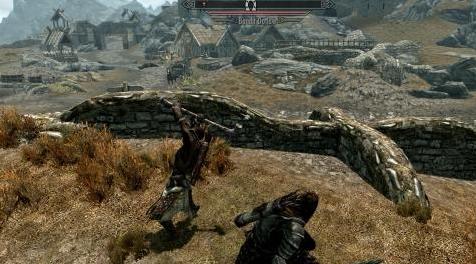
MOD介绍:
1.指数
-------------------------------------------------- -------------------------------------
1.指数
2.要求
3.推荐的Mods
4. Mod描述
5.从先前版本升级
6.安装
7.卸载
8.不相容
9.已知问题/错误
10. F#A#Q.
11.如何提供反馈
12.版本历史
13.权限和免责声明
14.联系信息
15.使用的工具
16.学分
17.未来计划
-------------------------------------------------- -------------------------------------
2.要求
-------------------------------------------------- -------------------------------------
- The Elder Scrolls V:Skyrim Special Edition的官方副本
- Skyrim Script Extender 64(SKSE64),可在此处获取:://skse#silverlock#org/
-------------------------------------------------- -------------------------------------
3.推荐的Mods
-------------------------------------------------- -------------------------------------
- SkyUI:没有这个,就没有配置Dodge Mod的游戏内配置菜单。
- 凡人敌人:在攻击动画中锁定敌人。如果没有这个,你将无法躲避大多数常规攻击,因为香草敌人会在适当位置跟踪你。
-------------------------------------------------- -------------------------------------
3A。其他Mods
-------------------------------------------------- -------------------------------------
- 致命战斗:战斗模式,极大改善敌人行为,定时阻挡和定时防御
- 潜行工具:流氓需要的一切。喉咙分切,击倒,陷阱,特技箭头等
- 现实巨剑战斗动画大修:巨剑动画包,包含空闲,移动和攻击。受HEMA,Dark Souls和For Honor的启发。
- 沉浸式移动速度:调整移动速度。跑步比较慢,走路更快。向后移动速度更快。
- 逼真的双手速度:使双手武器的速度提高25%。
- SPERG:我个人最喜欢的perk mod。不要同时使用这个和现实的双手速度。
- Smilodon:致命战斗的替代品。
-------------------------------------------------- -------------------------------------
4. Mod描述
-------------------------------------------------- -------------------------------------
这个模型允许玩家做出短暂,快速的动作来躲避对手的攻击。
控制
默认情况下,mod会自动检测您用于短跑的键,并且在向侧面或向后移动时按此键会使您在适当的方向闪避。
如果安装了SkyUI,播放器还可以使用SkyUI的Mod配置菜单中提供的用户友好菜单将用于躲避的键更改为他喜欢的任何其他键。
闪躲
玩家的躲闪由2部分组成。当按下闪避键时,玩家将立即获得移动速度的大幅增加,这意味着玩家可以在所选择的方向上以更快的速度继续移动非常短的时间。
这种增加的动作很快就会出现躲闪动画,玩家可以在选定的方向上快速迈出一步,然后重新获得对角色的控制和正常控制。
覆盖的总距离和角色移动的速度是玩家正常移动速度的乘积。这意味着,特别是安装了mods会增加穿着Heavy Armor的负面效果对你的移动速度的影响(例如Deadly Combat有这样一个功能),但在香草天际中也有较小的程度,穿着Light时躲闪会更有效穿着重装甲时的护甲。
如果你有一个人员或法术装备,只有闪避的加速部分可以工作,但额外的动画不会。你仍会得到iframe。
躲闪还会花费Stamina。
组态
您可以下载两个版本的mod。
1.道奇Mod iframe:主版本有所有模式的iframe。所以你不能在躲避时被击中。 iframe仅出现在闪避的起始三分之二处。除了Quickstep模式,因为它很短,所以在整个过程中都有iframe。
2. Dodge Mod no iframes:此版本在Quickstep模式下只有iframe。其他模式没有iframe。
可选:道奇mod Borgut:Borgut的oldrim mod的直接端口,没有编辑。较慢,但覆盖更远的距离。没有iframe。
如果安装了SkyUI,SkyUI的Mod配置菜单中会有一个Dodge Mod菜单,有多种选项。除了如上所述更改闪避键的能力,以及完全停用mod以确保清除卸载的能力(在卸载部分中有关此内容的更多详细信息),可以选择在4种不同模式之间切换能跑。
1.键盘(普通)模式:建议键盘用户使用此模式。通常应正确识别键盘输入,一切都应按预期工作。当mod第一次加载时,如果mod检测到您正在使用键盘,则默认选择此选项。
2.键盘(精确)模式:此模式仅适用于具有强大装备的键盘用户。它将做更多工作来准确识别和解释您的所有键盘输入。与先前模式相比,这将产生差异的唯一情况是对角向后移动(因此向后键和左右键同时被保持)。在这种情况下,先前的模式将自动默认为向后躲避,而此模式将识别您最后按下的两个键中的哪一个并向该方向闪避。
因此,在正常模式下,如果先按A键,然后按D键,然后按下闪避键,或先按D,再按A,然后闪避,则无关紧要;你会一直向后躲闪。在准确模式下,如果你先按A,然后按D,然后闪避,你会向后躲闪,但如果你
首先按D,然后按A,然后躲闪,你会向左躲闪。
缺点是这种模式需要更多的工作,所以如果你有一台低端PC或运行大量(脚本化)mod,它可能反应太慢,不适合使用闪避。
3.游戏手柄(模式):此模式是唯一可与游戏手柄/ Xbox控制器配合使用的模式。如果mod第一次加载,如果它识别出您正在使用游戏手柄,则默认选择它。
这种模式通常也适用于键盘,理论上它应该比普通的键盘模式稍快一些,所以即使在普通键盘模式下运行时,你的反应速度太慢,你也可以试试游戏手柄模式。无论您是否使用游戏手柄。如果你这样做,它可能会在一些罕见的情况下让你躲避意想不到的方向。
4.键盘(Quickstep)模式:此模式在两个版本中都有iframe。对于想要更短但响应更快的闪避的键盘用户,建议使用它。这个版本一开始并没有加速你的角色。相反,它立即播放闪避动画。但是,与其他版本不同,这个版本可能是垃圾邮件。只在第三人使用,因为第一人躲闪太短。这种模式根本不适用于工作人员或配备的法术。
-------------------------------------------------- -------------------------------------
5.从先前版本升级
-------------------------------------------------- -------------------------------------
从以前版本的mod升级时,请在安装新版本之前进行干净保存。这意味着:
- 在游戏的启动器中停用道奇Mod.esp。
- 加载您希望继续播放的已保存游戏,其中以前版本的mod处于活动状态。当出现有关不可用内容的弹出窗口时,请按“是”。
- 再次保存游戏(这是你的干净保存)
- 现在安装新版本并继续像通常的干净保存一样。
-------------------------------------------------- -------------------------------------
6.安装
-------------------------------------------------- -------------------------------------
您可以选择使用Nexus Mod Manager安装mod或手动安装。
1. Nexus Mod Manager安装
只需按下“使用经理下载”按钮,让NMM为您完成所有安装工作,就像使用任何其他mod一样。
2.手动安装
- 将下载的软件包解压缩到临时位置。
- 复制解压缩文件夹中的Data文件夹。
- 将Data文件夹粘贴到Skyrim Special Edition文件夹中。
- 启动游戏时,请确保在启动器的“数据文件”选项卡中启用mod的.esp文件(名为“Dodge Mod.esp”)。
-------------------------------------------------- -------------------------------------
7.卸载
-------------------------------------------------- -------------------------------------
卸载的工作方式不同,具体取决于您是使用Nexus Mod Manager安装mod还是手动安装。
1. Nexus Mod Manager卸载
如果您之前使用NMM安装了mod,您可以简单地让NMM为您卸载mod。
2.手动卸载
如果你手动安装了mod,你还需要手动删除mod的文件以完全卸载它。为此,请按照下列步骤操作:
- 找到天际特别版的数据文件夹。
- 在此Data文件夹中,删除名为“Dodge Mod.esp”的文件以及此mod在Scripts文件夹中安装的四个.psc文件。 (他们的名字以DodgeMod或QF_DodgeMod开头)
如果安装了SkyUI,您还可以先使用游戏中的Mod配置菜单在删除之前停用游戏中的mod。如果你先忘了这样做,一般不会出问题,但从理论上讲,mod可能会留下一些小痕迹
如果忽略此步骤,即使在卸载后也会保存您的游戏。实际上,这种负面影响只有在卸载并重新安装mod数千次而不执行此额外步骤后才会变得明显,但是如果你选择仍然存在
我想绝对确保一切都被正确删除。
-------------------------------------------------- -------------------------------------
8.不相容
-------------------------------------------------- -------------------------------------
- 没有确认。
-------------------------------------------------- -------------------------------------
9.已知问题/错误
-------------------------------------------------- -------------------------------------
- 如“模态说明”中所述,当玩家配备了法杖或法术时,躲闪动画不起作用。你仍然可以获得iframe和速度提升。
- Quickstep模式在第一人称躲闪太短的问题,即使iframe存在。
-------------------------------------------------- -------------------------------------
10. F#A#Q.
-------------------------------------------------- -------------------------------------
问:我在游戏中看不到任何配置菜单!
答:确保安装了适当版本的SkyUI,其中包含MCM功能并正确安装。
问:mod不起作用!
答:确保您正确安装了SKSE64。确保正确安装了此mod的所有部分。确保在游戏的启动器中激活mod的.esp文件。
如果您正在使用Xbox控制器,请确保mod在游戏手柄模式下正确运行(您需要SkyUI来检查)。
如果它现在仍然无效,请尝试下载mod的可选“松散文件”版本。
如果它仍然不起作用,请尝试将Dodge mod一直移动到加载顺序的顶部(所以在所有.esm文件之后)。
此外,有人报告说它只需要几分钟的实时,直到mod开始为他工作,所以如果它仍然无法工作,你可能想尝试。
问:为什么不躲避五线谱/法术?
答:这不是故意的设计;使用Borgut1337的躲闪动画是一个问题(它们带有香草天际,它们只是没有被基础游戏使用)。我正在研究解决问题的其他方法(我可以制作自己的自定义动画)。
问:它适用于Xbox 360控制器吗?
答:是的。
问:它是否以第一人称模式运行?
答:是的。 “键盘(Quickstep)”模式在第一人称中存在问题,其中躲闪太短,甚至存在iframe。
问:我可以使用双击代替冲刺按钮吗?
答:还没有。希望我能在一段时间内完成。
问:mod的反应太慢了!
答:如果您使用键盘并在精确键盘模式下运行mod,请尝试将其更改为普通键盘模式。如果它仍然很慢,或者您已经在正常键盘模式下运行,请尝试使用游戏手柄模式(是的,即使您使用的是键盘)。
如果它在游戏手柄模式下仍然太慢,你要么必须升级你的PC,卸载其他一些脚本mod,要么尝试使用tktk1的TK Dodge mod中提供的Script Dragon版本(参见Alternative / Similar Mods部分)。
-------------------------------------------------- -------------------------------------
11.如何提供反馈
-------------------------------------------------- -------------------------------------
由于这是为SE上传的第一个版本,因此感谢您的反馈。如果mod无法正常工作,请告诉我。当提供有关躲避功能的特定部分的反馈(如耐力成本,速度,距离)以及使用的某些值似乎有误时,请提供以下信息:
- 我们在谈论哪种躲闪?剩下?对?背部?他们都是?
- 你使用哪种mod?特别是战斗模式和其他影响耐力或移动速度的模式很重要。
- 您使用的是键盘还是游戏手柄?在三种模式中你可以运行mod(键盘正常,键盘准确,游戏手柄)?
-------------------------------------------------- -------------------------------------
12.版本历史
-------------------------------------------------- -------------------------------------
0.1(2018年1月8日)
- Borgut1337的道奇Mod for Skyrim Legendary Edition版本1.22的端口。应该完美地工作,但我没有声明版本1.0,直到mod已经被更多用户测试。
0.2(2018年1月8日)
- 修正了CTD并删除了导致CTD的BSA版本。
0。3(2018年1月27日)
- 提高闪避的速度。添加了“Quickstep”选项,可实现更短但响应更快的闪避。
0。0(2018年1月28日)
- 在“Quickstep”模式中添加了iframe。
0.5(2018年1月28日)
- 为所有模式添加了iframe。单独“无iframes”版本。
-------------------------------------------------- -------------------------------------
13.权限和免责声明
-------------------------------------------------- -------------------------------------
- 下载中的所有文件均按“原样”提供,不提供任何形式的担保或保证。在任何情况下,作者都不对任何索赔负责,无论是否与下载相关。
- 以未经编辑的形式,此mod只能在www#skyrimnexus#com以外的网站上重新分发。如果您在其他网站上重新分发相同的mod,则必须通知您的用户原始作者不会在www#nexusmods#com或forums#bethsoft#com以外的任何网站上查找反馈或协助进行故障排除。
- 如果编辑,更改或改进,此mod也可以在www#nexusmods#com上重新分发。
- 在上述情况下,您必须先向原作者索取许可。原作者也必须因其工作而受到赞誉,并且必须包括原始自述文件。
-------------------------------------------------- -------------------------------------
14.联系信息
-------------------------------------------------- -------------------------------------
- 发表您对我将不时阅读的评论的想法。
- 您可以在nexus论坛上向我提供更多技术问题或建议。
- 请勿联系Borgut1337关于此mod的SE版本。
-------------------------------------------------- -------------------------------------
15.使用的工具
-------------------------------------------------- -------------------------------------
- 创作套件
-------------------------------------------------- -------------------------------------
16.学分
-------------------------------------------------- -------------------------------------
谢谢:
- Borgut1337,这个mod的原作者。他很酷,让我上传SE版本。
链接到原始mod:www#nexusmods#com/skyrim/mods/29258
- 贝塞斯达游戏工作室:制作出色的游戏“天际”
- Creation Kit wiki的所有贡献者
-------------------------------------------------- -------------------------------------
17.未来计划
-------------------------------------------------- -------------------------------------
- 我正在研究mod的速度和距离调整。我会在准备好时上传变种进行测试。最终,我计划通过MCM调整速度和距离。
- 更好的自定义动画,适用于五线谱和魔法。
————————————————————————————————————————————————————————
1. Index
---------------------------------------------------------------------------------------
1. Index
2. Requirements
3. Recommended Mods
4. Mod Description
5. Upgrading From A Previous Version
6. Installation
7. Uninstallation
8. Incompatibilities
9. Known Issues/Bugs
10. F#A#Q.
11. How To Give Feedback
12. Version History
13. Permissions & Disclaimer
14. Contact Information
15. Tools Used
16. Credits
17. Future Plans
---------------------------------------------------------------------------------------
2. Requirements
---------------------------------------------------------------------------------------
- A working, official copy of The Elder Scrolls V: Skyrim Special Edition
- Skyrim Script Extender 64(SKSE64), available here: kse#silverlock#org/
---------------------------------------------------------------------------------------
3. Recommended Mods
---------------------------------------------------------------------------------------
- SkyUI: Without this, there will be no in-game configuration menu to configure Dodge Mod.
- Mortal Enemies: Locks enemies in place during attack animations. Without this, you will not be able to dodge most regular attacks since vanilla enemies pivot in place to track you.
---------------------------------------------------------------------------------------
3a. Other Mods
---------------------------------------------------------------------------------------
- Deadly Combat: Combat mod with vastly improved enemy behavior, timed blocking and timed warding
- Sneak Tools: Everything a rogue needs. Throat slitting, knockouts, traps, trick arrows etc.
- Realistic Greatsword Combat Animation Overhaul: Greatsword animation pack with idles, movement and attacks. Inspired by HEMA, Dark Souls and For Honor.
- Immersive Movement Speed: Tweaks the movement speeds. Running is slower, walking is faster. Moving backwards is faster.
- Realistic Two-Handed Speed: Increases speed of Two-Handed Weapons by 25%.
- SPERG: My personal favorite perk mod. Don't use this and realistic two-handed speed at the same time.
- Smilodon: A lighter alternative to deadly combat.
---------------------------------------------------------------------------------------
4. Mod Description
---------------------------------------------------------------------------------------
This mod allows the player to make short, quick movements to dodge the attacks of opponents.
Controls
By default, the mod will automatically detect which key you use for sprinting, and pressing this key whilst moving sideways or backwards will make you dodge in the appropriate direction.
If SkyUI is installed, the player will also be able to change the key used for dodging to any other key he likes using a user-friendly menu available in SkyUI’s Mod Configuration Menu.
Dodging
A player’s dodge consists of 2 parts. Immediately when the dodge key is pressed, the player will gain a large increase in movement speed, meaning that the player can continue movement at an increased speed in the chosen direction for a very short amount of time.
This increased movement is quickly followed by a dodge animation, where the player makes one more quick step in the chosen direction and then regains his footing and normal control of the character.
The overall distance covered and speed at which the character moves is a multiplication of the player’s normal movement speed. This means that, especially with mods installed which increase the negative effects wearing Heavy Armor has on your movement speed (for example Deadly Combat has such a feature), but also to a lesser extent in vanilla Skyrim, dodging will be more effective when wearing Light Armor than it is when wearing Heavy Armor.
If you have a staff or spells equipped, only the speed up part of the dodge will work but the extra animation won’t. You will still get iframes.
Dodging also costs Stamina.
Configuration
There are two versions of the mod you can download.
1. Dodge Mod iframes: The main version has iframes for all the modes. So you cannot be hit while dodging. iframes are only present for the starting two thirds of the dodge. Except in Quickstep mode which has iframes for the whole duration because it is so short.
2. Dodge Mod no iframes: This version only has iframes in Quickstep mode. The other modes don't have iframes.
Optional: Dodge mod Borgut: The direct port of Borgut's oldrim mod with no edits. Slower but covers a bit more distance. Does not have iframes.
If SkyUI is installed, there will be a Dodge Mod menu in SkyUI’s Mod Configuration Menu with various options. Apart from the ability to change the dodge key as described above, and the ability to deactivate the mod entirely to ensure a clean uninstallation (further details about this in the Uninstallation section) there is an option to switch between 4 different modes in which the mod can run.
1. Keyboard (Normal) mode: This mode is recommended for keyboard users. Keyboard input should generally be recognized correctly and everything should work as expected. When the mod loads the first time, if the mod detects that you are using a keyboard this option will be selected by default.
2. Keyboard (Accurate) mode: This mode is only recommended for keyboard users with a powerful rig. It will do more work to accurately recognize and interpret all of your keyboard input. The only situation in which this will make a difference when compared to the previous mode is when having moving backwards diagonally (so the backwards key and either the left or the right key are held at the same time). The previous mode will in such a case automatically default to dodging backwards, whereas this mode will recognize which of the two keys you pressed last and dodge in that direction.
So, in the normal mode it will not matter if you press the A key first and then the D key and then the dodge key, or first D, then A, then dodge; you will always dodge backwards. In the accurate mode, if you press A first, then D, then dodge, you will dodge backwards, but if you
press D first, then A, then dodge, you will dodge to the left.
The drawback is that this mode requires a lot more work, so if you have a lower-end PC or are running a large amount of (scripted) mods, it may react too slow for the dodges to be worth using.
3. Gamepad (mode): This mode is the only mode which actually works with a gamepad/Xbox controller. It will by default be selected when the mod loads for the first time if it recognizes that you are using a gamepad.
This mode also does generally work with a keyboard, and theoretically it should be slightly faster than even the normal keyboard mode, so if the mod is reacting too slow for your taste even when running in the normal keyboard mode, you could try gamepad mode regardless of whether you are using a gamepad or not. If you do so though, it may in some rare cases have you dodge in an unexpected direction.
4. Keyboard (Quickstep) mode: This mode has iframes in both versions. It is recommended for keyboard users who want a shorter but more responsive dodge. This version does not speed your character up at first. Instead, it instantly plays the dodge animation. However, unlike the other versions, this one can be spammed. Only use this in third person, because the first person dodge is too short. This mode will not work at all with staff or spell equipped.
---------------------------------------------------------------------------------------
5. Upgrading From A Previous Version
---------------------------------------------------------------------------------------
When upgrading from a previous version of the mod, please make a clean save BEFORE installing the new version. This means:
- Deactivate Dodge Mod.esp in the game’s launcher.
- Load your saved game with which you wish to continue playing, where a previous version of the mod was active. Press ‘’Yes’’ when a pop-up appears about unavailable content.
- Save the game again (this is your clean save)
- Now install the new version and continue as you would normally with your clean save.
---------------------------------------------------------------------------------------
6. Installation
---------------------------------------------------------------------------------------
You can choose to either install the mod using the Nexus Mod Manager or to install manually.
1. Nexus Mod Manager Installation
Simply press the ‘’Download With Manager’’ button and let NMM do all the installing work for you as you would with any other mod.
2. Manual Installation
- Unpack the downloaded package in a temporary location.
- Copy the Data folder in the unpacked folder.
- Paste the Data folder in your Skyrim Special Edition folder.
- When you launch the game, make sure to enable the mod’s .esp file (named ‘’Dodge Mod.esp’’) in the launcher’s Data Files tab.
---------------------------------------------------------------------------------------
7. Uninstallation
---------------------------------------------------------------------------------------
Uninstallation works differently depending on whether you installed the mod using the Nexus Mod Manager or manual installation.
1. Nexus Mod Manager Uninstallation
If you previously installed the mod using NMM, you can simply let NMM uninstall the mod for you as well.
2. Manual Uninstallation
If you manually installed the mod, you also need to manually remove the mod’s files to completely uninstall it. To do so, follow these steps:
- Find Skyrim Special Edition's Data folder.
- In this Data folder, delete the files named ‘’Dodge Mod.esp’’ and the four .psc files installed by this mod in the Scripts folder. (Their names start with DodgeMod or QF_DodgeMod)
If SkyUI is installed, you can also use the in-game Mod Configuration Menu first to deactivate the mod in-game before deleting it. If you forget to do this first it will generally not be an issue, but theoretically the mod might leave some small traces inside
your saved game even after uninstallation if this step is neglected. Realistically the negative effects of this would only become noticeable after uninstalling and reinstalling the mod thousands of times without performing this extra step, but the option is still there in case you
want to be absolutely sure that everything is removed correctly.
---------------------------------------------------------------------------------------
8. Incompatibilities
---------------------------------------------------------------------------------------
- None confirmed.
---------------------------------------------------------------------------------------
9. Known Issues/Bugs
---------------------------------------------------------------------------------------
- As described in the Mod Description, dodge animations do not work when the player has Staves or Spells equipped. You will still get the iframes and speed boost.
- Quickstep mode has an issue in first person where the dodge is too short, even though the iframes are present.
---------------------------------------------------------------------------------------
10. F#A#Q.
---------------------------------------------------------------------------------------
Q: I see no configuration menu in-game!
A: Make sure you installed a proper version of SkyUI which includes MCM functionality and installed it correctly.
Q: The mod doesn’t work!
A: Make sure you installed SKSE64 correctly. Make sure you installed all parts of this mod correctly. Make sure the mod’s .esp file is activated in the game’s launcher.
If you’re using an Xbox controller, make sure that the mod is correctly running in gamepad mode (you need SkyUI to check this).
If it still doesn’t work now, try downloading the optional ‘’Loose files’’ version of the mod instead.
If it still doesn't work, try moving Dodge mod all the way to the top of your load order (so right after all of your .esm files).
Also, someone reported that it simply took a few minutes of real time until the mod started working for him, so if it still doesn't work you may want to try that.
Q: Why doesn’t dodging work with staves/spells?
A: It is not an intentional design; it is an issue with the dodge animations Borgut1337 used (they came with vanilla Skyrim, they just weren’t used by the base game). I am looking into other ways to solve the problem (I may make my own custom animations).
Q: Does it work with an Xbox 360 Controller?
A: Yes.
Q: Does it work in first person mode?
A: Yes. The "Keyboard (Quickstep)" mode has an issue in first person where the dodge is too short, even the the iframes are present.
Q: Can I use double-tapping instead of sprint button?
A: Not yet. Hopefully I'll get to that some time.
Q: The mod is reacting too slow!
A: If you are using a keyboard and are running the mod in accurate keyboard mode, try changing it to normal keyboard mode. If it’s still slow, or you were already running in normal keyboard mode, try gamepad mode (yes, even if you are using a keyboard).
If it’s still too slow in gamepad mode, you’ll either have to upgrade your PC, uninstall some other scripted mods, or try the Script Dragon version available in tktk1’s TK Dodge mod (see Alternative/Similar Mods section) instead.
---------------------------------------------------------------------------------------
11. How To Give Feedback
---------------------------------------------------------------------------------------
Since this is the first version being uploaded for SE, feedback is appreciated. Let me know if the mod is not working properly. When giving feedback on specific parts of the dodging feature (like stamina cost, speed, distance covered), and some of the values used seem wrong, please provide the following information:
- Which dodge are we talking about? Left? Right? Back? All of them?
- Which mods are you using? Especially combat mods and other mods which affect stamina or movement speed are important.
- Are you using a keyboard or a gamepad? And in which of the three modes available are you running the mod (keyboard normal, keyboard accurate, gamepad)?
---------------------------------------------------------------------------------------
12. Version History
---------------------------------------------------------------------------------------
0.1 (8 January 2018)
- Port of version 1.22 of Dodge Mod for Skyrim Legendary Edition by Borgut1337. Should work perfectly, but I'm refraining from declaring a version 1.0 until the mod has been tested by more users.
0.2 (8 January 2018)
- Fixed CTD and removed the BSA version as it was causing CTD.
0.3 (27 January 2018)
- Increased the speed of the dodge. Added a "Quickstep" option for a shorter but more responsive dodge.
0.4 (28 January 2018)
- Added iframes to the "Quickstep" mode.
0.5 (28 January 2018)
- Added iframes to all the modes. Seperate "no iframes" version.
---------------------------------------------------------------------------------------
13. Permissions & Disclaimer
---------------------------------------------------------------------------------------
- ALL FILES IN THE DOWNLOAD ARE PROVIDED ''AS IS'' WITHOUT ANY WARRANTY OR GUARANTEE OF ANY KIND. IN NO EVENT CAN THE AUTHOR BE HELD RESPONSIBLE FOR ANY CLAIMS, WHETHER OR NOT THEY ARE RELATED TO THE DOWNLOAD.
- In unedited form, this mod may only be redistributed on sites other than www#skyrimnexus#com. If you redistribute the same mod on other sites, you MUST inform your users that the original author will not look for feedback or assist in troubleshooting on any site other than www#nexusmods#com or forums#bethsoft#com.
- If edited, changed or improved upon, this mod may also be redistributed on www#nexusmods#com.
- IN BOTH OF THE ABOVE CASES, you must first ask the original author for permission. The original author must also be credited for his work, and the original readme must be included.
---------------------------------------------------------------------------------------
14. Contact Information
---------------------------------------------------------------------------------------
- Post your thoughts on the comments I will read them from time to time.
- You can DM me on nexus forums with more technical questions or suggestions.
- DO NOT contact Borgut1337 about the SE version of this mod.
---------------------------------------------------------------------------------------
15. Tools Used
---------------------------------------------------------------------------------------
- The Creation Kit
---------------------------------------------------------------------------------------
16. Credits
---------------------------------------------------------------------------------------
Thanks to:
- Borgut1337, the original author of this mod. He was cool enough to let me upload the SE version.
Link to original mod: www#nexusmods#com/skyrim/mods/29258
- Bethesda Game Studios: For making the awesome game Skyrim
- All contributors to the Creation Kit wiki
---------------------------------------------------------------------------------------
17. Future Plans
---------------------------------------------------------------------------------------
- I'm working on speed and distance tweaks for the mod. I will upload variants for testing when they are ready. Eventually, I plan to make it possible to tweak speed and distance through MCM.
- Better custom animations that work with staves and magic.
资源查找:
最新文章
点击热榜
推荐问答
- [问答]情商课一般几岁孩子去学比较好?
- [问答]怎么看自己孩子情商低不低?孩子情商低的10大特征是真的吗?
- [问答]我想提高情商和说话要看什么书?
- [问答]顾三月情感课程pdf谁有?
- [问答]谁有情感培训课程资源?
- [问答]如何看卖情感课程正规还是不正规?
回复区
昵称:
邮箱:
内容: