上古卷轴5:重置版MOD Xp32扩展SE背面更好的战斧和战锤
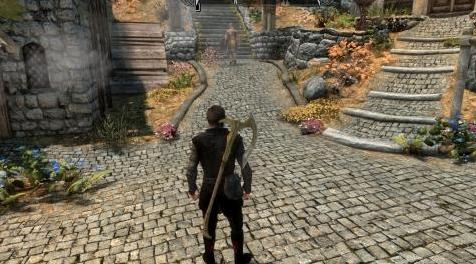
MOD介绍:
nfxzzq
2019年5月7日,上午3:26
与ECE兼容的骨架冲突
-------------------------------------------------- -------------------------------------------------- -------
从原始粘贴的复制:
简而言之,它只是编辑了nif文件。
此文件修改默认节点。解压缩并覆盖XP32 Maximum Skeleton Extended。
www#nexusmods#com/skyrim/mods/95411
此mod需要XP32 Maximum Skeleton Extended,以及该mod的所有相关要求。
我正在弄乱XPMS Maximum 32扩展骨架,并注意到了这一点
双手剑和双手斧头/锤子分开
“护套”的节点。我修改了双手轴/锤子节点来改变
这个位置让武器的头靠在肩膀附近
该
haft垂下而不是在角色头部上方3英尺处。
我认为通过racemenu可以实现类似的功能
如果你将它们设置为使用,那么这个mod也会影响NPC
通过XPMS样式菜单修改双轴/锤子的节点。
此外,由于它们是单独的节点,因此不会影响大剑护套位置。
当然,绘制动画并没有改变,但实际上并没有改变
沉浸式打破了我。我有点想象这个角色抓住了
在头部正下方的武器的武器,并迅速翻过来。
自2011年以来,这些武器的护套位置一直困扰着我。我总是发现我宁愿沉浸其中。
安装:
我建议使用mod管理器应用程序。我使用Mod Organizer
选择默认节点mod文件或SWP节点mod文件。
从存档安装mod并将其定位为覆盖XP32 Maximum
骨架扩展。唯一被覆盖的文件是Skeleton nifs
角色资产。这些nif是当前XP32的精确副本
扩展的nifs唯一的变化是重新定位
默认或SWP两个手斧/锤子节点,具体取决于您的文件
选择。
默认:
安装完游戏后,您应该会看到角色和NPC的位置自动更改
如果战斧/战锤节点在XPMS样式中设置为默认值
两者的MCM菜单。
如果你使用的是一把使用战斧动画的大剑的mod武器,那么它会颠倒过来,所以你
将需要将您的角色更改为战斧和SWP节点
使用此类武器时,XPMS样式菜单中的战锤。
SWP:
安装后,启动游戏,加载角色,然后转到XMPS MCM菜单的样式部分。
将战斧/战锤位置更改为角色的SWP,并根据需要对NPC执行相同操作。
如果你使用的是一把使用战斧的大剑的mod武器
动画,它会鞘倒,所以你需要改变你的
XPMS中战斧和战锤的默认节点的字符
使用此类武器时的样式菜单。
兼容性:
应该不兼容的唯一mod是修改XP32 Extended Skeleton的其他mod。
问题:
转换可能需要一些时间。一般在切换时
使用XPMS样式菜单的任何武器的位置,通常我有
装备武器,打开菜单,退出几次
过渡到完成。
我根据钢铁战斧校准了位置
我的演奏见过大多数其他战斧和战锤的样子
这个位置很好。
然而,有些武器的握把位置与标准不同,因此它们的护套位置
背面有点偏,通常太低了。 Dawnguard War Hammer是
很好的例子,虽然它们可以很容易地在NifScope中修复
加载武器网格并将它们转换为所需的
位置。
如果你有一个mod将木材切割轴和镐改为双手,它们将位于大约中间位置
由于短得多的护套,护套后面。没有那么多
可以用这些来完成,因为过渡网格将导致
挥舞时看起来很奇怪的武器。
更新04/11/2019
我继续上传了我一直在使用的装备动画
可选文件。这是来自右臀部动画的匕首
沉浸式动画/ XP32最大骨架扩展。
它并不完美,但我认为它非常适合。
我无法得到原版mod作者的回复
这些文件,但如果权限有问题,我肯定有人
会指出来的。
——————————————————————————————————————————————
nfxzzq
07 May 2019, 3:26AM
Compatible Skeleton Conflict with ECE
-----------------------------------------------------------------------------------------------------------
Copy pasted from original:
In short, It´s just edited nif file.
This file modifies the Default node. Unpack and overwrite XP32 Maximum Skeleton Extended.
www#nexusmods#com/skyrim/mods/95411
This mod requires XP32 Maximum Skeleton Extended, and all related requirements for that mod.
I was messing with the XPMS Maximum 32 extended skeleton and noticed that
the two handed swords and two handed axes/hammers have separate
nodes for "sheathing". I modified the two handed axes/hammers node to change
the position so the the head of the weapon rests near the shoulder and
the
haft hangs down instead of sticking up 3 feet above the characters head.
I think a similar function can be achieved though racemenu for the
character, but this mod also effects NPCs if you set them to use the
modified node for two handed axes/hammers through the XPMS Styles menu.
Also, since they are separate nodes, this does not effect great swords sheathing position.
Of course drawing animation does not change, but it's not really too
immersion breaking for me. I kind of imagine the character grasping the
weapon by the haft just below the head and quickly flipping it over.
The sheathing position for these weapons has been bothering me since 2011. I've always found i rather immersion breaking.
Installation:
I recommend the use of a mod manager app. I use Mod Organizer
Choose either the Default node mod file, or the SWP node mod file.
install the mod from the archive and position it to overwrite XP32 Maximum
Skeleton Extended. The only files overwritten are the Skeleton nifs for
the character assets. These nifs are exact copies of the current XP32
extended nifs with the only change being the repositioning of the
Default or SWP two hand axe/hammer node, depending on which file you
choose.
Default:
After installed launch the game and you should see the position change automatically for your character and NPCs
if the Battleaxe/Warhammer node is set to Default in the XPMS Styles
MCM menu for both.
If you are using a mod weapon that is a large sword that uses battleaxe animations, it will sheath upside down, so you
will need to change your character to the SWP node for battleaxes and
warhammers in the XPMS Styles menu while using such weapons.
SWP:
After installed, launch the game, load your character, and go to the Styles section of the XMPS MCM menu.
Change the Battleaxe/Warhammer position to SWP for the character, and do the same for NPCs if desired.
If you are using a mod weapon that is a large sword that uses battleaxe
animations, it will sheath upside down, so you will need to change your
character to the Default node for battleaxes and warhammers in the XPMS
Styles menu while using such weapons.
Compatibility:
The only mods that should be incompatible are other mods that modify the XP32 Extended Skeleton.
Issues:
It may take a bit for the transition to occur. in general when switching
positions for any weapon with the XPMS Styles menu, often times i have
to equip the weapon, open the menu, and exit out of it a couple times
for the transition to complete.
I calibrated the position based on the Steel and Iron Battleaxes, and in
my playing have seen that most other Battleaxes, and Warhammers look
good in this position.
However, there are some of these weapons that have different grip locations than standard, so their sheathed position
on the back is a bit off, usually too low. The Dawnguard War Hammer is
good example of this, though they can be easily fixed in NifScope by
loading the weapons meshes and transitioning them to the desired
position.
If you have a mod that changes wood cutting axes and pickaxes to two handed, they will be positioned about the middle of the
back when sheathed due to the much shorter haft. There is not much that
can be done with these since transitioning the mesh will cause the
weapon to look odd when wielded.
Update 04/11/2019
I went ahead and uploaded the equipping animation I've been using under
Optional Files. This is the draw dagger from right hip animation from
Immersive Animations/XP32 Maximum Skeleton Extended.
It's not perfect, but I think it fits fairly well.
I've not been able to get a response from the original mod authors of
these files, but if there is an issue with permissions, I'm sure someone
will point it out.
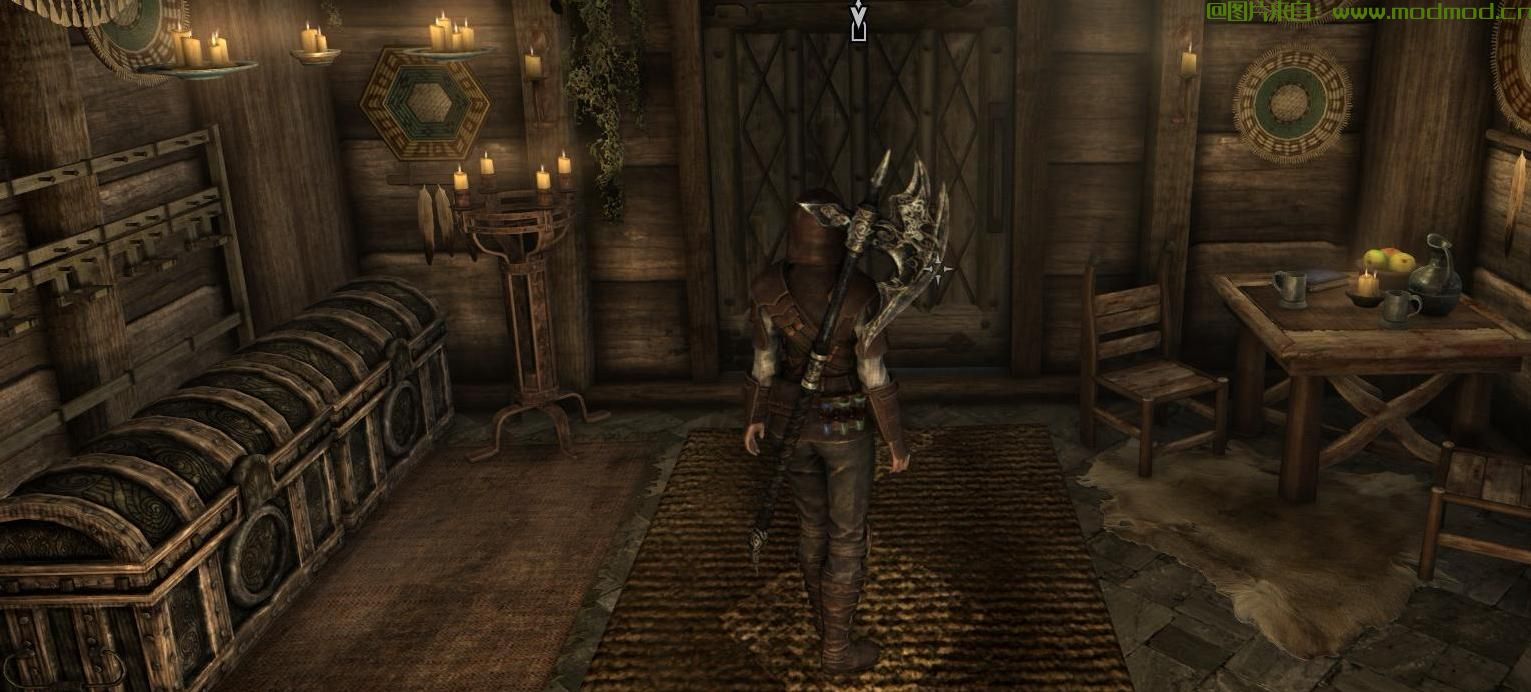
演示截图:
资源查找:
最新文章
点击热榜
推荐问答
- [问答]情商课一般几岁孩子去学比较好?
- [问答]怎么看自己孩子情商低不低?孩子情商低的10大特征是真的吗?
- [问答]我想提高情商和说话要看什么书?
- [问答]顾三月情感课程pdf谁有?
- [问答]谁有情感培训课程资源?
- [问答]如何看卖情感课程正规还是不正规?
回复区
昵称:
邮箱:
内容: