上古卷轴5:重置版MOD 真正的卫队对话大修SSE
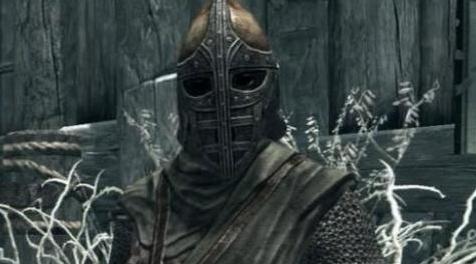
MOD介绍:
原始mod页面= Guard Dialogue大修
这是原GDO Mod的近乎完美的端口!唯一的变化是:
将格式号重新编号为44。
删除了WICastMagic03 [QUST:000167D3],因为它已被官方修复无关。
重新打包BSA文件。
复制生存关键字。
检查USSEP v4#1#7。
这使得它可以接近您可以为SSE获得的GDO的确切端口。
更多的对话,更多的现实主义,更多的尊重。这个Mod改变了卫兵对话,将它从破坏你在天际世界沉浸的东西改为实际增加它的东西。全部采用原始声音并完全符合Skyrim Lore。
GDO修复了所有Skyrim Guards对话错误并做了很多其他事情。
GDO改变了Skyrim Guard对话对你游戏情绪的影响。而不是让你烦恼,警卫会通过正确识别你的行为而不是对他们应该尊重的角色做出不尊重的评论来增强你对游戏的体验,并增加你在天际世界的沉浸感。
GDO不会删除警卫词汇中的任何评论;他们在游戏开始时仍然会像往常一样粗鲁和嘲笑你。然而,一旦你的角色完成了获得守卫尊重的任务,他们的态度就会开始改变,变得越来越好,一旦你的角色是天际的传奇,他们就会尊重,感激,有时甚至会紧张在你面前。
由于游戏过于严格的条件,GDO解锁了许多从未或者很少使用的防守对话。这不是一个错误,而是Bethesda开发人员提出的一个我不同意的设计选择。这意味着在GDO之前,警卫会说的比你将要习惯的要多得多。许多人以前从未听过一些评论,其他人只会在有限的情况下很少听到这些评论。
一旦你受到尊重,GDO会为你的角色添加对话选项,如果警卫谴责你大喊大叫或丢弃武器。
GDO可以防止警卫卡在他们只说“它是什么?”之类的循环中。
GDO现在为一些拥有相同声音的其他NPC提供一些但不是全部的后卫评论。只有那些可以合理地被认为不具有警卫特定性的评论才能做到这一点,并且完全不干扰正常的NPC对话,因此不存在因此添加而产生冲突的可能性。
如果您希望禁用此功能,以便所有Guard对话仅由Guards说出,请使用Console命令:
将GDOExtraNPCs设置为0
禁用后,此功能将对该角色保持禁用状态。任何新游戏都将从启用该功能开始。
GDO设置所需的技能等级,然后警卫将你的技能评论为50.这在游戏中被认为是行家并且似乎是合适的。如果需要,可以使用游戏内控制台自定义此值。
GDO在3个变量中保持技能水平阈值,每个变量对应于特定技能类别。他们是:
GDOSkillCombat
GDOSkillMagic
GDOSkillStealth
每个默认值为50。如果您希望在警卫评论之前更改所需的技能水平,只需更改相应变量的值;它们不需要设置为相同的值。使用以下控制台命令时,请忽略引号,它们仅用于指示语法中的通用字段名称。
要检查当前值,请使用GetGlobalValue命令:
语法:GetGlobalValue'variable'
“变量”是上述3中的一个。例如。 GetGlobalValue GDOSkillCombat
要设置新值,请使用Set命令:
语法:将'variable'设置为'value'
“变量”是上述3中的一个,“值”是您要设置的技能级别。例如。将GDOSkillStealth设置为63
设置后,该值将保存在您的存档游戏中,除非您选择再次更改,否则不会更改该角色。任何新游戏都将以默认值50开头。
安装:
GDO不需要启动新游戏才能正常运行。
它旨在无缝地融入您的游戏并经过全面测试。
兼容性:
GDO与hothtrooper44完全兼容Immersive Armors。
GDO与hothtrooper44和Ironman5000以及我完全兼容Immersive Weapons。
GDO与kryptopyr完全兼容武器装甲服装和杂物修复。
GDO与lifestorock的Skyrim Immersive Creatures特别版完全兼容。
GDO与任何不会改变Guard Dialogue的东西兼容。
通过将GDO放在加载顺序中的另一个Mod之后,GDO可以与另一个改变Guard对话的Mod一起使用。
加载顺序:
警卫对话Overhaul.esp。 应该在任何改变Guard对话的mod之后以及任何编辑Skyrim vanilla Weapons或Armor的Mod之前以及任何添加武器或盔甲的mod之前放置。
已知的问题:
GDO完全安全。 你可以肯定这个Mod不会让你的游戏处于破碎的状态。
————————————————————————————————————————————————————
Original mod page = Guard Dialogue Overhaul
This is an near EXACT port of the original GDO Mod! The only changes are:
Renumbering of the formid number to 44.
Removed WICastMagic03 [QUST:000167D3] as it has been rendered irrelevant by official fixes.
Repackaged the BSA file.
Copied over survival keywords.
Checked against USSEP v4#1#7.
This makes it as close to an exact port of GDO you can get for SSE.
More Dialogue, More Realism, More Respect. This Mod alters the Guard Dialogue, changing it from something that breaks your immersion in the world of Skyrim to something that actually increases it. All in the original voices and Fully compliant with Skyrim Lore.
GDO fixes All the Skyrim Guards dialogue bugs and does much, much more.
GDO alters the effect that Skyrim Guard dialogue has on the mood of your game. Rather than annoying you, guards will enhance your experience of the game and increase your immersion in the world of Skyrim by properly recognizing your actions and not making disrespectful comments to a character that they are supposed to respect.
GDO does not remove any comments from the guards’ vocabulary; they will still be just as rude and mocking to you at the start of the game as they always have. However, once your character has completed quests that earn the guards’ respect, their attitudes will begin to change, getting better and better to the point that, once your character is a legend in Skyrim, they will be respectful, grateful and sometimes even nervous in your presence.
GDO unlocks much guard dialogue that was never or only very rarely used due to overly restrictive conditions in the game. This is not a bug, but rather a design choice made by the Bethesda developers that I disagree with. This means that there will be much more variety in what the guards will say than you will be used to from before GDO. Many people will never have heard some of the comments before, and others will only have heard them very rarely in limited circumstances.
GDO adds dialogue options for your character to use, once you are respected, if guards berate you for shouting or dropping weapons.
GDO prevents guards from getting stuck in a loop where they say nothing but “What is it?”.
GDO now makes some, but NOT ALL, of the guard comments available to some other NPCs who share the same voices. This is only done with those comments that could reasonably be considered to not be guard specific and is done without interfering with normal NPC dialogue at all so there’s NO possibility of conflict from this addition.
If you wish to disable this feature, so that ALL of the Guard Dialogue is ONLY spoken by Guards, use the Console command:
Set GDOExtraNPCs To 0
Once disabled, this feature will remain disabled for that character. Any new game will begin with the feature enabled.
GDO sets the Skill level required before a guard will comment on your skill to 50. This is considered Adept within the game and seems appropriate. If desired, this value can be customized by use of the in-game console.
GDO holds the skill level threshold value in 3 variables, each corresponding to a particular skill category. They are:
GDOSkillCombat
GDOSkillMagic
GDOSkillStealth
The default value is 50 for each of them. If you wish to change the skill level required before guards will comment, simply change the value of the corresponding variables; they DO NOT need to be set to the same values. When using the following Console commands, ignore the inverted commas, they are present only to indicate generic field names within the syntax.
To check the current value, use the GetGlobalValue command:
Syntax:GetGlobalValue ‘variable’
With the ‘variable’ being one of the 3 above. E.g. GetGlobalValue GDOSkillCombat
To set a new value, use the Set command:
Syntax:Set ‘variable’ To ‘value’
With the ‘variable’ being one of the 3 above and the ‘value’ being the skill level you want to set. E.g. Set GDOSkillStealth To 63
Once set, the value will be preserved in your savegame and will not change for that character unless you choose to change it again. Any new game will begin with the default value of 50.
Installation:
GDO does NOT require a new game to be started in order to function properly.
It's designed to slot into your game seamlessly and is thoroughly tested.
Compatibility:
GDO is fully compatible with Immersive Armors by hothtrooper44.
GDO is fully compatible with Immersive Weapons by hothtrooper44 and Ironman5000 and me.
GDO is fully compatible with Weapons Armor Clothing and Clutter Fixes by kryptopyr.
GDO is fully compatible with Skyrim Immersive Creatures Special Edition by lifestorock.
GDO is compatible with anything that doesn't change Guard Dialogue.
GDO can be used with another Mod that alters Guard Dialogue by placing GDO after the other Mod in your Load Order.
Load Order:
Guard Dialogue Overhaul.esp. Should be placed after any mod that alters Guard Dialogue and before any Mod that edits Skyrim vanilla Weapons or Armor and before any mod that adds weapons or armor.
Known Issues:
GDO is COMPLETELY SAFE. You can be sure this Mod won't ever leave your game in a broken state.
资源查找:
最新文章
点击热榜
推荐问答
- [问答]情商课一般几岁孩子去学比较好?
- [问答]怎么看自己孩子情商低不低?孩子情商低的10大特征是真的吗?
- [问答]我想提高情商和说话要看什么书?
- [问答]顾三月情感课程pdf谁有?
- [问答]谁有情感培训课程资源?
- [问答]如何看卖情感课程正规还是不正规?
实时热榜
回复区
昵称:
邮箱:
内容: