上古卷轴5:重置版MOD 真彩色平衡ENB
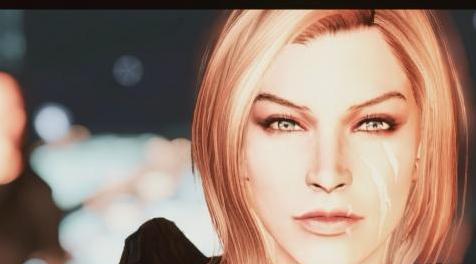
MOD介绍:
目标
这个项目的主要目标是改变你看待天际颜色的方式。我为每个天气模型使用定制的LUT,产生中性和美丽的颜色。我提供了两个预设,Desaturated和Vibrant,两者都完全按照他们的说法进行。该ENB适用于白云石天气,NAT,乡村天气和生动天气。
安装
1.下载ENB Binary:Binary .325
A.将二进制.325中的d3d11.dll和d3dcompiler_46e.dll复制到Skyrim主文件夹。
2.安装Reshade:RESHADE
A.在安装Reshade期间选择Skyrim应用程序并选择“Direct3D 10+”
当系统询问您是否要下载着色器集合时,请单击是。
3.选择我的ENB(只有一个,而不是两个)预设并将所有内容复制到Skyrim主文件夹中,覆盖reshade-shaders文件夹
4.加载游戏并按“结束”键加载转发并按照步骤,选择我的两个预设中的一个:
A.去饱和
B.充满活力
5.享受!
学分
非常感谢Rudy允许我使用他的enb编辑作为我预设的基础。没有你,我无法做到!
————————————————————————————————————————————————————
GOAL
The main goal of this project is to change the way you look at Skyrim's colors. I used customized LUTs for each weather mod which produces neutral and beautiful colors. I have provided two presets, Desaturated and Vibrant, both of which do exactly as they say. This ENB will work for Dolomite Weathers, NAT, Rustic Weathers and Vivid Weathers.
INSTALLATION
1. Download ENB Binary: Binary .325
A. Copy d3d11.dll and d3dcompiler_46e.dll from the Binary .325 to the Skyrim main folder.
2. Install Reshade: RESHADE
A. Select the Skyrim application during install of Reshade and select "Direct3D 10+"
When asked if you would like to download a collection of shaders, hit yes.
3. Select my ENB(Just one, not both) preset and copy all contents into Skyrim main folder, over-writing the reshade-shaders folder
4. Load game and press the "End" key to load reshade and follow steps, select one of my two presets:
A. Desaturated
B. Vibrant
5. Enjoy!
CREDITS
A great thank you to Rudy for allowing me to use his enb edits as the foundation of my preset. I couldn't have done it without you!
资源查找:
最新文章
点击热榜
推荐问答
- [问答]情商课一般几岁孩子去学比较好?
- [问答]怎么看自己孩子情商低不低?孩子情商低的10大特征是真的吗?
- [问答]我想提高情商和说话要看什么书?
- [问答]顾三月情感课程pdf谁有?
- [问答]谁有情感培训课程资源?
- [问答]如何看卖情感课程正规还是不正规?
实时热榜
回复区
昵称:
邮箱:
内容: