上古卷轴5:重置版MOD NPC服装替代品
MOD介绍:
介绍
如果你像我一样,那么我相信你已经收集了多年来制作的许多伟大的服装和盔甲模型。虽然有很多东西可供选择,但我总是觉得很遗憾除了我的角色和同伴之外没有人使用它们。
是的,您可以使用Simple NPC Outfit Manager等实用程序来更新友好NPC的服装,但这对我来说还不够。我想做的就是能够在不必使用Creation Kit的情况下更新我在游戏中遇到的任何人的服装而无需与他们交互(不言而喻)。
所以我所做的是创建一个系统,允许您设置多达100套服装,然后分配它们供各种类型的NPC使用。所以你可以设置一些穿着Farmer服装的NPC使用的服装,一些穿着Miners服装的NPC服装等等。
使用Add Item Menu设置服装,Towawot慷慨地允许我从我的mod无缝调用。这允许您在已安装的任何mod中找到任何服装项目。
在为一类NPC设置了服装之后,在游戏中遇到的那个类的任何NPC将用其中一个设置替换它们的装备。
如果您决定稍后改变服装,您可以让NPC接收更改,甚至将它们恢复到标准服装。
请注意,以下类型的NPC不受此mod的影响:
老人 - 更具体地说是使用两个老人声音的人
Argonians和Khajiit - 尽管可以在MCM菜单中切换。
如何使用
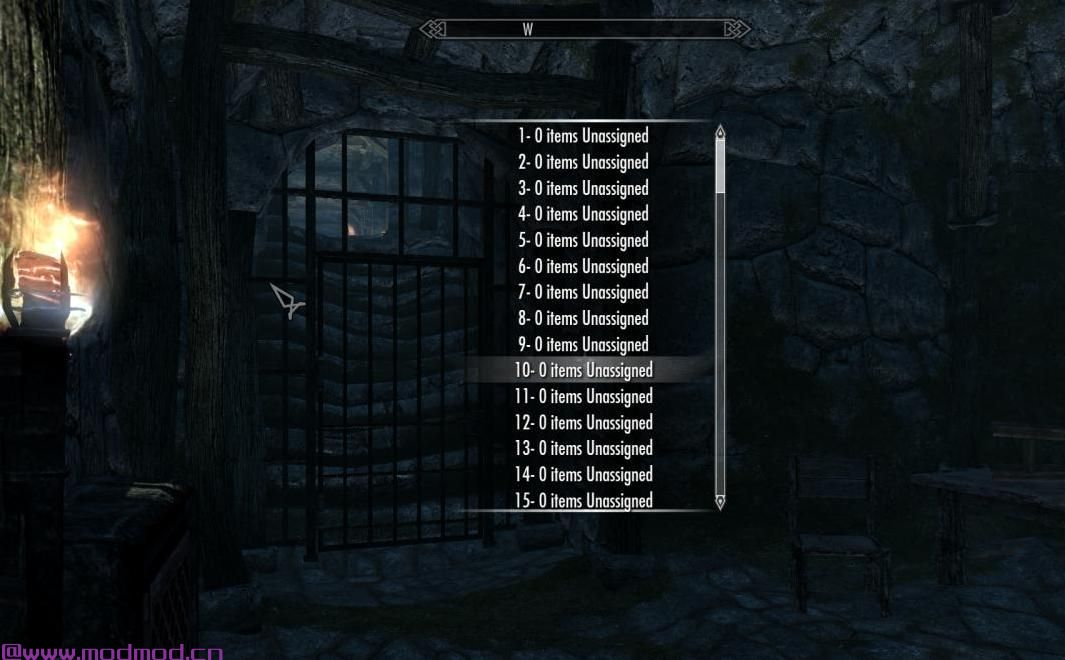
一旦安装,你将获得一个新的力量添加物品到装备。装备和使用此电源会显示一个菜单,其中列出了所有100套服装,它们包含的内容,然后允许您向它们添加项目。
如果您之前使用过“添加项目菜单”,那么添加项目将很熟悉。如果没有,那么快速散步:
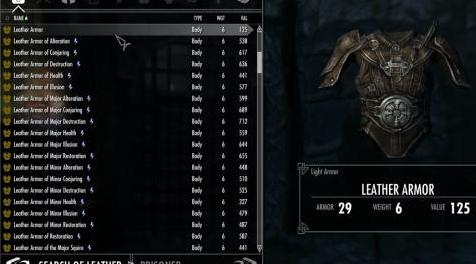
您首先会看到一个文本输入框,可以输入搜索词,例如皮革。
如果您的esp名称中有任何具有搜索词的mod,那么您将看到这些mod的列表,然后可以选择其中一个以查看该mod中的所有项目或使用[Search Item]选项进行搜索所有在其名称中包含搜索词的项目的mod。
然后将打开一个包含所有匹配项目的Container,您可以选择所需的项目。这些物品将被添加到装备中。
从容器中选择项目时请注意:
玩家永远不会收到任何选定的项目,他们只会被添加到服装中
如果您从容器切换到播放器并选择库存中的一个项目,那么该项目将移动到容器(按照正常的容器操作),但您将无法将此项目重新放回库存中永远失去了你,所以不要这样做!
如果该物品没有与其相关联的标准衣服或盔甲关键字之一,则它将不会被添加到该装备中。这是为了阻止服装中包含的非衣物(武器,药水等)。不幸的是,服装/盔甲mod并不总是设置关键字,在这些情况下你将无法将这些项目添加到你的服装(除非你修改CK中的服装/护甲模型或使用TES5Edit)
一旦装备有一些物品,添加物品装备喊叫菜单将显示:
服装中的物品数量
该装备已被分配到的班级
服装是否仅用于女性,男性仅用于两者。只有在MCM菜单中启用了男性定位时,才会显示此选项。女性只有F,男性只有M,两者都是B.
装备中主要物品的名称(通常这将是具有身体类型的任何物品)
可能是以下符号中的一个或多个^ {_。这些表明装备是否缺少头部佩戴的东西(^),手臂({)或脚(_)的某些东西。
从Add Items to Outfit shout菜单中选择填充的装备时,您将获得以下选项:
列出服装中的物品
添加更多物品到服装
从服装中取出一件物品
将装备分配给一类NPC
如果您添加多个使用相同主体位置的项目,则将应用正常的天际规则,并且NPC将装备最佳项目。
可以分配给装备的NPC类对应于天际的NPC服装的主要类型,例如Farmers覆盖了任何穿着创作套件中16个服装之一的人,其名称以FarmClothes开头。
添加物品装备喊叫菜单是向服装添加物品的最佳方式。您也可以使用MCM菜单执行此操作,但不建议这样做。原因是各种弹出菜单出现在MCM屏幕后面,您必须关闭所有MCM菜单并返回游戏才能与它们进行交互。一切正常,使用起来比较麻烦。您可以使用MCM菜单执行一些较少使用的选项。
高级功能
更新服装
如果你像我一样,只有在你看到穿着的衣服之后才会注意到你忘记添加的几件物品,或者你决定要让NPC完全不同。
在这些情况下,您可以在更新装备后转到mods MCM菜单,然后在Configure页面上选择Rescan NPC。这将迫使mod在下次遇到NPC时重新处理NPC(通常NPC只处理一次)并更新他们的装备。
保存并加载
在MCM菜单的“配置”页面上,您可以保存已设置的服装,然后将其加载到另一个游戏中。
如果两个游戏都可以访问完全相同的mods,那么所有的服装都会像在原始游戏中一样移动。
但是如果新游戏缺少某些mod(或者如果有不同版本的mod具有不同的格式),则使用它们从服装中删除任何无法找到的项目。这是一个静默过程,即它没有告诉您有关被删除的项目,尽管它在papyrus调试日志中记录了这一点。
目标百分比
MCM菜单中的目标页面允许您更改目标类别中NPC的百分比,即您可以将农民的滑块设置为50%,然后50%的农民将使用香草服装,50%将使用装备你已经设置好了。
启用Argonians和Khajiit
在MCM菜单中,在配置页面上,如果您希望mod在决定谁获得新装备时包含Argonians和Khajiit,则可以将Apply Outfits切换到Beast Races。
禁用Mod
MCM菜单中的“配置”页面提供了禁用mod的功能。如果禁用,则将停止所有活动脚本,并且将不再更新NPC。 mod可以在以后重新启动。
回归香草服装
如果你想恢复一类NPC的香草服装,那么可以遵循以下过程:
在MCM菜单中的目标页面上,找到该类并将%更新为0。
在“配置”页面上,选择“Recan NPC”
在“天际”中再次遇到NPC
更新班级名称以及每个班级的目标人员
mod使用JSON文件来存储与每个类关联的类名和vanilla服装。这个名为classOutfits.json的文件存在于skse \ plugins \ npcclothingreplacer目录中。如果您知道自己在做什么,可以编辑此文件并执行以下操作:
更改mod中出现的类名。请注意,如果更改类的名称,则需要更改类服装列表的名称以进行匹配。
更改与每个班级相关联的香草服装。这些服装只是作为一个针对各种类名的格式的列表。注意不在标准esm文件中的服装,你必须告诉它与Dawnguard和Dragonborn服装一样的formid和mod文件。请注意,如果formid以0x开头,则假定为十六进制,否则将其视为十进制数。
如果你确实更新了这个文件,你将需要启动一个新游戏(或者禁用并重新启用MCM菜单中的mod),以便获取更新,因为它只在首次加载mod时才会被读取。请注意,如果mod因任何原因无法处理加载此文件(通常因为输入的内容不是有效的JSON),它将从头开始重新生成它并使用默认值。
不包括NPC
该mod包含一种机制,你可以将NPC排除在他们的装备改变之外,即使他们穿着你选择瞄准的一个类别的装备。 skse \ plugins \ npcclothingreplacer目录中的文件classOutfits.json包含一个名为excludenpcs的条目,该条目包含mod忽略的NPC的基本ID列表。因此,如果您想要排除Alva和Annekke,那么您将更新excludenpcs列表,如下所示:
“excludenpcs”:[“0x000135E6”,“0x00013666”]
如果你确实更新了这个文件,你将需要启动一个新游戏(或者禁用并重新启用MCM菜单中的mod),以便获取更新,因为它只在首次加载mod时才会被读取。请注意,如果mod因任何原因无法处理加载此文件(通常因为输入的内容不是有效的JSON),它将从头开始重新生成它并使用默认值。
不兼容/已知问题
这个mod不会改变任何vanilla资产,应该与几乎任何东西兼容。
目前没有已知问题
504/5000谢谢和致谢
我要感谢以下人员,没有他们这个mod可能不会存在:
Towawot为他出色的添加项目菜单mod并允许我从这个mod使用它
confusedchim用于开发Simple NPC Outfit Manager,它向我展示了如何正确更新NPC服装
SKSE团队
SkyUI团队
expired6978用于开发UIExtensions
exiledViper开发PapyrusUtil
最后,所有其他伟大的模组作者在过去几年中对Skyrim进行了如此强化。————————————————————————————————————————————————————
Introduction
If you are like me then I'm sure you have collected many of the great outfits and armor mods that have been made over the years. While having a wide selection of things to wear from is great, I always found it a shame that no one other than my character and companions used them.
Yes you can use utilities such as Simple NPC Outfit Manager to update the outfits of friendly NPCs, but that was not enough for me. What I wanted to do be able to update the outfits of anyone I came across in the game without having to interact with them and (it goes without saying) without having to use the Creation Kit.
So what I did was create a system which allows you to setup up to 100 outfits and then assign them to be used by various classes of NPC. So you can setup a number of outfits that are used by NPCs who wear Farmer outfits, a number for NPCs who wear Miners outfits and so on.
The outfits are set up using Add Item Menu , which Towawot graciously allowed me to call seamlessly from my mod. This allows you to find any clothing item in any mod you have installed.
After outfits have been setup for a class of NPC, any NPC of that class encountered during the game will have their outfit replaced with one of the ones setup.
And if you decide to change the outfits later on, you can get the NPCs to pick up the changes, or even put them back to their standard outfit.
Note the following types of NPC will be unaffected by this mod:
Old people - more specifically anyone using the two old person voices
Argonians and Khajiit - although this can be toggled in the MCM menu.
How To Use
Once installed you will get a new power Add Items to Outfit. Equipping and using this power displays a menu listing all 100 outfits, what they contain and allows you to then add items to them.
If you have used Add Item Menu previously then adding items to the outfits will be familiar. If not then a quick walk follows:
You are first shown a text entry box and can enter a search term, for example leather.
If you have any mods which have the search term in their esp name then you will be shown a list of those mods and can then select one of them to see all the items in that mod or use the [Search Item] option to search in all mods for items that have the search term in their name.
A Container will then be opened containing all the matching items and you can select the items you wish. These items will be added to the outfit.
Note when selecting items from the container:
The player never receives any of the items selected, they only get added to the outfit
If you switch from the container to the player and select one of the items in your inventory then that item will move to the container (as per normal container operation), but you won't be able to then get this item back into your inventory and it is lost to you for ever, so don't do this!
If the item doesn't have one of the standard a clothing or armor keywords associated with it then it will not be added to the outfit. This is to stop non-clothing items (weapons, potions etc.) being included in the outfits. Unfortunately clothing/armor mods don't always set the keywords and in these cases you won't be able to add those items to your outfits (unless of course you modify the clothing/armor mod in the CK or using TES5Edit)
Once an outfit has some items, the Add Items to Outfit shout menu will show:
The number of items in in the outfit
The class the outfit has been assigned to
Whether the outfit is to be used for females only, males only or both. This will only show if you have enable targeting of males in the MCM menu. There will be a F for females only, M for males only or B for both.
The name of the primary item in the outfit (generally this will be any item that has a type of Body)
Possibly one or more of the following symbols ^{_. These indicate if the outfit is missing something to wear on the head(^), something for the arms({) or something for the feet(_).
When selecting a populated outfit from the Add Items to Outfit shout menu you will get the following options:
List the items in the outfit
Add more items to the outfit
Remove an item from the outfit
Assign the outfit to a class of NPC
If you add multiple items that use the same body slot the normal Skyrim rules will apply and the NPCs will equip the best item.
The NPC classes that can be assigned to the outfit correspond to the main types of NPC outfits in Skyrim, so for example Farmers covers anyone who is wearing one of the 16 outfits in the creation kit whose name starts with FarmClothes.
The Add Items to Outfit shout menu is the best way of adding items to outfits. You can also do this using the MCM menu but this is not recommended. The reason is that the various pop-up menus appear behind the MCM screens and you have to close all the MCM menus and go back to the game before you can interact with them. It all works, it's just more cumbersome to use. There are some less used options that you can only do using the MCM menu.
Advanced Features
Updating Outfits
If you are like me, its only after you see an outfit being worn that you notice the couple of items you forgot to add or decide you want to give the NPCs a different look completely.
In these cases you can, after updating the outfit, go to the mods MCM menu and on the Configure page select Rescan NPCs. This will force the mod to reprocess NPCs again the next time they are encountered (normally NPCs are only processed once) and update their outfit.
Save and Load
On the Configuration page in the MCM menu, you can save the outfits you've setup and then load them into another game.
If both games have access to exactly the same mods installed then all the outfits will be moved across exactly as they were in the original game.
But if the new game is missing some mods (or if there is a different version of the mod with different formids) then any items that can't be found are removed from the outfits using them. This is a silent process, i.e. it doesn't tell you that about the items that are removed, although it does log this in the papyrus debug log.
Target Percentages
The Target pages in the MCM menu allow you to change the % of NPCs in a class who are targeted, i.e. you can set the slider to be 50% for Farmers then 50% of farmers will use the vanilla outfits and 50% will use the outfits you've setup.
Enable Argonians and Khajiit
In the MCM menu, on the Configuration page you can toggle Apply Outfits to Beast Races if you want the mod to include Argonians and Khajiit when deciding who gets new outfits.
Disable Mod
The Configuration page in the MCM menu provides a facility to disable the mod. If disabled all the active scripts will be stopped and NPCs will no longer be updated. The mod can be restarted at a later date.
Reverting to Vanilla Outfits
If you ever want to revert to the vanilla outfits for a class of NPCs then the following process can be followed:
On the Target pages in the MCM menu, find the class and set the % to update to 0.
On Configuration page, select Recan NPCs
Go and encounter the NPCs once more in Skyrim
Updating Class Names and Who is Targeted for Each Class
The mod uses a JSON file to store the class names and the vanilla outfits associated with each class. This file named, classOutfits.json, exists in the skse\plugins\npcclothingreplacer directory. If you know what you are doing you can edit this file and do the following:
Change the class names as they appear in the mod. Note if you change the name of a class you need to change the name of the class outfits list as well to match.
Change the vanilla outfits that are associated with each class. The outfits are just held as a list of formids against the various class names. Note for outfits not in the standard esm files you have to tell it the formid and the mod file as has been done for Dawnguard and Dragonborn outfits. Note if the formid starts with 0x then it is assumed to be hex, otherwise it is treated as a decimal number.
If you do update this file you will need to start a new game (or disable and re-enable the mod in the MCM menu) for the updates to be picked up as it is only read when the mod is first loaded. Note if the mod can't process load this file for any reason (normally because what has been entered is not valid JSON) it will regenerate it from scratch and use the default values.
Excluding NPCs
The mod contains a mechanism where you can exclude an NPC from having their outfit changed even if they are wearing an outfit from one of the classes you have chosen to target. The file classOutfits.json, in the skse\plugins\npcclothingreplacer directory contains an entry called excludenpcs, which contains a list of base ids of NPCs that the mod ignores. So if for example you wanted to exclude both Alva and Annekke then you would update the excludenpcs list as follows:
"excludenpcs" : [ "0x000135E6", "0x00013666" ]
If you do update this file you will need to start a new game (or disable and re-enable the mod in the MCM menu) for the updates to be picked up as it is only read when the mod is first loaded. Note if the mod can't process load this file for any reason (normally because what has been entered is not valid JSON) it will regenerate it from scratch and use the default values.
Incompatibilities/Known Issues
This mod doesn't change any vanilla assets and should be compatible with pretty much anything.
There are no known issues at this time
Thanks and Acknowledgements
I'd like to thank the following, without whom this mod probably wouldn't exist:
Towawot for his excellent Add Item Menu mod and allowing me to use it from this mod
confusedchim for developing Simple NPC Outfit Manager which showed me how to update NPCs outfits properly
SKSE Team
SkyUI Team
expired6978 for developing UIExtensions
exiledViper for developing PapyrusUtil
And finally all the other great mod authors who have enhanced Skyrim so much over last few years.
演示截图:
资源查找:
最新文章
点击热榜
推荐问答
- [问答]情商课一般几岁孩子去学比较好?
- [问答]怎么看自己孩子情商低不低?孩子情商低的10大特征是真的吗?
- [问答]我想提高情商和说话要看什么书?
- [问答]顾三月情感课程pdf谁有?
- [问答]谁有情感培训课程资源?
- [问答]如何看卖情感课程正规还是不正规?
回复区
昵称:
邮箱:
内容: