上古卷轴5:重置版MOD Hothordes 2019 SSE Modlist
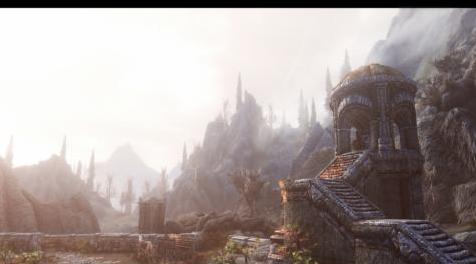
MOD介绍:
Hello Any和所有玩家!我在社区中已经注意到Skyrim Classic的忠实粉丝仍然觉得SSE在mods方面仍然处于劣势。我在这里打扰那个神话,因为在SSE已经出局的时候,已经移植了许多旧的mod以及新的SSE-Exclusive mods,它们取代了许多流行的过时mod。据我所知,并不是每个人都有时间去搜索关联,找到低估新发布的mods以添加到他们的加载顺序,即使Nexus试图推广新的mods!我也知道,在点头方面并非每个人都知识渊博。所以这里的目的是作为一个新的modlist /指南,将经常更新2019年及以后!考虑它是一个品味制作者指南,所有质量和有价值的mod值得下载。
如果你觉得这个名单上没有值得的mods,请随时告诉我。
为了让玩家了解这个设置是如何制作的,
我目前的规格:
Nvidia Geforce 1050 TI OC 4GB VRAM
英特尔奔腾g4560 3.50GHz
DDR4 2800 16gb内存
240GB SSD
1 TB硬盘(这是我保持SSE W /其mod的地方,但当然SSD会减少加载屏幕时间)
*像我这样的modlist通常需要55GB *
Skyrim针对香草进行了优化,因此我总能获得平稳的60 FPS。这将取决于我们安装的纹理大小,以及我们是否将使用enb(本指南还包括enb替代品)。
工具:
MOD ORGANIZER 2(由于它的特性和功能,我比其他所有人更喜欢它,以及用户友好性如何与Vortex缺乏的细节数量相比)。
SSEdit:需要这个,因为很多主要的ESM包含不必要的行李!
LOOT:Loot对您的插件订单进行排序,并为您提供不兼容性和脏插件的提示,A必须! (通常99%准确)。
记住:
去除纹理,enbs,天气,甚至照明大修应该在游戏中安全。
但普遍的共识是不要删除脚本重模式(或任何触及脚本的mod),除非你打算开始一个新的游戏。
除此之外,每次安装时都要测试每个脚本/天气/照明大修模组。我从来没有真正遇到过一次安装纹理的问题。
另一方面,除非你能负担得起VRAM,否则不需要使用4k纹理。我个人已经注意到即使使用1080p显示器也可以使用它们,但是
通常建议您使用2k纹理以获得视觉和性能优势。
如果Skyrim SE更新怎么办?
我发现阻止SSE更新的最佳修复方法正在发挥作用,右键单击您的游戏并选择首选项。转到更新选项卡并选择选项; “我发布时更新”。这样SSE不会更新,除非您从steam启动它。相反,您将通过Mod Organizer 2启动SKSE64。
————————————————————————————————————————————————————————
Hello Any and All players! I've come to notice in the community there are still die hard fans of Skyrim Classic who feel that SSE is still on the back burner when it comes to mods. I'm here to dis spell that myth since in the time SSE has been out, plenty of old mods have been ported as well as new SSE-Exclusive mods which replace a lot of popular outdated mods. I understand not everyone has the time to scour the nexus to find underrate newly released mods to add to their load order, even despite Nexus' attempts at promoting new mods! I'm also aware that not every is very knowledgeable when it comes to nodding. So this here is purposed as a new modlist/guide the will be frequently updated for 2019 and onward! Consider it a tastemaker guide to all the quality and worthwhile mods worth downloading.
If you feel there are worthy mods not on this list, feel free to let me know.
To give players an idea with how this set up was made,
my current specs:
Nvidia Geforce 1050 TI OC 4GB VRAM
Intel pentium g4560 3.50GHz
DDR4 2800 16gb ram
240GB SSD
1 TB HDD (This is where I keep SSE W/ its mods but of course an SSD will decrease loading screen time)
*55GB typically needed for a modlist like mine*
Skyrim is optimized well for vanilla so I always get smooth 60 FPS. That'll change depending on just what size textures we install, as well as if we will use enb (this guide also include enb alternatives).
TOOLS:
MOD ORGANIZER 2 (I prefer this over all others due to its features and functions, along with how user friendly it can be compared to the amount of detail Vortex lacks).
SSEdit: Gonna need this since alot of the main ESMs contain unnecessary baggage!
LOOT: Loot sorts your plugin order as well as giving you the tip on incompatibilities and dirty plugins, A must have! (its usually 99% accurate).
Keep in mind:
Removing texures, enbs, weathers, or even lighting overhauls SHOULD be safe mid game.
But the general consensus is don't remove script heavy mods (or any mod that touches scripts really) unless you plan on starting a new game.
Along with that, its a good idea to test each script/weather/lighting overhaul mods every time you install one. I've never really come across issues with installing textures all at once.
On another note, using 4k textures isn't really needed unless you can afford the VRAM. I personally have definitely noticed a difference in using them even with a 1080p monitor, but
it is generally recommended you use 2k textures for both visual and performance benefit.
What if Skyrim SE updates??
Best fix i've found to preventing SSE from updating is going onto steam, right click your games and choose preferences. Go towards the updates tab and Choose the option; "update when I launch". This way SSE doesn't update unless you launch it from steam. Instead you'll be launching SKSE64 through Mod Organizer 2.
资源查找:
最新文章
点击热榜
推荐问答
- [问答]情商课一般几岁孩子去学比较好?
- [问答]怎么看自己孩子情商低不低?孩子情商低的10大特征是真的吗?
- [问答]我想提高情商和说话要看什么书?
- [问答]顾三月情感课程pdf谁有?
- [问答]谁有情感培训课程资源?
- [问答]如何看卖情感课程正规还是不正规?
回复区
昵称:
邮箱:
内容: