上古卷轴5:重置版MOD 混合控制
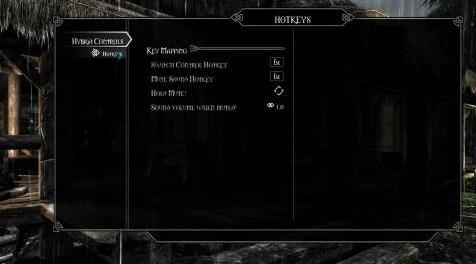
MOD介绍:
混合控制
Oldrim版本
这是什么?
一个Mod。明显。特别是一个统一键盘,鼠标和游戏手柄控件的Mod。为了我自己的方便,它还具有几乎任何控件的修复和我在最后几年中设法挤压的界面。此外,它还增加了各种独特功能,以扩展游戏的控制和自定义功能,其中一些功能甚至无法使用标准工具集。一些功能包括:
1.关闭游戏手柄游戏,从而可以在游戏手柄和键盘/鼠标控制之间切换
2.在默认控件菜单中重新绑定键盘的所有默认热键,缩放键,控制台和ESC菜单
3.删除F12的硬编码键,快速加载/快速保存并运行,释放4个附加默认键
4.允许将任何可能的默认键功能重新绑定到键盘,鼠标或游戏手柄
5.删除了偏好菜单和2个默认热键的默认游戏手柄键
6.用缩放和2个修改键替换D-Pad按钮,以允许完全控制任何默认功能,并介绍独特的功能
7.修复了与显示无功能键/按钮相关的各种界面问题
8.允许在各种菜单中使用更多键/按钮
9. MCM功能在反转控制模式之间切换
10.使用游戏手柄开始/立即退出天际
11.通过游戏手柄调整显示器亮度
12.通过游戏手柄调节音量
13.通过游戏手柄进行Fire Steam覆盖菜单
14.将键盘与游戏手柄结合使用,无需关闭游戏手柄
15.使用可自定义的MCM热键反转控件
使用流版HC_360.exe获得的功能列在下方。确保在安装过程中只选择一个。
安装?
1.确保已安装必备组件
2.手动安装mod或使用提供的Fomod表格(Vortex,MO2?)
3.打开Skyrim Special Edition \ Data文件夹(相应的Vortex / MO2安装文件夹),找到HC_360_off.exe(默认版本)或HC_360_stream.exe(Nvidia直播)
4.右键单击.exe并将其放在桌面上,创建一个快捷方式
5.激活.exe以确保所有功能都正常运行!
你会如何允许这样的附加功能?
使用基于c ++代码的自定义构建.exe。除了普通的mod文件之外,您还需要手动将其安装到您想要的任何地方,并使用Skyrim进行运行。
你能描述哪些键设置到游戏手柄?
当然。干得好:
D-Pad左侧修改器:
DPL + A =热键1
DPL + B =热键2
DPL + X =热键3
DPL + Y =热键4
DPL + LB =热键5
DPL + RB =热键6
DPL + LT =热键7
DPL + RT =热键8
DPL +开始=收藏夹菜单
DPL + Back =控制台菜单
DPL + LS =切换自动移动
DPL + RS =切换始终运行
D-Pad右侧修改器:
DPR + A =快速库存菜单
DPR + B =快速魔术菜单
DPR + X =快速统计(Perks)菜单
DPR + Y =快速地图菜单
DPR + START =关闭游戏手柄(外部)
DPR + BACK = Skyrim尚未运行时开始SKSE(外部),Skyrim运行时=即时退出
DPR + LB =降低显示器亮度
DPR + RB =提高显示器亮度
DPR + RS =监视亮度默认值
DPR + LT =较低的系统容量
DPR + RT =提高系统容量
DPR + LS =打开蒸汽覆盖
如果您使用的是流式版.exe,则会更改以下按钮:
DPR + LB =切换相机
DPR + RB =切换FPS计数器
DPR + RS =打开/关闭Nvidia体验叠加
DPR + LT =广播暂停/取消暂停
DPR + RT =制作截图
确保您已在Nvidia Experience中设置默认热键!
任何错误或限制?
不幸的是,因为我还在努力调整mod。我的疫苗接种时间已过两天,所以我发布了第一个BETA版本,以获得一些报告和反馈。引入的错误将在未来的更新中被挤压。错误是:
- 目前您只能通过主动Steam覆盖调整音量
- 激活Steam覆盖层可能会有点不稳定
- 所有新的游戏手柄键,除缩放外,目前都无法反弹......这包括所有其他默认功能,如f.e.使用控制器进入快捷菜单
常问问题
请你详细说明一下吗?
我不知道还能说些什么。如果您没有任何问题,我想一切都在努力满足您的需求。
这些可以与Xbox 360一起使用吗?
它将专门用于X-Box 360控制器。至少使用.exe进行的功能。为自己测试。当使用不同的控制器时,我建议使用互联网上的控制器仿真器之一。
这是亵渎吗?你为什么要使用控制器?
因为我可以。在天际有些情况下你只想向后倾斜并享受这个世界。我在沿着乡村旅行和谈话期间主要使用控制器。我主要使用键盘/鼠标控制进行战斗和复杂的菜单浏览。它在键盘上打开了更多免费热键,供我使用需要它们的mod。
你能添加这个或那个功能吗?
是。 设置.exe很容易。 一旦框架设置完毕,我基本上只需要为新功能交换数字。 添加不同的.exe版本只需几分钟。 有一次,我可能只会制作一个“更多免费热键”版本,只需一个修改器按钮,并且只为修改器添加外部功能,这样所有其他热键都可以免费使用mod。 肯定会有一个抽搐流版本,但是现在我想做更多的讨论。———————————————————————————————————————————————————————————————
Hybrid Controls
Oldrim Version
What is this?
A Mod. Obviously. In particular a Mod that unifies keyboard, mouse and gamepad controls. It also features pretty much any fix to controls and the interface I've managed to squish during the last copple of years, for my own convenience. In addition it adds various unique functions to expand controling and customizing your game, some of them not even possible with the standard tool set. Some of the features include:
1. Turning off your gamepad ingame and thus being able to switch between gamepad and keyboard/mouse control
2. Rebind all default hotkeys, zoom keys, console and ESC-menu for keyboard in the default controls menu
3. Removed the hardcoded keys for F12, quickload/quicksave and run, freeing up 4 addtional default keys
4. Allowed rebinding any possible default key function to keyboard, mouse or the gamepad
5. Removed the default gamepad keys for favorit menu and 2 default hotkeys
6. Replaced D-Pad buttons with zoom and 2 modifier keys, to allow full control on any default function, and introduce the unique functions
7. Fixed various interface issues related to displaying unfunctional keys/buttons
8. Allowed for more keys/buttons to be used in various menus
9. MCM function to switch between inverted control mode
10. Start/instantly quit Skyrim with the gamepad
11. Adjust monitor brightness via gamepad
12. Adjust volume via gamepad
13. Fire Steam overlay menu via gamepad
14. Use keyboard in combination with gamepad, without turning gamepad off
15. Invert controls with a customizable MCM hotkey
Features you get with the stream version of the HC_360.exe are listed downside. Make sure to chose only one during installation.
Installation?
1. Make sure to have the prerequisites installed
2. Install the mod either manually or with the provided Fomod form (Vortex, MO2?)
3. Open your Skyrim Special Edition\Data folder(respective Vortex/MO2 install folder), and find either the HC_360_off.exe(default version), or the HC_360_stream.exe(Nvidia live streaming)
4. Make a shortcut, by right clicking the .exe and put it on the desktop
5. Activate the .exe to make sure all features are working ingame!
How would you allow for such additional functions?
With a custom build .exe based on c++ code. You'll need to manually install it to any place you wish, in addition to the normal mod files, and run it with Skyrim.
Can you describe which keys are set to the gamepad?
Sure. Here you go:
D-Pad left modifier:
DPL+A = Hotkey 1
DPL+B = Hotkey 2
DPL+X = Hotkey 3
DPL+Y = Hotkey 4
DPL+LB= Hotkey 5
DPL+RB= Hotkey 6
DPL+LT= Hotkey 7
DPL+RT= Hotkey 8
DPL+Start = Favorites Menu
DPL+Back = Console Menu
DPL+LS= Toggle Auto Move
DPL+RS= Toggle Always Run
D-Pad right modifier:
DPR+A = Quick Inventory Menu
DPR+B = Quick Magic Menu
DPR+X = Quick Stats(Perks) Menu
DPR+Y = Quick Map Menu
DPR+START = Turn Off Gamepad(external)
DPR+BACK = Start SKSE when Skyrim is not already running(external), when Skyrim is running = instant quit
DPR+LB= Lower Monitor Brightness
DPR+RB= Raise Monitor Brightness
DPR+RS= Monitor Brightness Default
DPR+LT= Lower System Volume
DPR+RT= Raise System Volume
DPR+LS= Open Steam Overlay
If you are using he streaming version .exe, the following buttons are changed:
DPR+LB = Toggle camera
DPR+RB = Toggle FPS counter
DPR+RS = Open/Close Nvidia Experience Overlay
DPR+LT = Broadcasting pause/unpause
DPR+RT = Make screenshot
Make sure you've setup the default hotkeys in Nvidia Experience!
Any bugs or limitations?
Unfortunately yes, as I'm still working on finetuning the mod. My vaccancy is over in two days, so I' releasing this first BETA version, to get some reports and feedback. Introduced bugs will be squished in future updates. Bugs are:
- currently you can only adjust volume with active Steam overlay
- the activation of the Steam overlay might act a little wonky
- all new gamepad keys, except zoom, can currently not be rebound...this includes all additional default functions like f.e. entering quick menus with the controller
FAQ
Will you please give a more detailed description?
I don't know what else to say. If you don't have any questions, I suppose everything's working to suit your needs.
Can these be used with the Xbox 360?
It will work exclusively with the X-Box 360 controller. At least the functions made with the .exe. Test for yourself. I recommend using one of the miriads of controller emulators found on the internet, when using a different controller.
This is blasphemy? Why would you use a controller?
Because I can. There are situations in Skyrim when you just want to lean back and enjoy the world. I'm mostly using controllers when traveling along the country and during conversations. I keep using keyboard/mouse control primarly for combat and during complicated menu browsing. It opens so much more free hotkeys on the keyboard for me to be used with mods that need them.
Could you add this or that function?
Yes. Setting up the .exe is easy peasy. Once the framework was setup, I basically just need to exchange numbers for new functions. It's a matter of minutes to add different .exe versions. At one point I'm probably going to make a "more free hotkeys" only version, with a single modifier button and adding only external functions to the modifier, so that all other hotbuttons are free for usage with mods. A twitch stream version will certainly follow, but for now I want to do more teting.
资源查找:
最新文章
点击热榜
推荐问答
- [问答]情商课一般几岁孩子去学比较好?
- [问答]怎么看自己孩子情商低不低?孩子情商低的10大特征是真的吗?
- [问答]我想提高情商和说话要看什么书?
- [问答]顾三月情感课程pdf谁有?
- [问答]谁有情感培训课程资源?
- [问答]如何看卖情感课程正规还是不正规?
回复区
昵称:
邮箱:
内容: