上古卷轴5:重置版MOD 水下模糊修复
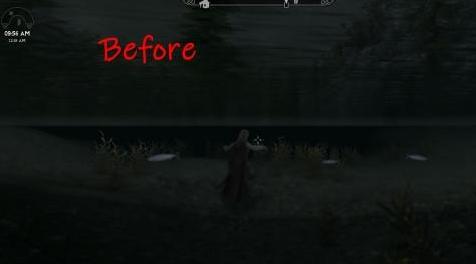
MOD介绍:
我在互联网上搜索了一个修复以减轻水下模糊,因为在我看来它看起来很块状/锯齿状/坏。我看到的最常见的建议是关闭.ini文件中的景深,这会完全禁用DOF并使水下看起来不切实际的清晰!所以经过更多的搜索,我想出了如何改变它!这是结果! :)
一旦你知道在哪里看,它实际上是一个非常简单的修复,我刚刚在UnderwaterImageSpace中更改了2个字段 - 距离和范围。将距离更改为正数是真正解决了难以模糊的问题,DoF中的其他设置并没有真正产生那么大的差异,因此如果您愿意,可以将它们更改为您喜欢的SSEEdit中的任何内容!
它能做什么
降低水下模糊的数量,因此您的角色仍然可见,没有锯齿状边缘或尴尬的阴影。水下仍然看起来像水下,你仍然看不到水下很远的距离,当他们远离你时,事情仍然会模糊。
水将更加清晰,通过表面向上看会更加明显。
加载订单
简单的回答:如果它正常工作,那么无论你把它放在哪里都是一个好地方,如果不是,请把它放在你的负载顺序中,直到确实如此。
其他答案:放置在修改UnderwaterImageSpace的任何内容之后。没有那么多,也许一些天气或照明模式,但我没有检查它们。
兼容性
最糟糕的情况是,它只会取代其他mod提供的水下效果,如果有的话。
我认为Vivid Weathers做了类似的事情,所以如果你正在使用它,你可能不需要这个,除非其他东西覆盖大众。
完全兼容逼真的水2,水的边缘修复,黑曜石天气,真实的风暴,湿和冷,增强的灯光和FX *(这些是我正在使用的!)
* ELFX增强器我认为确实修改了UnderwaterImageSpace,之后只需加载它。或者使用Mator Smash获得最好的一切,或者使用SSEEdit将Distance字段复制到enhancer.esp(参见图片),这样你甚至不需要这个mod。
看看我的其他mods! :)
狼人野性野兽奔跑
减少对抗性动物(适用于SkyTEST)
——————————————————————————————————————————————————
I searched the internet for a fix to lessen the underwater blur, because in my opinion it looks so blocky/jagged/bad. The most common suggestion I seen was to turn off depth of field in the .ini files, which disables DOF entirely and makes underwater look unrealistically crystal clear! So after alot more searching, I figured out how to change it! Here's the results! :)
It's actually a very simple fix once you know where to look, I just changed 2 fields in UnderwaterImageSpace - Distance, and Range. Changing Distance to a positive number is what really fixes the bad blur, the rest of the settings in DoF don't really make that much significant difference, so you can change them to whatever you prefer in SSEEdit if you like!
What It Does
Lowers the amount of underwater blur, so your character is still decently visible without jagged edges or awkward shading. Underwater still looks underwatery and you still cannot see a great distance underwater, and things will still be blurred when they're further away from you.
Water will be slightly clearer, and looking up through the surface will be slightly more visible.
Load Order
Simple answer: If it's working then wherever you put it is a good spot, if its not, put it lower in your load order until it does.
Other answer: Place after anything that modifies UnderwaterImageSpace. There's not much that does, maybe some weather or lighting mods, but I haven't checked them all.
Compatibility
Worst case scenario, it will just replace what underwater effects other mods give, if any.
I think Vivid Weathers does something similar, so chances are if you're using that, you don't need this, unless something else is overwriting VW.
Fully compatible with Realistic Water 2, Water's Edge Fix, Obsidian Weathers, True Storms, Wet and Cold, Enhanced Lights and FX* (These are the ones I'm using!)
*ELFX enhancer I think does modify UnderwaterImageSpace, just load this after. Or use Mator Smash for the best of everything, or copy the Distance field to the enhancer.esp with SSEEdit (see pictures) so you don't even need this mod.
Check out my other mods! :)
Werewolf Feral Beast Run
Less Confrontational Animals (For SkyTEST)
资源查找:
最新文章
点击热榜
推荐问答
- [问答]情商课一般几岁孩子去学比较好?
- [问答]怎么看自己孩子情商低不低?孩子情商低的10大特征是真的吗?
- [问答]我想提高情商和说话要看什么书?
- [问答]顾三月情感课程pdf谁有?
- [问答]谁有情感培训课程资源?
- [问答]如何看卖情感课程正规还是不正规?
回复区
昵称:
邮箱:
内容: