上古卷轴5:重置版MOD 裁判官眼睛SE
MOD介绍:
裁判官的眼睛
由治安法官
6500+下载; 3500+独特
自从遗忘以来,我总是讨厌那些看起来像香草的死人眼睛的颜色
他们与GIMP试图同时带来鲜艳的色彩
试图接近传说。为此,我向你们提出:裁判官
Skyrim SE的眼睛。包装更换了几个香草眼睛
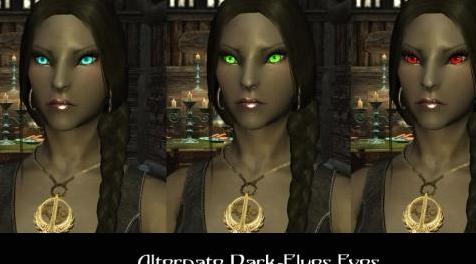
特别是它包括人类和精灵的新眼睛;此外,虽然标准版带有对Loremer友好的dunmer眼睛,我对所有dunmer的红眼睛都非常无聊,我制作了一个替代版本,其中包括三种鲜艳的颜色(蓝色,绿色和红色),仅供黑暗精灵使用。
- 9只眼睛为人类
- Dunmeri的4只眼睛
- Aldmeri的3只眼睛
- Bosmeri的3只眼睛
- Dunmeri的3只眼睛[Alternate]
*对不起Orcs,Kahjit和Argonians,但我只参加了比赛
通常玩,如果有请求虽然我可能会在新版本上工作
但是缺少比赛。
如果你喜欢我的眼睛,请用你的“新”眼睛张贴你角色的照片,当然不要忘记赞同:)
1.0
初始发行。
1.1
暗淡的精灵眼睛略微调整。不幸的是,对于Dunmeri来说,传说是非常严格的,他们都是红眼睛。
1.2
重新包装所有标准眼睛。
添加了替代黑暗精灵眼睛(蓝色,绿色,红色)。
2.0
重新包装DDS以减少V-Ram消耗。
(66%较小尺寸纹理,相同分辨率)
移至Skyrim SE。
使用Mod Manager或提取数据文件夹中zip文件的内容
- 或 - 如果你想只使用一些眼睛
打开\ Data \ Textures \ actors \ character \ Eyes \
选择要安装的眼睛并将它们放入\ Data \ Textures \ actors \ character \ Eyes \
删除\ Data \ Textures \ actors \ character \ Eyes \ eyeblind.dds
删除\ Data \ Textures \ actors \ character \ Eyes \ eyeblue.dds
删除\ Data \ Textures \ actors \ character \ Eyes \ eyebrown.dds
删除\ Data \ Textures \ actors \ character \ Eyes \ eyedarkelf.dds
删除\ Data \ Textures \ actors \ character \ Eyes \ eyedarkelfdeepred.dds
删除\ Data \ Textures \ actors \ character \ Eyes \ eyedarkelfdeepred2.dds
删除\ Data \ Textures \ actors \ character \ Eyes \ darkelfunique1.dds
删除\ Data \ Textures \ actors \ character \ Eyes \ eyegreen.dds
删除\ Data \ Textures \ actors \ character \ Eyes \ eyegrey.dds
删除\ Data \ Textures \ actors \ character \ Eyes \ eyehazel.dds
删除\ Data \ Textures \ actors \ character \ Eyes \ eyehazelbrown.dds
删除\ Data \ Textures \ actors \ character \ Eyes \ eyehighelf.dds
删除\ Data \ Textures \ actors \ character \ Eyes \ eyehighelfdarkyellow.dds
删除\ Data \ Textures \ actors \ character \ Eyes \ eyehighelforange.dds
删除\ Data \ Textures \ actors \ character \ Eyes \ eyelightgrey.dds
删除\ Data \ Textures \ actors \ character \ Eyes \ eyedarkblue.dds
删除\ Data \ Textures \ actors \ character \ Eyes \ eyeiceblue.dds
删除\ Data \ Textures \ actors \ character \ Eyes \ eyewoodelf.dds
删除\ Data \ Textures \ actors \ character \ Eyes \ eyewoodelfdeepbrown.dds
删除\ Data \ Textures \ actors \ character \ Eyes \ eyewoodelfdeepviolet.dds
删除\ Data \ Textures \ actors \ character \ Eyes \ eyewoodelflightbrown.dds
Ranger Stand-Alone Companion SFW
战斗机独立伴侣SFW
天际:
法术 - 光彩
彩色钉子
增强Lydia
裁判官的眼睛
改进了Soultrap
商家股票重生修复
法术 - 漂浮
天际SE:
裁判官眼睛SE
只要您发送给我,您就可以在您的mod中使用这些文件
要求获得许可的消息,并且您相信我使用了我的文件。
贝塞斯达论坛的裁判官
——————————————————————————————————————————————————
Magistrate Eyes
by Magistrate
6500+ Downloads; 3500+ Unique
Since Oblivion I always hated the vanilla dead-looking eye colors so I worked on
them with GIMP trying to bring vibrant colors and at the same time
trying to stay close to the lore. Therefor, I present to you: Magistrate
Eyes for Skyrim SE. The pack replace several vanilla eyes, more
specifically it includes new eyes for humans and elves; also, while the Standard Version ships with lore-friendly dunmer eyes I got incredibly bored with the good-ole red eyes for all dunmer and I made an Alternate Version which includes three bright colors (blue, green and red) for dark elves only.
- 9 Eyes for Humans
- 4 Eyes for Dunmeri
- 3 Eyes for Aldmeri
- 3 Eyes for Bosmeri
- 3 Eyes for Dunmeri [Alternate]
*Sorry about Orcs, Kahjit and Argonians but I did only the races that I
normally play, if there's request though I may work on a new release for
the missing races though.
If you like my eyes, please post a picture of your character with your "new" eyes, and of course don't forget to endorse :)
1.0
Initial release.
1.1
Slightly tuned Dark Elves eyes. Unfortunately lore is quite strict when it comes to Dunmeri, they all got red eyes.
1.2
Repackaged All Standard Eyes.
Added Alternate Dark-Elves Eyes (Blue, Green, Red).
2.0
Repackaged DDS for less V-Ram consumption.
(66% Smaller Size Texture, Same Resolution)
Ported to Skyrim SE.
Either use a Mod Manager or extract the content of the zip file in your data folder
- OR - if you want to use just SOME eyes
Open \Data\Textures\actors\character\Eyes\
Pick the eye(s) you want to install and put them in your \Data\Textures\actors\character\Eyes\
Delete \Data\Textures\actors\character\Eyes\eyeblind.dds
Delete \Data\Textures\actors\character\Eyes\eyeblue.dds
Delete \Data\Textures\actors\character\Eyes\eyebrown.dds
Delete \Data\Textures\actors\character\Eyes\eyedarkelf.dds
Delete \Data\Textures\actors\character\Eyes\eyedarkelfdeepred.dds
Delete \Data\Textures\actors\character\Eyes\eyedarkelfdeepred2.dds
Delete \Data\Textures\actors\character\Eyes\darkelfunique1.dds
Delete \Data\Textures\actors\character\Eyes\eyegreen.dds
Delete \Data\Textures\actors\character\Eyes\eyegrey.dds
Delete \Data\Textures\actors\character\Eyes\eyehazel.dds
Delete \Data\Textures\actors\character\Eyes\eyehazelbrown.dds
Delete \Data\Textures\actors\character\Eyes\eyehighelf.dds
Delete \Data\Textures\actors\character\Eyes\eyehighelfdarkyellow.dds
Delete \Data\Textures\actors\character\Eyes\eyehighelforange.dds
Delete \Data\Textures\actors\character\Eyes\eyelightgrey.dds
Delete \Data\Textures\actors\character\Eyes\eyedarkblue.dds
Delete \Data\Textures\actors\character\Eyes\eyeiceblue.dds
Delete \Data\Textures\actors\character\Eyes\eyewoodelf.dds
Delete \Data\Textures\actors\character\Eyes\eyewoodelfdeepbrown.dds
Delete \Data\Textures\actors\character\Eyes\eyewoodelfdeepviolet.dds
Delete \Data\Textures\actors\character\Eyes\eyewoodelflightbrown.dds
Ranger Stand-Alone Companion SFW
Fighter Stand-Alone Companion SFW
Skyrim:
Spell - Brilliance
Colored Nails
Enhanced Lydia
Magistrate Eyes
Improved Soultrap
Merchant Stock Respawn Fix
Spell - Levitate
Skyrim SE:
Magistrate Eyes SE
You are permitted to use these files in your mod as long as you send me a
message to ask for permission and you credit me for use of my files.
Magistrate on Bethesda's Forum
资源查找:
最新文章
点击热榜
推荐问答
- [问答]情商课一般几岁孩子去学比较好?
- [问答]怎么看自己孩子情商低不低?孩子情商低的10大特征是真的吗?
- [问答]我想提高情商和说话要看什么书?
- [问答]顾三月情感课程pdf谁有?
- [问答]谁有情感培训课程资源?
- [问答]如何看卖情感课程正规还是不正规?
回复区
昵称:
邮箱:
内容: