上古卷轴5:重置版MOD 通过AHK设置CPU亲和力和优先级 - 性能提升
MOD介绍:
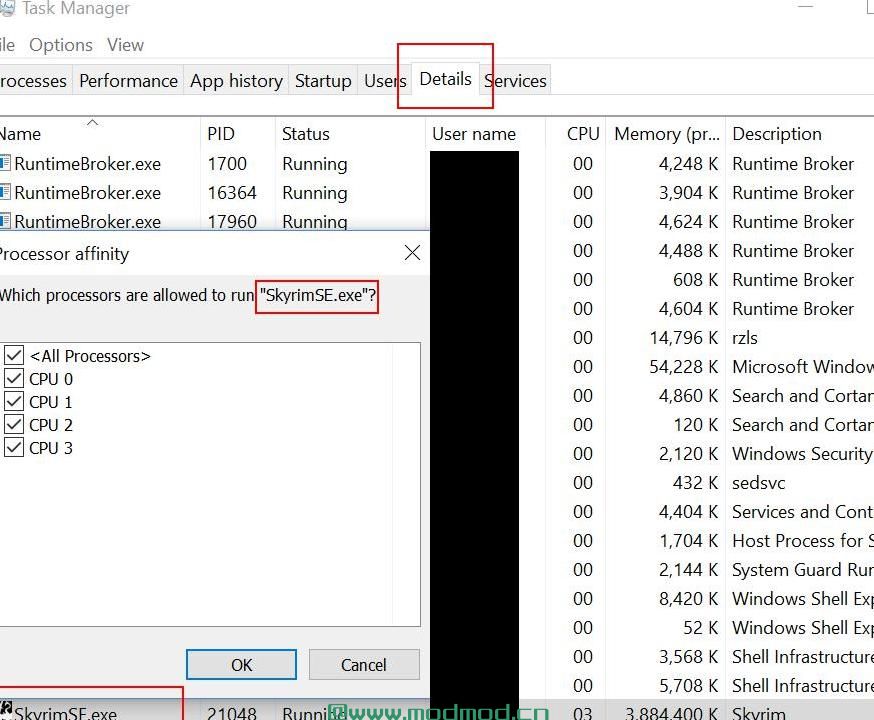
我的skyrim se默认以2核心亲和力(4核心cpu)和后台优先级开始,
导致严重的滞后和口吃。
我不知道为什么也不确定其他人是否会遇到这种情况,但无论如何我想分享。
(如果您不确定,可以查看taskmanager,请参阅[图像])
1)下载并安装AHK,标记安装路径:
www#autohotkey#com/download/
2)找到新安装的程序,右键单击AutoHotkey.exe - >属性 - >兼容性 - >以管理员身份运行该程序
3.1)创建一个名为skyrimSE.ahk的文件,并将以下内容复制并粘贴到文件中:
#ifwinactive ahk_class天际特别版ahk_exe SkyrimSE.exe
大写锁定::
温格特,PID_,PID,A
流程,优先级,%pid _%,H
Affinity_Set(15,PID_)
返回
3.2)将代码的前10~11行(从开始到第一个空白行)复制并粘贴到文件中,保存并关闭:
github.com/dufferzafar/Autohotkey-Scripts/blob/master/lib/Affinity.ahk#fromHistory
4)双击你的skyrimSE.ahk打开
5)运行看看,加载后按Capslock一次,完成。
————————————————————————————————————————————
My skyrim se start with 2 core affinity (4 core cpu) and background priority by default ,
resulting in heavy lag and stuttering.
I don't know why and not sure if others encounter this, but I would like to share anyway.
(you can check in taskmanager if you are not sure, see [Images])
1) download and install AHK, mark the install path:
www#autohotkey#com/download/
2) find your newly installed program, right click AutoHotkey.exe -> Properties -> Compatibility -> Run this program as an administrator
3.1)create a file named like skyrimSE.ahk and copy & paste the following into the file:
#ifwinactive ahk_class Skyrim Special Edition ahk_exe SkyrimSE.exe
CapsLock::
WinGet,pid_,PID,A
Process, Priority,%pid_%,H
Affinity_Set(15,pid_)
return
3.2)copy&paste the first 10~11 lines (from start to first blank line) of the code into the file, save& close:
github.com/dufferzafar/Autohotkey-Scripts/blob/master/lib/Affinity.ahk#fromHistory
4) double click your skyrimSE.ahk to open
5) run see, after it is loaded press Capslock once, done.
演示截图:
资源查找:
最新文章
点击热榜
推荐问答
- [问答]情商课一般几岁孩子去学比较好?
- [问答]怎么看自己孩子情商低不低?孩子情商低的10大特征是真的吗?
- [问答]我想提高情商和说话要看什么书?
- [问答]顾三月情感课程pdf谁有?
- [问答]谁有情感培训课程资源?
- [问答]如何看卖情感课程正规还是不正规?
回复区
昵称:
邮箱:
内容: