上古卷轴5:重置版MOD 亲爱的日记 - 期刊和MCM论文界面
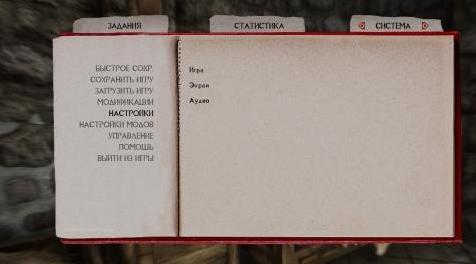
MOD介绍:
这个小mod为Journal / Statistics / Settings菜单和MCM提供了纸质界面。
MCM替换器基于我的mod更宽版MCM菜单的“甚至更宽版”版本,包括所有最终版本修复,因此不再有文本剪辑。
包括闪烁的存档游戏修复程序。
包括一些次要的期刊UI修复。
您可以安装Journal和MCM文件,也可以单独使用它们。
我强烈建议您使用Sovngard字体替换器或其他您喜欢的替换器以获得更多的手写外观。
有可选版本,带有小血腥污渍。它主要是为了使SKSE文本可见,因为它的颜色无法通过swf文件编辑进行查询。
兼容性说明:
兼容所有不会改变configmenu.swf和quest_journal.swf文件的内容
兼容任何语言
与天际灵魂兼容
底部条形图已删除,因此必须与超宽屏幕兼容
如果由于某种原因你使用宽松文件形式的SkyUI(解压缩的BSA),只需在mod Manager中加载我的mod后。或者在手动安装时手动覆盖。
对于GAMEPAD用户:
据报道,目前在主菜单和统计菜单中选择的选项不起作用。我会尽快解决这个问题。
大多数未来的升级(todo-list):
更多纹理变体(也许是文字颜色)
更多封面颜色变体
半透明版本
分辨率更高(不像看起来那么容易)
血量更多的版本
可选:“修改”行删除
可选:删除MCM图像
库存和魔术UI
LE版
更广泛的主菜单
留下您的建议评论。
最后,对于屏幕截图上没有那么多英文文本,我很抱歉。懒得切换:P
————————————————————————————————————————————————————————
This little mod provides paper interface for Journal/Statistics/Settings menu and MCM.
The MCM replacer is based on "Even Wider Rescaled" version of my mod Wider MCM Menu for SkyUI, all final version fixes included, so no more text clipping.
Flashing savegame fix included.
Some minor Journal UI fixes included.
You can install both Journal and MCM files or use them separately.
I highly recommend using Sovngard font replacer or other replacer you like for more hand-written look.
There is optional version with small bloody stain. It's mainly to make SKSE text visible because its color can't be chaged via swf-file edit.
Compatibility note:
Compatible with everything that does not change configmenu.swf and quest_journal.swf file
Compatible with any language
Compatible with Skyrim Souls
Bottom bar image removed, so must be compatible with ultra wide monitors
If for some reason you use SkyUI in loose files form (unpacked BSA), just load my mod after SkyUI in mod manager. Or overwrite manually in case of manual installation.
FOR GAMEPAD USERS:
It's reported that for now options choosing in main and statistics menus doesn't work. I'll try to fix this asap.
Most possible future upgrades (todo-list):
More texture variants (and maybe text colors)
More cover color variants
Semi-transparent versions
Higher resolution (not as easy as it may seem)
Versions with more blood
Optional: "Modifications" line removal
Optional: MCM images removal
Inventory and Magic UI
LE version
Wider Main menu
Leave comments with your suggestions.
Lastly, I'm sorry for not so many English text on screenshots. Too lazy for switching :P
资源查找:
最新文章
点击热榜
推荐问答
- [问答]情商课一般几岁孩子去学比较好?
- [问答]怎么看自己孩子情商低不低?孩子情商低的10大特征是真的吗?
- [问答]我想提高情商和说话要看什么书?
- [问答]顾三月情感课程pdf谁有?
- [问答]谁有情感培训课程资源?
- [问答]如何看卖情感课程正规还是不正规?
回复区
昵称:
邮箱:
内容: