上古卷轴5:重置版MOD 春分ENB
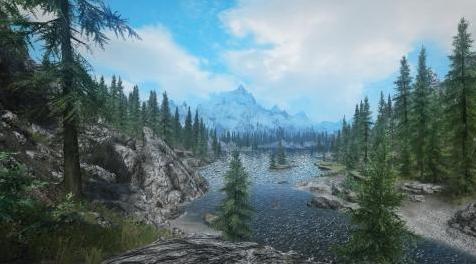
MOD介绍:
Aequinoctium ENB用于:
Aequinoctium - 天气和季节
针对Aequinoctium的ENB预设 - 天气和季节,具有均衡的色彩校正,同时保持非常愉悦和生动的外观。
此预设针对游戏进行了优化,以便在GTX 960上保持帧速率尽可能接近60 FPS,中等设置为@ 1080p。
要求:
---------------------------
Aequinoctium - 天气和季节
ENB 0.343或更新
必须在Skyrim Launcher中禁用游戏中的环境遮挡
如何安装:
---------------------------
1.下载Aequinoctium - Weathers and Seasons并通过您最喜欢的mod管理器安装它
2.下载ENB并仅将以下文件解压缩到SkyrimSE文件夹(SkyrimSE.exe存在的位置):
d3d11.dll | d3dcompiler_46e.dll | enblocal.ini
3.下载并将Aequinoctium ENB提取到SkyrimSE文件夹(SkyrimSE.exe存在的位置)
那就是全部,享受!
特征:
---------------------------
PostPassShader - 负责色彩色调和饱和度
绽放 - 一种大型的绽放,它采用场景的颜色并将其展开,使一切看起来更漂亮
景深 - 默认情况下禁用。焦点位于屏幕中心上方,以便在游戏过程中使用
环境遮挡 - 与游戏的环境遮挡相比,更好的环境遮挡变体
程序太阳 - 太阳发光更好
基于图像的照明 - 此着色器可在地面和物体上创建天空的微妙反射
SubSurfaceScattering - 启用此着色器时,字符外观看起来更好
建议的模组:
---------------------------
Veydosebrom
自然山和岩石4k
Landscape Overhaul HD(包括Real Snow HD 2k,也推荐使用)
难以区分的香草树广告牌(我使用Premade Vanilla和Dragonborn Treelods High Resolution 1024截图,因为我不使用添加额外树木的mods)
积分
---------------------------
此ENB预设基于Keizaal ENB。非常感谢luxor8071允许我使用它作为创建它的基础。一定要看看他的作品!
感谢The Truth ENB的作者Phinix允许我使用他的Night-eye修复着色器代码和Shocklizard来实现代码。非常感激!
特别感谢以下人员,因为如果没有他们,这是不可能的:
鲍里斯沃龙佐夫
Guzio
京
JawZ
马蒂麦克弗利
MaxG3D
Kingeric1992
luxor8071
Phinix
Shocklizard
————————————————————————————————————————————————
Aequinoctium ENB for:
Aequinoctium - Weathers and Seasons
An ENB preset for Aequinoctium - Weathers and Seasons with a balanced color correction while keeping a very pleasant and vivid look.
This preset is optimized for gameplay to maintain the framerate as close as possible to 60 FPS on a GTX 960 with medium settings @ 1080p.
Requirements:
---------------------------
Aequinoctium - Weathers and Seasons
ENB 0.343 or newer
Ambient Occlusion from the game must be disabled in Skyrim Launcher
How to install:
---------------------------
1. Download Aequinoctium - Weathers and Seasons and install it through your favorite mod manager
2. Download ENB and extract only the following files into your SkyrimSE folder (where SkyrimSE.exe exists):
d3d11.dll | d3dcompiler_46e.dll | enblocal.ini
3. Download and extract Aequinoctium ENB into your SkyrimSE folder (where SkyrimSE.exe exists)
4. That's all, enjoy!
Features:
---------------------------
PostPassShader - Responsible for colors hues and saturation
Bloom - The kind of large bloom that takes the scene's color and spreads it around making everything look nicer
Depth of Field - Disabled by default. The focus point is set above screen center so that it can be used during gameplay
Ambient Occlusion - A much better variant of Ambient Occlusion compared to game's Ambient Occlusion
Procedural Sun - Sun glows nicer
Image Based Lighting - This shader creates a subtle reflection of the sky on ground and objects
SubSurfaceScattering - Characters skins look much nicer when this shader is enabled
Suggested mods:
---------------------------
Veydosebrom
Natural Mountains and Rocks 4k
Landscape Overhaul HD (includes Real Snow HD 2k which is also recommended)
Indistinguishable Vanilla Tree Billboards (I use the Premade Vanilla and Dragonborn Treelods High Resolution 1024 in screenshots since I don't use mods that add extra trees)
Credits
---------------------------
This ENB preset is based on Keizaal ENB. Many thanks to luxor8071 for allowing me use it as a base to create this. Be sure to check out his works as well!
Thanks to Phinix, author of The Truth ENB for allowing me to use his Night-eye fix shader code and to Shocklizard for implementing the code. Much appreciated!
Special thanks to the following people as this wouldn't have been possible without them:
Boris Vorontsov
Guzio
Kyo
JawZ
Marty McFly
MaxG3D
Kingeric1992
luxor8071
Phinix
Shocklizard
资源查找:
最新文章
点击热榜
推荐问答
- [问答]情商课一般几岁孩子去学比较好?
- [问答]怎么看自己孩子情商低不低?孩子情商低的10大特征是真的吗?
- [问答]我想提高情商和说话要看什么书?
- [问答]顾三月情感课程pdf谁有?
- [问答]谁有情感培训课程资源?
- [问答]如何看卖情感课程正规还是不正规?
回复区
昵称:
邮箱:
内容: