上古卷轴5:重置版MOD 第一人称相机修复说明
MOD介绍:
修复需要NifScope工具和有关如何使用NifScope的基本知识。
1.转到Skyrim SE数据文件夹
2.打开文件夹数据/网格/ actors / character / _1stperson / skeleton.nif
3.使用NifScope打开skeleton.nif
4.单击0 BSFadeNode以展开文件结构。
5.展开8NiNode显示9NiNode
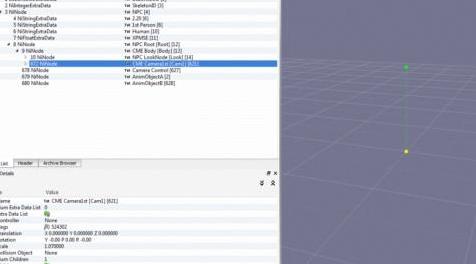
6.突出显示673 NiNode CME Camera1st以扩展块详细信息
7.向下滚动到展开的块详细信息
8.找到“规模1.0000000”
9.双击1.000000并更改为1.070000
10.保存没有renamimg的文件
11.发射游戏
1.07对我来说非常适合......作为Nord。 您可以根据自己的喜好调整1.07。
——————————————————————————————————————————————————
Fix requires NifScope tool and basic knowledge on how to use NifScope.
1. Go to Skyrim SE Data Folder
2. Open Folder Data/meshes/actors/character/_1stperson/skeleton.nif
3. Using NifScope open skeleton.nif
4. Click on the 0 BSFadeNode to expand the file structure.
5. Expand 8NiNode reveals 9NiNode
6. Highlight 673 NiNode CME Camera1st to expand block details
7. Scroll down to expanded block details
8. Find "Scale 1.0000000"
9. Double click on 1.000000 and change to 1.070000
10. Save file without renamimg
11. Launch game
1.07 works perfect for me... as a Nord. Feel free to adjust the 1.07 to your preference.
资源查找:
最新文章
点击热榜
推荐问答
- [问答]情商课一般几岁孩子去学比较好?
- [问答]怎么看自己孩子情商低不低?孩子情商低的10大特征是真的吗?
- [问答]我想提高情商和说话要看什么书?
- [问答]顾三月情感课程pdf谁有?
- [问答]谁有情感培训课程资源?
- [问答]如何看卖情感课程正规还是不正规?
回复区
昵称:
邮箱:
内容: