上古卷轴5:重置版MOD 警卫对话大修SE - 没有Lollygagging
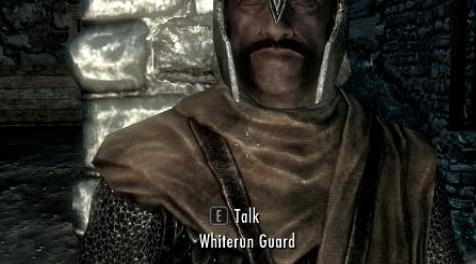
MOD介绍:
有人做了一个Guard Dialogue Overhaul的港口,他认为他会在mod上强加自己的偏好并将其作为官方端口上传。他的改变包括禁用“箭头到膝盖”,“没有lollygagging”和“有人偷走你的甜食?”线条,我认为这是一个大胆的暴行,我让他知道。然后他禁止我离开他的港口,并向我发送有关被授权的消息。我相信,如果你正在制作别人流行的mod的唯一端口,你必须坚持其设计理念,如果你想改变它,你将它作为一个替代版本与原始。所以这是原始版本。幸运的是,我已经拥有自己的mod和USKP修复程序的端口,所以我只花了一些时间将优化结果转移到他有人要做的条件上。它没有Admonish Shouts功能,也没有啤酒给警卫或“WAF修复”,因为它们完全不需要。 GDO有内置的SPIKE兼容系统,有一个原因,它被WACCF和我自己的mod AA使用,所以你只能在WACCF之前加载GDO。不需要WAF修复,但它有CRF修复,我已经改进了一些评论冷却时间。它选择接受捐赠点,其中100%归于原作者Eckss。请享受,并记住...没有lollygagging。
原始描述:
更多的对话,更多的现实主义,更多的尊重。这个Mod改变了卫兵对话,将它从破坏你在天际世界沉浸的东西改为实际增加它的东西。全部采用原始声音并完全符合Skyrim Lore。
GDO修复了所有的天际卫士对话漏洞并做了很多其他事情。
GDO改变了Skyrim Guard对话对你游戏情绪的影响。而不是让你烦恼,警卫会通过正确识别你的行为而不是对他们应该尊重的角色做出不尊重的评论来增强你的游戏体验并增加你在天际世界的沉浸感。
GDO不会删除警卫词汇中的任何评论;他们在游戏开始时仍然会像往常一样粗鲁和嘲笑你。然而,一旦你的角色完成任务以获得守卫的尊重,他们的态度就会开始改变,变得越来越好,一旦你的角色是天际的传奇,他们就会尊重,感激,有时甚至会紧张在你面前。
由于游戏过于严格的条件,GDO解锁了许多从未或者很少使用的防守对话。这不是一个错误,而是Bethesda开发人员提出的设计选择,我不同意。这意味着在GDO之前,警卫会说的比你将要习惯的要多得多。许多人以前从未听过一些评论,其他人只会在有限的情况下很少听到。
一旦你受到尊重,GDO会为你的角色添加对话选项,如果警卫谴责你大喊大叫或放弃武器。
GDO可以防止警卫卡在一个他们只能说“它是什么?”的循环中。
GDO现在为一些拥有相同声音的其他NPC提供一些但不是全部的后卫评论。这只是在那些可以合理地被认为不具有警卫特定性的评论中完成的,并且完全没有干扰正常的NPC对话,因此这种添加不存在冲突的可能性。
如果您希望禁用此功能,以便所有Guard对话仅由Guards说出,请使用Console命令:
将GDOExtraNPCs设置为0
禁用后,此功能将对该角色保持禁用状态。任何新游戏都将从启用该功能开始。
GDO在守卫将你的技能评论为50之前设置所需的技能等级。这在游戏中被认为是行家并且似乎是合适的。如果需要,可以使用游戏中的控制台自定义该值。
GDO在3个变量中保持技能水平阈值,每个变量对应于特定技能类别。他们是:
GDOSkillCombat
GDOSkillMagic
GDOSkillStealth
每个默认值为50。如果您希望在警卫评论之前更改所需的技能水平,只需更改相应变量的值;它们不需要设置为相同的值。使用以下控制台命令时,忽略引号,它们仅用于指示语法中的通用字段名称。
要检查当前值,请使用GetGlobalValue命令:
语法:GetGlobalValue'variable'
“变量”是上述3中的一个。例如。 GetGlobalValue GDOSkillCombat
要设置新值,请使用Set命令:
语法:将'variable'设置为'value'
“变量”是上述3中的一个,“值”是您想要设置的技能级别。例如。将GDOSkillStealth设置为63
设置后,该值将保存在您的存档游戏中,除非您选择再次更改,否则不会更改该角色。任何新游戏都将以默认值50开头。
穗。
从v1.4起,GDO不再附带SPIKE.esm。旧版本(包括版本号早于v1.4的翻译)仍然需要它。
SPIKE - 虚拟版。
从GDO v1.3开始,现在将支持SPIKE-VE。
此兼容性系统不需要包含单独的主文件,并且完全取代SPIKE。
重要提示:您不得使用TES5Edit清理GDO。 GDO中的所有东西都需要在那里才能正常运行。
安装:
GDO不需要启动新游戏才能正常运行。
它旨在无缝地插入您的游戏并经过全面测试。
有关安装,请使用Nexus Mod Manager或查看ReadMe以了解具体信息。
对于卸载,请使用Nexus Mod Manager或查看自述文件以获取详细信息。
兼容性:
GDO完全兼容更快的Akaviri 2H武器和剑增强 - 由Gajumaru和Mahlzeit88的SPIKE
GDO与更快的Skyforge 2H武器完全兼容 - SPIKE by Mahlzeit88
GDO与hothtrooper44完全兼容Immersive Armors。
GDO与hothtrooper44和Ironman5000以及我完全兼容Immersive Weapons。
GDO与CaBaL120的MididBorn Book of Silence完全兼容。
GDO完全兼容武器和装甲修复 - 由kryptopyr重新制作的Remade和Complete Crafting大修。
GDO与Argonil的Awesome Artifacts完全兼容。
GDO与生命周期中的天际沉浸生物完全兼容。
GDO与所有DLC兼容。
GDO与任何不会改变Guard Dialogue的东西兼容。
通过将GDO放在加载顺序中的另一个Mod之后,GDO可以与另一个改变Guard对话的Mod一起使用。
加载顺序:
警卫对话Overhaul.esp。应该放置任何改变防卫对话的模式之后,沉浸式装甲(如果安装了IA)之后以及编辑天际香草武器或护甲之类的任何模式之前(例如沉默之书或武器和装甲修复中的midianborn_Skyforge_Weapons.esp - 重制) ,否则在.esp列表中的任何位置。
已知的问题:
GDO完全安全。你可以肯定这个Mod不会让你的游戏处于破碎的状态。
副标题翻译。
如果使用GDO的字幕翻译版本,请确保按照Bethesda支持中心的指示在Skyrim.ini文件中正确设置语言。
TES5编辑清洁GDO。
从版本1.3开始,不得使用TES5Edit清理GDO。 GDO中的所有东西都需要在那里才能正常运行。
天际早熟的虫子。
从版本1.3开始,GDO不再受此错误的影响。
由于这个bug导致玩家实际上暂时成为了Thane,我将这里的信息留给任何可能因为不同的Mod而在游戏中遇到这个bug的人。
“天际”中有一个错误,有时会导致玩家在获得头衔之前暂时真正成为塔恩。在这个临时期间,守卫曾经将球员称为塔恩。我已设法在禁用GDO的情况下重新创建此错误。这意味着它可能始终存在于游戏中,或者可能已由其中一个补丁引入。
无论如何,它不是GDO中的错误,并且从版本1.3开始,它应该不再明显。
天际对话错误。
从版本1.2开始,GDO不再受此错误的影响。
我将这个Bugfix程序留给这里因为不同的Mod可能在游戏中遇到这个错误的人。
此错误会影响包含自定义对话的许多Mod,并可能导致无法正确进行无声对话和对话。可以通过以下步骤进行修复:
1.在安装Mod的情况下加载SaveGame。
2.保存游戏。
3.加载新的SaveGame。
4.再次保存游戏。
5.加载最后的保存。
现在应该从最后的保存开始修复该错误。
这个加载,保存,加载,保存,加载序列的原因似乎是为了使用Skyrim正常运行,自定义对话需要由游戏引擎初始化两次。此序列为任何自定义对话Mod完成必要的双重初始化。
最终评论:
我要感谢我的所有翻译人员,他们出色的工作使我的mod得到了更广泛的观众的赞赏。谢谢你们;你在这个和其他mod上的努力使Nexus成为一个真正的全球社区,我相信每个使用你的翻译的人都会非常欣赏你的辛勤工作。
谢谢你mwpeck为SkyRe兼容性补丁。 (仅在不使用Reproccer时使用)
非常感谢所有赞同这个mod的人,以及对所有给予我荣誉的人们的特别谢谢,我真的很感激!特别感谢向我捐赠的非常慷慨的用户 - 我不知所措。
谢谢你们对我的工作留下了赞赏评论的每个人。我过去曾试图在可能的情况下单独回答每一个问题,但是对于你们这么多人我不想用我的回复而不是你的评论来填补这个问题。请放心,我确实花时间阅读每一个并欣赏所有这些内容。谢谢!
即使我没有回复,我也会留意你提出的任何建议。
请享用。
Eckss。
————————————————————————————————————————————————————————————
Someone had made a port of Guard Dialogue Overhaul in which he thought he'd impose his own preferences on the mod and upload it as the official port. His changes included disabling the "Arrow to the knee", "No lollygagging" and "Someone stole your sweetroll?" lines, which I think is a daring atrocity, and I let him know. Then he banned me from his port, and send me messages about being entitled. I believe that if you're making the only port of someone else's popular mod, you gotta stay true to its design philosophy, if you wanna change it you make that as an alternate version together with the original. So here's the original version. Luckily I already had my own port of the mod with USKP fixes so it's only taken me a few moments to carry over the optimizations to conditions that he got someone to make. It doesn't have the Admonish Shouts function, or give beers to guards, or "WAF fixes" as they were entirely unneeded. GDO has the built-in SPIKE compatibility system for a reason, it's used by WACCF and my own mod AA, so you're only supposed to load GDO before WACCF. No WAF fixes needed, but it's got CRF fixes and I've improved some comment cooldowns. It's opted-in to receive Donation Points, 100% of which goes to the original author, Eckss. Please enjoy, and remember... no lollygagging.
Original description:
More Dialogue, More Realism, More Respect. This Mod alters the Guard Dialogue, changing it from something that breaks your immersion in the world of Skyrim to something that actually increases it. All in the original voices and Fully compliant with Skyrim Lore.
GDO fixes All the Skyrim Guards dialogue bugs and does much, much more.
GDO alters the effect that Skyrim Guard dialogue has on the mood of your game. Rather than annoying you, guards will enhance your experience of the game and increase your immersion in the world of Skyrim by properly recognising your actions and not making disrespectful comments to a character that they are supposed to respect.
GDO does not remove any comments from the guards’ vocabulary; they will still be just as rude and mocking to you at the start of the game as they always have. However, once your character has completed quests that earn the guards’ respect, their attitudes will begin to change, getting better and better to the point that, once your character is a legend in Skyrim, they will be respectful, grateful and sometimes even nervous in your presence.
GDO unlocks much guard dialogue that was never or only very rarely used due to overly restrictive conditions in the game. This is not a bug, but rather a design choice made by the Bethesda developers that I disagree with. This means that there will be much more variety in what the guards will say than you will be used to from before GDO. Many people will never have heard some of the comments before, and others will only have heard them very rarely in limited circumstances.
GDO adds dialogue options for your character to use, once you are respected, if guards berate you for shouting or dropping weapons.
GDO prevents guards from getting stuck in a loop where they say nothing but “What is it?”.
GDO now makes some, but NOT ALL, of the guard comments available to some other NPCs who share the same voices. This is only done with those comments that could reasonably be considered to not be guard specific and is done without interfering with normal NPC dialogue at all so there’s NO possibility of conflict from this addition.
If you wish to disable this feature, so that ALL of the Guard Dialogue is ONLY spoken by Guards, use the Console command:
Set GDOExtraNPCs To 0
Once disabled, this feature will remain disabled for that character. Any new game will begin with the feature enabled.
GDO sets the Skill level required before a guard will comment on your skill to 50. This is considered Adept within the game and seems appropriate. If desired, this value can be customised by use of the in-game console.
GDO holds the skill level threshold value in 3 variables, each corresponding to a particular skill category. They are:
GDOSkillCombat
GDOSkillMagic
GDOSkillStealth
The default value is 50 for each of them. If you wish to change the skill level required before guards will comment, simply change the value of the corresponding variables; they DO NOT need to be set to the same values. When using the following Console commands, ignore the inverted commas, they are present only to indicate generic field names within the syntax.
To check the current value, use the GetGlobalValue command:
Syntax:GetGlobalValue ‘variable’
With the ‘variable’ being one of the 3 above. E.g. GetGlobalValue GDOSkillCombat
To set a new value, use the Set command:
Syntax:Set ‘variable’ To ‘value’
With the ‘variable’ being one of the 3 above and the ‘value’ being the skill level you want to set. E.g. Set GDOSkillStealth To 63
Once set, the value will be preserved in your savegame and will not change for that character unless you choose to change it again. Any new game will begin with the default value of 50.
SPIKE.
From v1.4, GDO no longer comes with SPIKE.esm. Older versions, including translations with version numbers older than v1.4, still require it.
SPIKE - Virtual Edition.
From GDO v1.3 onwards, support will now be included for SPIKE – VE.
This Compatibility System requires no separate Masterfile to be included and completely replaces SPIKE.
IMPORTANT : You Must Not clean GDO with TES5Edit. Everything in GDO needs to be there for it to function properly.
Installation:
GDO does NOT require a new game to be started in order to function properly.
It's designed to slot into your game seamlessly and is thoroughly tested.
For Installation, use Nexus Mod Manager or see the ReadMe for specifics.
For Uninstallation, use Nexus Mod Manager or see the ReadMe for specifics.
Compatibility:
GDO is fully compatible with Faster Akaviri 2H Weapons and Swords Enhanced - SPIKE by Gajumaru and Mahlzeit88
GDO is fully compatible with Faster Skyforge 2H Weapons - SPIKE by Mahlzeit88
GDO is fully compatible with Immersive Armors by hothtrooper44.
GDO is fully compatible with Immersive Weapons by hothtrooper44 and Ironman5000 and me.
GDO is fully compatible with aMidianBorn Book of Silence by CaBaL120.
GDO is fully compatible with Weapons and Armor Fixes - Remade and Complete Crafting Overhaul Remade by kryptopyr.
GDO is fully compatible with Awesome Artifacts by Argonil.
GDO is fully compatible with Skyrim Immersive Creatures by lifestorock.
GDO is compatible with all DLC.
GDO is compatible with anything that doesn't change Guard Dialogue.
GDO can be used with another Mod that alters Guard Dialogue by placing GDO after the other Mod in your Load Order.
Load Order:
Guard Dialogue Overhaul.esp. Should be placed after any mod that alters Guard Dialogue, after Immersive Armors (if IA is installed) and before any Mod that edits Skyrim vanilla Weapons or Armor (such as aMidianborn_Skyforge_Weapons.esp from the Book of Silence or Weapons and Armor Fixes - Remade), otherwise anywhere on the .esp list.
Known Issues:
GDO is COMPLETELY SAFE. You can be sure this Mod won't ever leave your game in a broken state.
Subtitle Translation.
If using a Subtitle translation version of GDO, make sure the language is correctly set in your Skyrim.ini file as directed by Bethesda Support Center.
TES5Edit Cleaning of GDO.
As of Version 1.3, GDO Must Not be cleaned with TES5Edit. Everything in GDO needs to be there for it to function properly.
Skyrim Premature Thane Bug.
As of Version 1.3, GDO is no longer affected by this bug.
As the bug causes the player to actually become a Thane temporarily, I’m leaving this information here for anyone who may be experiencing this bug in their game because of a different Mod.
There is a bug in Skyrim that sometimes causes the Player to, temporarily, actually become a Thane before earning the title. Guards used to refer to the player as Thane during this temporary period. I’ve managed to recreate this bug with GDO disabled. This means that it may always have been in the game or it may have been introduced by one of the patches.
Whatever the case, it’s not a bug in GDO and, as of version 1.3, it should no longer be evident.
Skyrim Dialogue Bug.
As of Version 1.2, GDO is no longer subject to this bug.
I’m leaving this Bugfix procedure here for anyone who may be experiencing this bug in their game because of a different Mod.
This bug affects many Mods that contains custom dialogue and can result in silent dialogue and conversations not proceeding correctly. It can be fixed with the following procedure:
1.Load a SaveGame with the Mod installed.
2.Save the game.
3.Load that new SaveGame.
4.Save the game again.
5.Load that final save.
The bug should now be fixed from that final save onwards.
The reason for this Load, Save, Load, Save, Load sequence seems to be that in order to function correctly with Skyrim, custom dialogue needs to be initialised twice by the game engine. This sequence accomplishes the necessary double initialisation for any custom dialogue Mod.
Final Comments:
I would like to thank all my translators, whose excellent work allows my mod to be appreciated by a wider audience. Thank you all; your efforts on this and other mods are what makes Nexus a truly global community and I’m sure everyone using your translations appreciates your hard work a great deal.
Thankyou to mwpeck for the SkyRe Compatibility Patch. (Only use if you don't use the Reproccer)
Thankyou very much to all those who have Endorsed this mod and a special thankyou to all those who have given me Kudos, I really appreciate it! An Extra Special Thankyou to the wonderfully generous users who Donated to me - I'm Overwhelmed.
Thankyou also everyone who has left an appreciative comment about my work. I have in the past tried to answer each one individually where I could, but with so many of you I don’t want to fill the thread with my replys rather than your comments. Rest assured that I do take the time to read every single one and appreciate ALL of them. Thankyou!
I will take note of any suggestions you make, even if I don’t reply.
Enjoy.
Eckss.
资源查找:
最新文章
点击热榜
推荐问答
- [问答]情商课一般几岁孩子去学比较好?
- [问答]怎么看自己孩子情商低不低?孩子情商低的10大特征是真的吗?
- [问答]我想提高情商和说话要看什么书?
- [问答]顾三月情感课程pdf谁有?
- [问答]谁有情感培训课程资源?
- [问答]如何看卖情感课程正规还是不正规?
回复区
昵称:
邮箱:
内容: