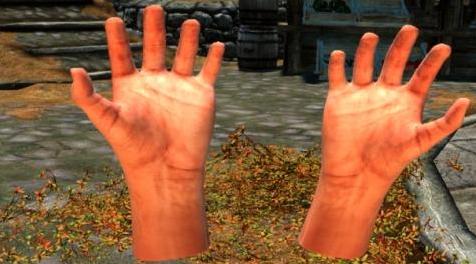
上古卷轴5:重置版MOD 空闲的手
MOD介绍:
================================================== ================================================== =======
描述:
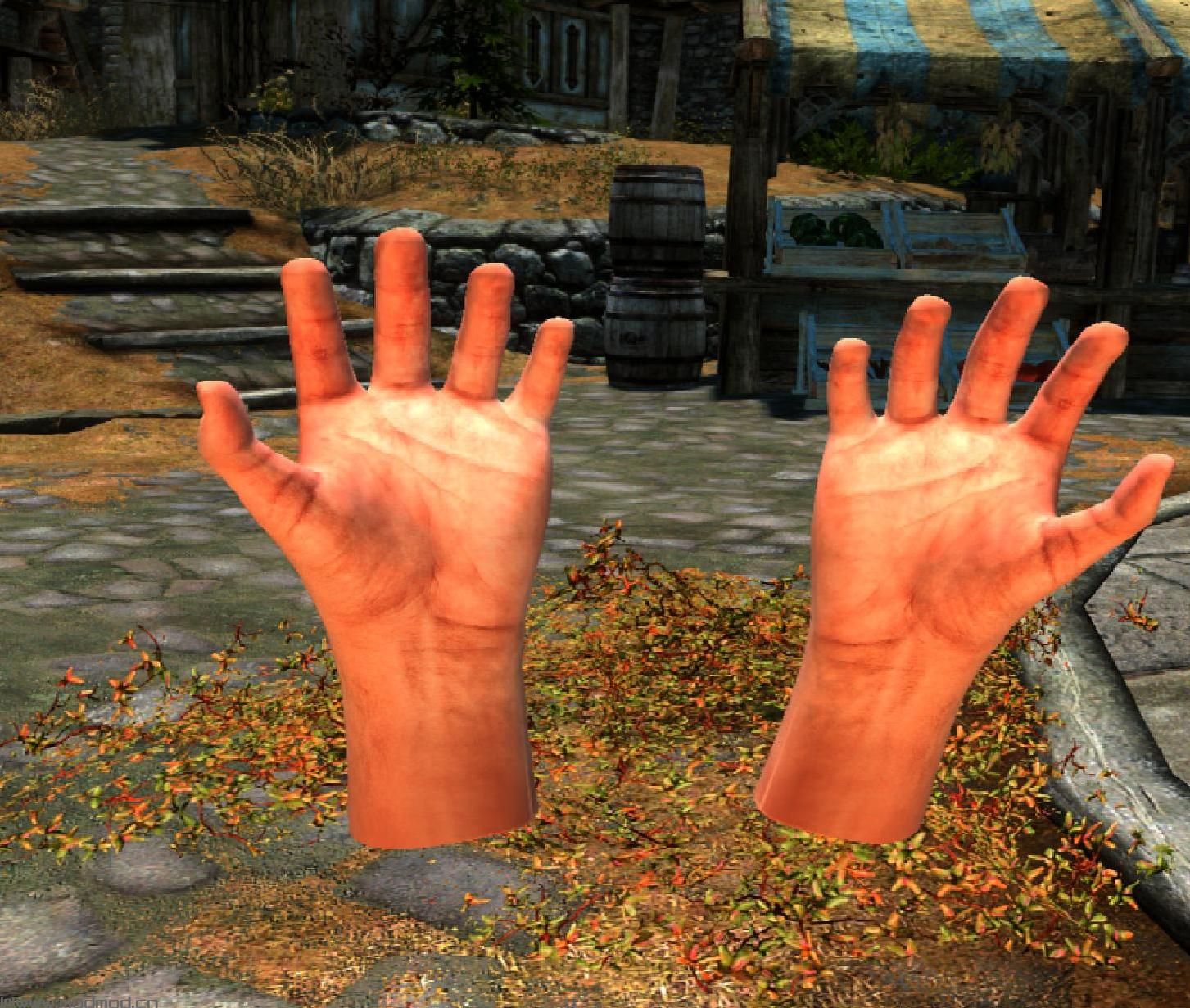
此模型是Oculus Touch模型替换器,使您可以在SkyrimVR中查看虚拟指针,而不是SteamVR提供的Oculus Touch模型。
注意:这取代了所有SteamVR游戏的默认Oculus Touch型号,因此您可能需要在播放“天际”时敲除快速批处理文件以替换模型,然后在完成后恢复它们。
================================================== ================================================== ===========
安装(OCULUS RIFT):
1.备份Steam目录中的以下文件夹或重命名它们(非常重要):
\蒸汽\ steamapps \ COMMON \ SteamVR \资源\ rendermodels \ oculus_cv1_controller_left
\蒸汽\ steamapps \ COMMON \ SteamVR \资源\ rendermodels \ oculus_cv1_controller_right
2.解压缩Oculus_Touch_Hands_v1#0#zip
3.删除以下文件夹(如果未重命名):
\蒸汽\ steamapps \ COMMON \ SteamVR \资源\ rendermodels \ oculus_cv1_controller_left
\蒸汽\ steamapps \ COMMON \ SteamVR \资源\ rendermodels \ oculus_cv1_controller_right
4.将oculus_cv1_controller_left&oculus_cv1_controller_right文件夹复制到:
\蒸汽\ steamapps \ COMMON \ SteamVR \资源\ rendermodels \
5.如果您打开SteamVR,请关闭它然后重新启动它。
皮肤色调(可选):
可以从下载部分下载可选的肤色包。安装:
1.解压'Idle_Hands_Skin_Tones.zip'
2.打开肤色文件夹,1 =最亮 - 4 =最暗
3.将'external_controller01_col.png'复制到两个:
\蒸汽\ steamapps \ COMMON \ SteamVR \资源\ rendermodels \ oculus_cv1_controller_left
\蒸汽\ steamapps \ COMMON \ SteamVR \资源\ rendermodels \ oculus_cv1_controller_right
4.如果您打开SteamVR,请关闭它然后重新启动它
注意:您可能希望在游戏中尝试一些不同的肤色,因为当应用了灯光时,它们可能会出现与SteamVR不同的音调。
================================================== ================================================== ===========
安装(WINDOWS混合现实):
前往下面的目录。
%LOCALAPPDATA%\微软\的Windows \ OpenVR
将有两个文件夹。两者都有“_1”或“_2”后缀,它们分别用于左侧和右侧控制器。拖放
“oculus_cv1_controller_left”的内容和
“oculus_cv1_controller_right”进入正确的文件夹。
这是一个大问题 - 每次加载SteamVR或OpenVR时,“controller.json”文件每次都会被覆盖。
但是,如果将其设置为只读,则不会被覆盖。删除
“controller.json”文件并重命名
“oculus_cv1_controller_left.json”和“oculus_cv1_controller_right.json”
文件到“controller.json”。
通过右键单击它们,然后单击属性,选中只读框,然后单击应用,将它们设置为只读。
加载SteamVR
(感谢Reddituīģŋser - AThingWithAThing)ģŋģŋ我自己没有测试过 - 如果这对您有用,请在评论部分报告。
由于报告无法正常工作,已删除说明。
================================================== ================================================== ===========
我怀疑这对Vive用户有用,因为我认为SteamVR对两个控制器使用一个模型。
更改日志:
- V1.1
更新了手部模型
双手置于更自然的姿势
- V1.0
初始发行
——————————————————————————————————————————————————————
===========================================================================================================
DESCRIPTION:
This mod is an Oculus Touch model replacer which enables you to see virtual hands in SkyrimVR in place of the Oculus Touch models provided by SteamVR.
NOTE: This replaces the default Oculus Touch models for ALL SteamVR games so you may want to knock up a quick batch file to replace your models when you play Skyrim and then restore them when your done.
===============================================================================================================
INSTALLATION (OCULUS RIFT):
1. Backup the following folders in your Steam directory or rename them (Very Important):
\Steam\steamapps\common\SteamVR\resources\rendermodels\oculus_cv1_controller_left
\Steam\steamapps\common\SteamVR\resources\rendermodels\oculus_cv1_controller_right
2. Unpack Oculus_Touch_Hands_v1#0#zip
3. Delete the following folders (if you didn't rename them):
\Steam\steamapps\common\SteamVR\resources\rendermodels\oculus_cv1_controller_left
\Steam\steamapps\common\SteamVR\resources\rendermodels\oculus_cv1_controller_right
4. Copy the oculus_cv1_controller_left & oculus_cv1_controller_right folders to:
\Steam\steamapps\common\SteamVR\resources\rendermodels\
5. If you had SteamVR open, close it and then relaunch it.
SKIN TONES (OPTIONAL):
A optional skin tones pack can be downloaded from the downloads section. To install:
1. Unpack 'Idle_Hands_Skin_Tones.zip'
2. Open a skin tone folder, 1 = lightest - 4 = Darkest
3. Copy 'external_controller01_col.png' to both:
\Steam\steamapps\common\SteamVR\resources\rendermodels\oculus_cv1_controller_left
\Steam\steamapps\common\SteamVR\resources\rendermodels\oculus_cv1_controller_right
4. If you had SteamVR open, close it and then relaunch it.Â
NOTE: You may want to try a few different skin tones in game as when the hands have lighting applied they may appear a different tone than in SteamVR.Â
===============================================================================================================
INSTALLATION (WINDOWS MIXED REALITY):
Head to the directory located below.
%localappdata%\Microsoft\Windows\OpenVR
There will be two folders. Both have a "_1" or a "_2" suffix, they are for the left and right controllers respectively. Drag and drop
the contents of "oculus_cv1_controller_left" and
"oculus_cv1_controller_right" into the correct folders.
This is where a big issue comes in- every time SteamVR or OpenVR is loaded, the "controller.json" file gets overwritten each time.
However, if it is set to read-only, it will not get overwritten. Delete
the "controller.json" file and rename the
"oculus_cv1_controller_left.json" and "oculus_cv1_controller_right.json"
files to "controller.json."
Set them to read-only by right clicking them, then clicking properties, checking the read-only box, and clicking apply.
Load up SteamVR
(Credit to Reddit uīģŋser - AThingWithAThing)īģŋ Not tested by myself - please report back in the comment section if this worked for you.
Instructions removed due to reports of them not working correctly.
===============================================================================================================
I doubt this will work for Vive users as I think SteamVR uses one model for both controllers.
CHANGE LOG:
- V1.1
Updated Hand Models
Hands placed in a more natural pose
- V1.0
Initial Release
演示截图:
资源查找:
最新文章
点击热榜
推荐问答
- [问答]情商课一般几岁孩子去学比较好?
- [问答]怎么看自己孩子情商低不低?孩子情商低的10大特征是真的吗?
- [问答]我想提高情商和说话要看什么书?
- [问答]顾三月情感课程pdf谁有?
- [问答]谁有情感培训课程资源?
- [问答]如何看卖情感课程正规还是不正规?
回复区
昵称:
邮箱:
内容: