上古卷轴5:重置版MOD 更新了分类的收藏夹菜单
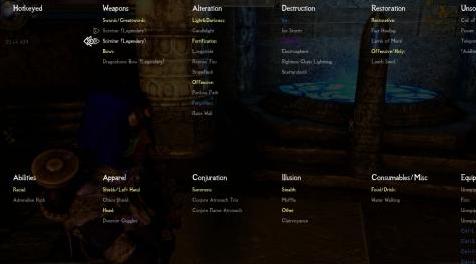
MOD介绍:
这是分类收藏夹菜单Oni版的更新版本,(显然)是分类收藏夹菜单的更新版本。由于Oni Edition还没有永久更新,我自己动手给你一个更加兼容的分类收藏菜单版本。我修改了Oni版的最新更新添加到了Hyrule和Apocalypse-Magic of the skyrim的遗物,我还添加了SPERG引入的能力。
我不要求对mod的内容有任何权利,你可以感谢Oni Edition的12个类别,每个类别都有自己的子类别。我所做的就是添加未在Oni Edition中列出的法术。
如果你想将咒语或其他物品添加到收藏夹列表,你可以要求我为你做,或者你可以通过进入你的天际数据文件夹自己做
C:/steamlibrary/steamapps/common/skyrim/data/interface/favoritesmenu.cfg
您可以在记事本中打开文件并编辑列表,直到您满意为止。我建议在编辑之前备份此文件。此外,您可以在天际开放时编辑此文件,这将使故障排除更快。
如果我错过了任何法术,武器等,或者你觉得属于错误的类别,请随时发表评论,我会尽快修复。
安装:
这是我的第一个“mod”,所以我不知道你应该如何打包这些东西。如果绿色大按钮不起作用,只需手动下载文件夹并将其解压缩到Skyrim数据文件夹中的相应文件夹中
中游安装完全安全
兼容性:
与分类的收藏夹菜单一样,这个mod几乎兼容一切,只需记住取消选中SkyUI MCM中的收藏夹框,这样每次打开收藏夹菜单时都不会收到错误信息。
版本之间的差异
Shadic的“收藏夹”菜单将“设备设置更改为食品/饮料和耗材/杂项”仅适用于耗材
更新的收藏夹菜单就像原始的分类收藏夹菜单
支持的Mods:
应与名称中包含剑,盾,斗篷,胸甲等的任何护甲/武器模型兼容
只要酒,炖肉,肉类等名称,应与大多数食品兼容
应与名称中带有召唤或召唤的任何召唤模式兼容
*天启魔法
*极光立石/仙女座
* SPERG
*现实的需求和疾病
*(部分)Hyrule的遗物
沉浸的马
*(部分)Perkus Maximus
*斯巴达踢
* Dwemer仙女
*无比的种族
*暴风雨(Vindictus Cyclone)
*身临其境的装甲
*身临其境的武器
*天际披风
* Bandolier包和puches
* Coldharbour Resummoned
*(一些)神秘主义
*(有些)Phenderix魔法世界
*多彩魔术
* Jaysus Swords
*皇家军械库
* Lore Weapon Expansion
去做:
>被遗忘的魔术重做
> Summermyst
>失去了天际的宝典
>元素毁灭魔法
>统筹
添加你自己的法术/物品/能力:
*如果您处于无边框窗口模式,则效果最佳
1.转到天际数据文件夹
2.在数据文件夹中,转到界面文件夹
3.向下滚动,直到看到favoritesmenu.cfg
4.在记事本或您使用的任何内容中打开favoritesmenu.cfg
5.只需将你的咒语名称添加到任何类别或子列表中
例:
###### Conjuration ######
[子列表]
name = Summons:
parent_list = Conjuration
enabled = true
keywords = *输入关键字或要添加到此列表中的咒语/项目的名称*(例如:Flame Atronach,Frost Atronach,Storm Atronach ......你也可以使用Atronach来覆盖名称中atronach的所有内容)
排除= *输入要从此列表中排除的关键字*(例如:daedric crescent被分类为剑类而不是变换类别,因此你可以在剑术类别中使daedric cresent成为排除的短语)
故障排除:
有两种方法可以调整收藏夹菜单大小
第一种方式:
1.在游戏中打开收藏夹菜单
2.按住/保持CRTL,然后使用箭头键滑动菜单。但是,一旦退出游戏,这将无法保存
第二种方式:
*如果您处于无边框窗口模式,则效果最佳
1.转到天际数据文件夹
2.在数据文件夹中,转到界面文件夹
3.向下滚动,直到看到favoritesmenu.cfg
4.在记事本或您使用的任何内容中打开favoritesmenu.cfg
5.在顶部显示[config],您可以根据自己的喜好使用这些设置
这些是您需要调整的唯一行:
menu_base_x = -2
menu_base_y = -660
list_alignment = left
default_num_list_entries = 15
default_list_width = 150
default_list_entry_height = 24
default_list_entry_font_size = 16
————————————————————————————————————————————————————————
This is an updated version of Categorized Favorites Menu Oni Edition which (obviously) is an updated version of Categorized Favorites Menu. Since Oni Edition hasn't been updated forever I took it upon myself to give you all a more compatiple version of categorized favorites menu. I modified Oni Edition for the new spells added by recent updates to Relics of Hyrule and Apocalypse- Magic of skyrim, I also added the abilities introduced by SPERG.
I don't claim any rights to the contents of the mod you can thank Oni Edition for the 12 categories, each with their own sub categories. All I did was add spells that weren't listed in the Oni Edition.
If you want to add spells or other items to the favorites list you can either ask me to do it for you or you can do it yourself by going into your skyrim data folder
C:/steamlibrary/steamapps/common/skyrim/data/interface/favoritesmenu.cfg
You can open the file in notepad and edit the list till your hearts content. I'd recommend backing up this file before editing it. Also you can edit this file while skyrim is open which will make troubleshooter a lot quicker.
If there's any spells,weapons,etc that I missed or you feel are in the wrong category feel free to leave a comment and I'll fix it as soon as possible.
Installation:
This is my first "mod" so I have no idea how you're supposed to pack these things. If the big green button doesn't work simply manually download and unzip the folder into their corresponding folders in your Skyrim data folder
Totally safe to install mid game
Compatibility:
Like categorized favorites menu this mod is pretty much compatible with everything just remember to untick the Favorites box in the SkyUI MCM so you don't get the error message every time you open your favorites menu.
Difference between versions
Shadic's Favorites menu changes Equip Sets to Food/Drink and Consumables/Misc to just Consumables
Updated Favorites menu is just like the original categorized favorites menu
Mods Supported:
Should be compatible with any Armor/Weapon mod with Sword, Shield, cloak, chestplate, etc. in the name
Should be compatible with most food items as long as wine, stew, meat, etc. is in the name
Should be compatible with any conjuration mod with summon or conjure in the name
* Apocalypse Magic
* Aurora Standing Stones / Andromeda
* SPERG
* Realistic Needs and Diseases
* (Some) Relics of Hyrule
* Immersive Horses
* (Some) Perkus Maximus
* Spartan Kick
* Dwemer Fairies
* Imperious Racials
* Tempest (Vindictus Cyclone)
* Immersive Armors
* Immersive Weapons
* Cloaks of Skyrim
* Bandolier bags and puches
* Coldharbour Resummoned
* (Some) Mysticism
* (Some) Phenderix magic world
* Colorful Magic
* Jaysus Swords
* Royal Armory
* Lore Weapon Expansion
To Do:
> Forgotten Magic Redone
>Summermyst
>Lost Grimoire of Skyrim
>Elemental Destruction Magic
>Ordinator
Adding your own spells/items/abilities:
*This works best if you're in borderless windowed mode
1. Go to your skyrim data folder
2. In the data folder go to the interface folder
3. Scroll down till you see favoritesmenu.cfg
4. Open favoritesmenu.cfg in notepad or whatever you use
5. Just add the name of your spell to any of the categories or sublist
Example:
###### Conjuration ######
[sublist]
name = Summons:
parent_list = Conjuration
enabled = true
keywords = *Enter keywords or the name of the spell/item you want added to this list* (example: Flame Atronach, Frost Atronach, Storm Atronach ... you could also just use Atronach to cover everything with atronach in the name)
excludes = *Enter keywords you want to exclude from this list* (example: daedric crescent gets sorted into swords category instead of conjuration category so you'd make daedric cresent an excluded phrase in the swordss category )
Troubleshooting:
There's 2 ways to adjust the favorites menu size
First way:
1. In game open the favorites menu
2. Press/Hold CRTL and then just use the arrow keys to slide the menu. This won't save once you exit the game however
Second way:
*This works best if you're in borderless windowed mode
1. Go to your skyrim data folder
2. In the data folder go to the interface folder
3. Scroll down till you see favoritesmenu.cfg
4. Open favoritesmenu.cfg in notepad or whatever you use
5. at the top where it says [config] you can play around with these settings to your liking
These are the only lines you should need to adjust:
menu_base_x = -2
menu_base_y = -660
list_alignment = left
default_num_list_entries = 15
default_list_width = 150
default_list_entry_height = 24
default_list_entry_font_size = 16
资源查找:
最新文章
点击热榜
推荐问答
- [问答]情商课一般几岁孩子去学比较好?
- [问答]怎么看自己孩子情商低不低?孩子情商低的10大特征是真的吗?
- [问答]我想提高情商和说话要看什么书?
- [问答]顾三月情感课程pdf谁有?
- [问答]谁有情感培训课程资源?
- [问答]如何看卖情感课程正规还是不正规?
回复区
昵称:
邮箱:
内容: