上古卷轴5:重置版MOD 沉浸式VR Quickslots工具
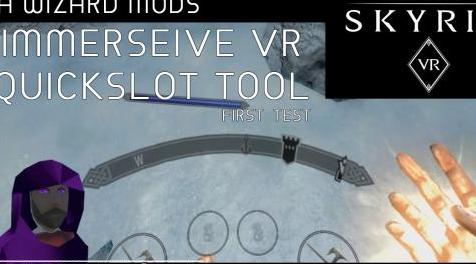
MOD介绍:
身临其境的VR Quickslots
对那些要求为这个项目捐款的人们如此感动和谦卑。您可以在我的个人资料页面上找到捐款链接
[左]版本0#1#4.3a更新(错误修复和改进的控制台速度)
希望对0#1#4.x系列的最后一次修订,最后一个主要错误应该被压扁,这会导致应用程序注册随机事件,导致随机行为,例如腰带槽偏移设置为游戏中的最小值或最大值并放置快速插槽遥不可及。
还添加了一个新的更快,有希望100%准确的控制台粘贴输入系统,感谢Reddit上的PortaBob的想法:)如果您遇到问题,可以使用复选框切换。 [/ left] [左]使用这个系统,控制台输入的速度和它的速度一样快,SKSE输入会更好但是我们等待这是一个非常好的解决方案,为了让它更少侵入你可以试试以下由ezbz383提交
www#filedropper#com/subtleconsole
无论有没有信用,请自由使用。我没有在Nexus上发布它,因为我没有得到你的许可,这不是什么大问题,所以如果你认为合适的话,宁可给你融入你的mod。如果你愿意,我会把它发布在Nexus上。任何你想要的。我正在使用它和它的伟大:)
如果我使用的文件站点不起作用,请告诉我。
这是它的作用/做法:
console.swf - 我用清晰的背景替换了控制台黑色不透明背景。简单地说,当控制台出现时,你看到的只是文字。
Ini调整 - 通过在SkyrimVR.ini中的[Menu]下添加两行,您可以使控制台几乎不可见,这样当您使用mod切换武器时,只有片刻滞后,鼠标图标闪烁一秒钟。
所以人们有一些选择。它们可以保持文本大小,但从控制台中删除黑色背景。他们可以缩小控制台的尺寸,但保留背景。或其任何组合。很多方法让控制台基本上看不见。[/ left]
重要信息 - 请参阅下面的“0#1#4a新功能”,了解新实验菜单btn模式的详细信息(如果有人喜欢,我认为它将成为默认输入)和可更换纹理功能。
(注意)此程序目前仅支持英语(QWERTY)键盘布局。这将在以后的版本中修复。
(注)以下是人们如何使用Oculus Rift
“打开ImmersiveVRQuickslotTool.exe,打开它自己的游戏,打开steamvr菜单然后回家,这不关闭工具,然后我从那里打开天际,它工作得很好。” Rift的性能更差,我正在寻找修复。感谢reddit上的Rotund_Tuber以及所有提供报告和反馈的其他reddit人。 :)
细节
这是一个mod / app,它可以创建浮动的快速图标,您可以通过运动控制器与之交互,在武器和法术之间切换,类似于在Vanishing Realms等VR游戏中存储设备的方式。
(警告)现在还处于早期阶段,这基本上是一个概念证明,它将迅速发展为一个功能更丰富的状态。目前我正在使用键盘模拟来发出控制台命令。在不久的将来,这将改为使用SKSEVR,这将显着改善功能。不过,我现在在这里提出这个早期版本,以便那些想要立即加入并提供有关未来功能的反馈。
安装(曼努埃尔)
将IVRQS zip文件解压缩到Skyrim VR基本应用程序文件夹。它可能在类似于此的路径中:
d:\游戏\ SteamLibrary \ steamapps \ COMMON \ SkyrimVR
这会将ImmersiveVRQuickslotTool.exe复制到您的Skyrim基本文件夹。
更新你的Skyrim plugins.txt文件..
导航到该文件,它可能位于类似于此的路径中:
C:\ Users \\ AppData \ Local \ Skyrim VR \ plugins.txt
将以下行附加到文件:
* ImmersiveVRQuickSlots.esp
执行Mod:
手动执行ImmersiveVRQuickSlotTool,exe应用程序..
d:\游戏\ SteamLibrary \ steamapps \ COMMON \ SkyrimVR \ ImmersiveVRQuickSlotTool.exe
按正常方式启动Skyrim VR。
最后请注意,卸载此mod需要玩家知道他们复制到Skyrim VR文件夹的所有文件的名称和路径。这将是添加到自述文件的好信息。
安装(Vortex)
由于Vortex处理zip文件内容的方式,在当前版本中使用Vortex进行安装有点尴尬。应用程序和esp在SkyrimVR \ Data文件夹中组合在一起,您可以通过这种方式安装,但是您需要从数据文件夹而不是SkyrimVR文件夹运行应用程序并仔细检查ImmersiveVRQuickSlots.esp是否在插件下的涡旋中启用标签。下一个版本将包含一个更好的mod Manager安装解决方案。
推出
在加载天际之前,您必须启动ImmersiveVRQuickSlotTool.exe。这是覆盖应用程序,它生成快速插槽图标并向Skyrim发送命令(目前通过控制台)。一旦IVRQS运行,就像正常一样启动SkyrimVR并确保Skyrim窗口具有焦点(单击它上面的任何位置)。
Quickslots
在游戏中,你会看到一些漂浮在腰部附近的快速图标。有两种类型的quickslot武器和魔法,两者都工作相同,但只能存储该类型的项目。
每个肩膀后面还有一个隐藏的快速插槽。左肩为盾牌,右肩为武器(我用它为我的弓)。
要将一个咒语或武器分配给一个快速插槽装备并将控制器移到图标上,你会感觉到一个小的触觉脉冲并且图标会改变。按下手柄按钮进行分配(在右侧控制器上,这也用于呼叫,您已被警告)。
要从插槽装备咒语或武器,请将控制器移到图标上,然后按下并释放扳机。你可以使用法术装备,目前只能装备右手的武器。 (注意目前你应该用右手拿着箭头指定并取回弓)。如果将当前项目分配给该快速图,您还可以使用快速图表来取消当前项目。
Quickslots应该保存他们的内容。
版本0#1#4.3a(错误修复和改进的控制台速度)
希望对0#1#4.x系列的最后一次修订,最后一个主要错误应该被压扁,这会导致应用程序注册随机事件,导致随机行为,例如腰带槽偏移设置为游戏中的最小值或最大值并放置快速插槽遥不可及。
还增加了一个新的更快,更有希望100%准确的控制台粘贴输入系统。如果遇到问题,可以使用复选框切换。
版本0#1#4a(新功能)
此更新中的主要新功能是
可替换的图标纹理 - 您可以在ImmersiveVRQuickSlotTextures文件夹中找到它们。你现在可以用你自己设计的闪亮可爱的手工制作替换这些可怕的程序员艺术偶像。每个插槽使用两个纹理,例如SpellTex.png和SpellTexSelect.png当控制器悬停在图标上时,将显示选择版本。图标文件是256,256 png图像。如果你搞砸了它们只需解压缩顶部的原始(坏)图标来修复它们。很想看到人们为此想出什么,最好的可能会包括在未来的更新中:)
(注意)现在,您必须在使用配置模式移动快速插槽时禁用菜单按钮模式。
菜单按钮模式 - 这是我发现更好的控件映射的最新实验。在菜单按钮模式下(通过复选框启用,我认为默认情况下当前是.. woops)IVRQS监听控制器上的单个按钮,vive上的菜单按钮或WMR / rift上的等效按钮。快速压力机配备,长按指定。
捕获的是这些按钮默认绑定带来日志/等待和补间/准备武器控件(所有快速重要)。需要在controlmapvr.txt文件中删除这些绑定,该文件打包在main.bsa中。我已经包含了一个适用于Vive的修改版本,Oculus和WMR用户必须编辑这个文件,一旦我知道要为这些系统更改什么,我将包含一个适用于所有人的单个文件。您可以在CUSTOM KEYBINDS文件夹中找到它,其内容需要复制到SkyrimVR \ Data \ Interface \最终路径应为“SkyrimVR \ Data \ Interface \ controls \ pc \ controlmapvr.txt”
对不起,如果这很令人困惑,那真的是值得的。要访问日志和补间(库存/地图/魔术等),请使用“bag”= tween和“book”= journal上的新快速图标图标。要访问辅助功能,等待和准备好/未准备武器按住菜单按钮2秒钟,而不是将鼠标悬停在快速插槽上。
其余的变更说明如下。
-Massive性能改进(修复了导致IVRQS不限制帧速率的错误,导致它以高达2000fps的速度运行,消耗大量系统资源,现在应该限制在90左右) - 实现新的实验模式 - 菜单按钮模式 - 重新用于菜单btn(vive)用于输入。需要控制图更改请参阅描述以获取完整的详细信息.- ImmersiveVRQuickSlotTextures中的暴露插槽图标纹理,以便用户可以用他们自己的创作替换狡猾的程序员艺术。
- 为日志(书)和补间(包)添加了新的快速图标.-添加了快速图配置选项。触觉强度滑块,触觉脉冲标志,触觉振动标志,隐藏距离覆盖,使用全局隐藏,不透明度覆盖,使用全局不透明度。 - 增加全局不透明度滑块以控制图标透明度 - 根据与控制器的距离添加自动隐藏图标。 - 修复了配置保存中的错误。 - 提高控制台关键输入的稳定性和准确性。
版本0#1#3a
(通过特殊要求快速更新,允许个人重新定位
——————————————————————————————————————————————————————————————
Immersive VR Quickslots
Am so touched and humbled at people asking to donate for this project. You can find a donate link on my profile page
[left]Version 0#1#4.3a UPDATE (Bug Fixes and Improved console speed)
Hopefully the last revision to the 0#1#4.x series, the last major bug should be squashed, this caused random events to be registered by the application causing random behaviour such as the belt slot offset setting to min or max mid game and putting the quick slots out of reach.
Also added a new much faster and hopefully 100% accurate console paste input system, thanks to PortaBob on Reddit for the idea :) If you experience issues this can be toggled off with the check box. [/left][left]With this system the console input is about as fast as it's going to get, SKSE input will be better but while we wait this is a pretty good solution, to make it even less intrusive you can try the following submitted by ezbz383
www#filedropper#com/subtleconsole
Please use this freely with or without credit. I didn't post it on Nexus because I didnt have your permission, and its not a big deal so would rather just give to you to integrate into your mod if you see fit. If you want, I will post it on Nexus. Whatever you want. Im using it and its great :)
If that file site I used doesn't work, let me know.
Here is what it is/does:
console.swf - I replaced the console black opaque background with a clear background. Simply put, when the console comes up all you see is text.
Ini tweaks - By adding two lines under [Menu] in the SkyrimVR.ini you can make the console nearly invisible so that when you switch weapons with your mod there is only a moment lag and the mouse icon flashes for a second.
So people have a few options. They can keep text size, but remove the black background from the console. They can downsize the console but keep the background. Or any combination thereof. Lots of ways to make the console basically invisible.[/left]
IMPORTANT - Please see "0#1#4a New Feature" below for details of the new experimental menu btn mode (which I think is going to become the default input if people like it) and replaceable textures feature.
(NOTE) This program currently only supports English (QWERTY) keyboard layout. This will be fixed in a future release.
(NOTE) Here's how people have gotten this to work on Oculus Rift
"Open the ImmersiveVRQuickslotTool.exe, it opens as its own game, open steamvr menu and go home, this doesn't close the tool, then I open Skyrim from there and it works just fine." Performance is worse on Rift which I'm looking into fixes for. Thanks to Rotund_Tuber on reddit and all the other reddit folk who have been providing reports and feedback. :)
Details
This is a mod/app which creates floating quickslot icons which you can interact with via your motion controllers to switch between weapons and spells, similar to how equipment is stored in VR games like Vanishing Realms.
(WARNING) It's still early days, this is essentially a proof of concept and it will be evolving rapidly towards a more feature rich state. Currently I'm making use of keyboard emulation to issue console commands. In the near future this will change to using SKSEVR which will significantly improve functionality. However I present this early version here for those who want to jump in now and provide feedback on features going forward.
To Install (Manuel)
Extract the IVRQS zip file to your Skyrim VR base Application folder. it may be in a path similar to this:
D:\games\SteamLibrary\steamapps\common\SkyrimVR
This will copy the ImmersiveVRQuickslotTool.exe to your Skyrim base folder.
Update your Skyrim plugins.txt file..
Navigate to the file, it may be in a path similar to this:
C:\Users\\AppData\Local\Skyrim VR\plugins.txt
Append the following line to the file:
*ImmersiveVRQuickSlots.esp
Executing the Mod:
Manually execute the ImmersiveVRQuickSlotTool,exe application..
D:\games\SteamLibrary\steamapps\common\SkyrimVR\ImmersiveVRQuickSlotTool.exe
Launch Skyrim VR as Normal.
Final note, Uninstallation of this mod will require players to know the names and paths of all the files they copied to their Skyrim VR folder. This would be good information to add to the readme.
To Install (Vortex)
Installing with Vortex is a little awkward in the current version due to the way Vortex handles the contents of the zip file. The app and the esp get mushed together in the SkyrimVR\Data folder, you can install this way but you will need to run the app from the data folder not the SkyrimVR folder and double check that ImmersiveVRQuickSlots.esp in enabled in vortex under the plugins tab. The next version will include a better solution for mod manager installs.
To Launch
You must launch ImmersiveVRQuickSlotTool.exe before you load up skyrim. This is the overlay application which generates the quickslot icons and sends commands to Skyrim (currently via the console). Once IVRQS is running start SkyrimVR as normal and ensure the Skyrim window has focus (click anywhere on it).
Quickslots
In game you will see a number of quickslot icons floating near your waist. There are 2 types of quickslot weapon and magic, both work the same but can only store that type of item.
There is also a hidden quickslot located behind each shoulder. Left shoulder for shields, right shoulder for weapons (I use it for my bow).
To assign a spell or weapon to a quickslot equip it and move the controller over the icon, you'll feel a small haptic pulse and the icon will change. Press the grip button to assign it (on the right controller this is also used for shouts, you have been warned).
To equip a spell or weapon from a slot move the controller over the icon and press and release the trigger. Spells can be equipped to which ever hand you use, weapons currently can only be equipped to the right hand. (Note currently you should use your right hand holding the arrow to assign and retrieve the bow). You can also use a quickslot to unequip your current item if its assigned to that quickslot.
Quickslots should save their contents.
Version 0#1#4.3a (Bug Fixes and Improved console speed)
Hopefully the last revision to the 0#1#4.x series, the last major bug should be squashed, this caused random events to be registered by the application causing random behaviour such as the belt slot offset setting to min or max mid game and putting the quick slots out of reach.
Also added a new much faster and hopefully 100% accurate console paste input system. If you experience issues this can be toggled off with the check box.
Version 0#1#4a (NEW FEATURES)
Major new features in this update are
Replaceable icon textures - you can find them in the ImmersiveVRQuickSlotTextures folder. You can now replace these horrible programmer art icons with shiney lovely hand crafted ones of your own design. Each slot uses two textures for example SpellTex.png and SpellTexSelect.png the select version is displayed when a controller is hovering over the icon. Icon files are 256,256 png images. If you mess them up just unzip the original (bad) icons over the top to fix them. Would love to see what people come up with for this, best ones may get included in future updates :)
(NOTE) For now you will have to disable Menu Button Mode while using config mode to move quickslot around.
Menu Button Mode - This is my latest experiment in finding a better control mapping. In Menu Button Mode (enabled via the check box, which I think is on by default currently.. woops) IVRQS listens for a single button on the controllers, the menu button on vive or its equivalent on WMR/rift. Quick presses equip, long presses assign.
The catch is these buttons are bound by default to bring journal/wait and tween/ready weapon controls (all quick important). These bindings need to be removed in the controlmapvr.txt file which is packed in the main.bsa. I've included a modified version which should work for Vive's, Oculus and WMR users will have to edit this file, once I know what to change for those systems I'll include a single file that will work for everyone. You can find it in the CUSTOM KEYBINDS folder, the contents of which need to be copied to the SkyrimVR\Data\Interface\ The final path should be "SkyrimVR\Data\Interface\controls\pc\controlmapvr.txt"
Sorry if this is confusing, it really is worth it though. To access the journal and tween (inventory/map/magic, etc) use the new quickslot icons on the belt "bag" =tween and "book" = journal. To access the secondary functions wait and ready/unready weapon hold the menu button for 2 seconds while not hovering over a quickslot.
The rest of the change notes are below.
-Massive performance improvements (fixed a bug causing IVRQS to not to limit it's frame rate causing it to run at up to 2000fps consuming considerable system resources, it should now limit to around 90)-Implemented new experimental mode - Menu Button Mode - re-purposing the menu btn (vive) to use for inputs. Requires control map changes see description for full details.-Exposed slot icon textures in ImmersiveVRQuickSlotTextures so users can replace the dodgy programmer art with their own creations.
-Added new quickslot icons for journal (book) and tween (bag).-Added quickslot configuration options. Haptic strength slider, haptic pulse flag, haptic vibration flag, hide distance override, use global hide, opacity override, use global opacity. -Added global opacity slider to control icon transparency-Added auto hide icons based on distance to controllers.-Fixed bug in configuration saves. -Improved stability and accuracy of key inputs to console.
Version 0#1#3a
(By special request a quick update to allow individual repositioning of quickslots, this is a quick pass at a feature that will see more improvements in the future)
- Added "Config Mode", in config mode the tool screen you can use the triggers to grab and reposition quick slots directly.
- Added "Mirror" toggle for config mode, when on moving quickslots in config mode will also move the mirrored quickslot for nice symmetrical setups (OCD feature)
- Added "Lock Y" toggle for config mode, when on moving quickslots in config mode will only move them in the x and z axis.
- Fixed a bug preventing the both the Z and Y axis sliders for the belt object being applied together.
UPDATE 0#1#2a
- Added offset Y axis slider for belt slots.
- Added offset Z axis slider for belt slots.
- Added Save/Load for profile settings.
- Added Safety Mode. In Safety mode inputs are only sent to Skyrim VR when armed by touching the right thumbpad.
- Improved keypresser input simulator.
- Fixed tool screen size (should be a nice small 800x600 now).
Future plans
Like I said this is very early days, first priority is getting SKSEVR working and adding lots of quickslot customisation options so users can set height, position, number of magic slots vs weapons slots, etc. If you've got any ideas or feedback I'd love to hear from you here, over on reddit, on my youtube channel or anywhere else you can track me down :)
资源查找:
最新文章
点击热榜
推荐问答
- [问答]情商课一般几岁孩子去学比较好?
- [问答]怎么看自己孩子情商低不低?孩子情商低的10大特征是真的吗?
- [问答]我想提高情商和说话要看什么书?
- [问答]顾三月情感课程pdf谁有?
- [问答]谁有情感培训课程资源?
- [问答]如何看卖情感课程正规还是不正规?
回复区
昵称:
邮箱:
内容: