上古卷轴5:重置版MOD 用于Skyrim VR的Oculus控制器重映射工具
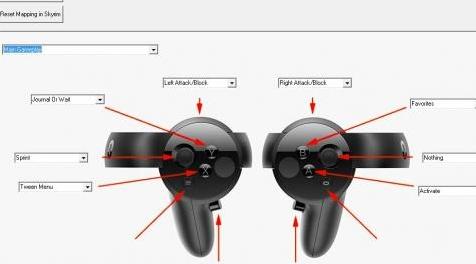
MOD介绍:
我为Skyrim VR制作了一个重映射工具。这时,它只适用于Oculus。如果我有一些时间,我会为Vive和WMR改变它。
它在... \ SkyrimVR \ Data \ Interface \ controls \ pc \ controlmapvr.txt中创建一个文本文件。如果你想
原始设置,删除文件或使用删除/重置按钮
Remappingtool!
此时,您无法重新映射模拟摇杆(仅模拟摇杆按钮)。我无法测试一切。如果您发现了错误,请分享!
________________________________________________________________________________________________________________________________
更新1
新版v1.1b:
- 现在可以在不退出工具的情况下按顺序编辑多个模式
-Better更改保存系统
________________________________________________________________________________________________________________________________
更新2
新v1.2:
- 首次启动后(您必须至少选择一次蒸汽SkyrimVR文件夹),您可以选择备用文件夹
您的controlmapvr.txt应该位于何处。如果controlmapvr.txt不存在,将创建它。
小费:
controlmapvr.txt的工作文件夹是:(如果选择备用文件夹,则不会被创建)
.. \ DATA \接口\控制\ PC \ controlmapvr.txt
————————————————————————————————————————————————————————————
I´ve made a Remapping Tool for Skyrim VR. At this time, it´s only for Oculus. If i had some time, i change it for Vive and WMR.
It creates a textfile in ...\SkyrimVR\Data\Interface\controls\pc\controlmapvr.txt. If you want
the original setting, delete the file or use the delete/reset button in
the Remappingtool!
At this time, you can´t remap the analog stick (only analog stick button). I can´t test everything. If you find a bug, share it!
________________________________________________________________________________________________________________________________
UPDATE 1
New v1.1b:
-Now you can edit multiple modes in sequence without quitting the tool
-Better changes save system
________________________________________________________________________________________________________________________________
UPDATE 2
New v1.2:
-After first start (you have to select steam SkyrimVR folder at lest one time) you can select an alternate folder
where your controlmapvr.txt should be located. The controlmapvr.txt will be created if it doesn´t exist there.
Tip:
Working folder for controlmapvr.txt is: (It will not be crated if you choose alternate folder)
..\Data\interface\controls\pc\controlmapvr.txt
资源查找:
最新文章
点击热榜
推荐问答
- [问答]情商课一般几岁孩子去学比较好?
- [问答]怎么看自己孩子情商低不低?孩子情商低的10大特征是真的吗?
- [问答]我想提高情商和说话要看什么书?
- [问答]顾三月情感课程pdf谁有?
- [问答]谁有情感培训课程资源?
- [问答]如何看卖情感课程正规还是不正规?
回复区
昵称:
邮箱:
内容: