辐射4MOD Kabuto VR
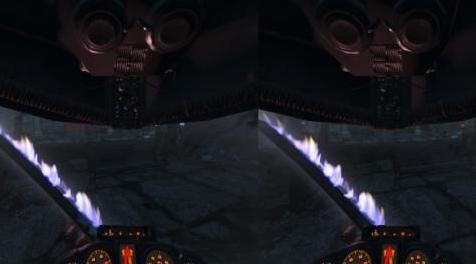
MOD介绍:
Kabuto VR
关于:
Kabuto:VR是一款身临其境的Power Armor头盔替代品,用于“Fallout 4 VR”,用一个基于游戏T-60头盔网的全封闭式头盔取代了平淡无奇的透明Power Armor HUD - 带有一点“艺术许可证”。
这个mod主要针对沉浸式寻求玩家。请注意,就像真正的头盔一样,它会限制你的视线,你会感觉更封闭。
对于那些寻求不那么身临其境的Power Armor体验的玩家,我提供3个额外版本的mod。它们都是独立的下载,你不需要主文件来使用它们 - 选择最适合你的游戏风格,或者当然没有一个也没关系!
头盔类型:
主要下载:用玻璃覆盖眼睛的全盔体验。这是迄今为止最具沉浸感的选择。
可选下载1:提供完整的头盔,但没有玻璃。对于那些发现玻璃有点限制的玩家。
可选下载2:提供原始的Power Armor界面,但没有透明度并重新添加灯光效果(是的,它会在晚上变暗)和玻璃以获得额外的沉浸感
可选下载3:提供与可选下载2相同的功能但没有玻璃。
安装:
重要 - 您必须遵循以下步骤
1.配置Fallout4Custom.ini以通过添加(或修改)以下行来允许松散的文件加载:
[文字]
bInvalidateOlderFiles = 1
sResourceDataDirsFinal =
sVRResourceStartUpArchiveList =
sVRResourceIndexFileList =
sResourceStartUpArchiveList = Fallout4 - Startup.ba2,Fallout4 - Shaders.ba2,Fallout4 - Interface.ba2,Fallout4_VR - Shaders.ba2
sResourceIndexFileList = Fallout4 - Textures1.ba2,Fallout4 - Textures2.ba2,Fallout4 - Textures3.ba2,
Fallout4 - Textures4.ba2,Fallout4 - Textures5.ba2,Fallout4 - Textures6.ba2,Fallout4 - Textures7.ba2,Fallout4 - Textures8.ba2,Fallout4 - Textures9.ba2,Fallout4_VR - Main.ba2,Fallout4_VR - Textures.ba2
现在继续按如下方式安装mod:
1。通过mod管理器安装mod或将提取的.zip中的文件夹放入“数据文件夹”。
2.打开C:\ Users \%username%\ AppData \ Local \ Fallout4VR \ Plugins.txt并在所有其他条目上方添加以下行:
* Fallout4_VR.esm
注意:添加其他mod或使用LOOT组织插件列表时,可能需要重做此步骤。
3.打开C:\ Users \%用户名%\ Documents \ My Games \ Fallout4VR \ Fallout4Custom.ini
[VRUI]
fPowerArmorOverlay_Helmet_TranslateZ = -12.0000
fPowerArmorOverlay_MaxAngleLeft = 0.0000
fPowerArmorOverlay_MaxAngleRight = 0.0000
fPowerArmorOverlay_Helmet_TranslateY = -10.000
fPowerArmorOverlay_Helmet_Scale = 0.5000
fPowerArmorOverlay_Helmet_RotateZ = 0.0000
fPowerArmorOverlay_MaxAngleDown = 0.0000
fPowerArmorOverlay_Helmet_RotateX = 0.0000
fPowerArmorOverlay_Helmet_TranslateX = 0.0000
注意:以上[VRUI]设置是我的“建议设置”,它们放在Vive Pro上,因此您可能会发现拨号难以阅读或整体位置不符合您的口味 - 这表示我不建议使用默认设置所以总是使用上面作为基础并调整它们。如果您找到了一些您希望分享的设置,请将它们添加到帖子部分,我会将它们添加到此页面的某个位置以供其他人参考。
About:
Kabuto:VR is an immersive Power Armor helmet replacement for 'Fallout 4 VR' which replaces the lackluster transparent Power Armor HUD with a fully enclosed helmet based on the games T-60 helmet mesh - with a little "artistic license".
This mod is primarily aimed at immersion seeking players. Be warned, just like a real helmet it will restrict your view and you will feel more enclosed.
For those players seeking a less immersive Power Armor experience I offer 3 additional versions of the mod. They are all standalone downloads, you do not need the main file to use them - choose which is most suited to your play style or of course none at all is fine as well!
Helmet Types:
Main Download: Full helmet experience with glass covering the eyes. This is by far the most immersive option to choose.
Optional Download 1: Provides the full helmet but without the glass. For those players who find the glass a little to restrictive.
Optional Download 2: Provides the original Power Armor interface but without the transparency and re-adds the lighting effects (yes it will be dark at night) and glass for an additional level of immersion
Optional Download 3: Provides the same features as Optional Download 2 but without the glass.
Installation:
IMPORTANT - YOU MUST FOLLOW THIS STEP
1. Configure Fallout4Custom.ini to allow for loose file loading by adding (or ammending) the following lines:
[Archive]
bInvalidateOlderFiles=1
sResourceDataDirsFinal=
sVRResourceStartUpArchiveList=
sVRResourceIndexFileList=
sResourceStartUpArchiveList=Fallout4 - Startup.ba2, Fallout4 - Shaders.ba2, Fallout4 - Interface.ba2, Fallout4_VR - Shaders.ba2
sResourceIndexFileList=Fallout4 - Textures1.ba2, Fallout4 - Textures2.ba2, Fallout4 - Textures3.ba2,
Fallout4 - Textures4.ba2, Fallout4 - Textures5.ba2, Fallout4 - Textures6.ba2, Fallout4 - Textures7.ba2, Fallout4 - Textures8.ba2, Fallout4 - Textures9.ba2, Fallout4_VR - Main.ba2, Fallout4_VR - Textures.ba2
Now continue to install the mod as follows:
1. Install the mod via your mod manager or drop the folders from the extracted .zip into your 'Data Folder'.
2. Open C:\Users\%username%\AppData\Local\Fallout4VR\Plugins.txt and add the following line above all other entries:
*Fallout4_VR.esm
Note: This step may need to be redone when you add other mods or use LOOT to organise your plugin list.
3. Open C:\Users\%Username%\Documents\My Games\Fallout4VR\Fallout4Custom.ini
[VRUI]
fPowerArmorOverlay_Helmet_TranslateZ=-12.0000
fPowerArmorOverlay_MaxAngleLeft=0.0000
fPowerArmorOverlay_MaxAngleRight=0.0000
fPowerArmorOverlay_Helmet_TranslateY=-10.000
fPowerArmorOverlay_Helmet_Scale=0.5000
fPowerArmorOverlay_Helmet_RotateZ=0.0000
fPowerArmorOverlay_MaxAngleDown=0.0000
fPowerArmorOverlay_Helmet_RotateX=0.0000
fPowerArmorOverlay_Helmet_TranslateX=0.0000
Note: The above [VRUI] settings are my 'suggested settings', they were put together on a Vive Pro so you may find dials difficult to read or the overall position not quite to your tastes - that said I do not recommend the default settings so always use the above as a base and tweak them. If you find some settings that you wish to share please do add them to the posts section and I'll add them somewhere on this page for others to reference.
资源查找:
最新文章
点击热榜
推荐问答
- [问答]情商课一般几岁孩子去学比较好?
- [问答]怎么看自己孩子情商低不低?孩子情商低的10大特征是真的吗?
- [问答]我想提高情商和说话要看什么书?
- [问答]顾三月情感课程pdf谁有?
- [问答]谁有情感培训课程资源?
- [问答]如何看卖情感课程正规还是不正规?
回复区
昵称:
邮箱:
内容: