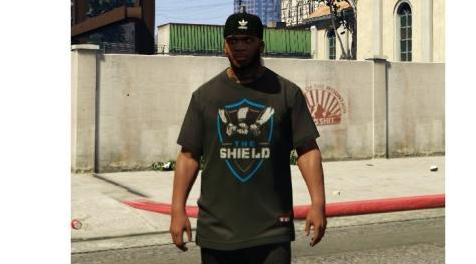
侠盗猎车手5「GTA5」Mod: WWE - The Shield 2018 T-shirt
MOD介绍:
这是富兰克林基本款T恤4号槽的定制纹理。
感谢您选择查看/下载我的WWE The Shield Reunion Tee 2018 Re-Texture Mod。 请忽略图像质量,游戏中的纹理具有高清画质。
免责声明:我对安装此mod后发生的任何错误或崩溃不可行。 请确保始终备份您替换的每个文件。
安装:
1.下载或打开,OpenIV。
2.转到Mods文件夹并选择x64v.rpf。
如果在编辑模式下没有看到x64v.rpf进入正常目录
右键单击并选择“移动到Mods文件夹”。
3.选择模型> cdimages> streampeds_players.rpf
4.打开“player_one”文件夹并向下滚动到
“upper_diff_004_[LETTER]_uni.ytd
5.选择A-P中的任何字母,然后在编辑模式下双击
选择的选项。
6.选择右上角的“替换”,然后选择包含的PNG文件。
7.在商店或通过培训师推出GTA V和Find T恤。
This is a custom texture for slot 4 of Franklin's basic t-shirt.
Thank you for choosing to view/download my WWE The Shield Reunion Tee 2018 Re-Texture Mod. Please ignore the image quality, the in-game texture is of High-Definition quality.
DISCLAIMER: I am not viable for any errors or crashes that occur after installing this mod. Please ensure you always back-ups of every file you replace.
Installation:
1. Download or Open, OpenIV.
2. Go to the Mods folder and Select x64v.rpf.
If you do not see x64v.rpf go to the normal directory whilst in edit mode and
right-click and select "Move to Mods Folder".
3. Select models>cdimages>streampeds_players.rpf
4. Open the "player_one" folder and scroll down to
"upper_diff_004_[LETTER]_uni.ytd
5. Choose any of the letters from A-P and whilst in Edit Mode double-click the
selected option.
6. Choose Replace in the top right and select the included PNG file.
7. Launch GTA V and Find said T-shirt in stores or via a Trainer.
资源查找:
最新文章
点击热榜
推荐问答
- [问答]情商课一般几岁孩子去学比较好?
- [问答]怎么看自己孩子情商低不低?孩子情商低的10大特征是真的吗?
- [问答]我想提高情商和说话要看什么书?
- [问答]顾三月情感课程pdf谁有?
- [问答]谁有情感培训课程资源?
- [问答]如何看卖情感课程正规还是不正规?
实时热榜
回复区
昵称:
邮箱:
内容: