辐射4MOD Buttressed Heavy Raider Torso - Bodyslide with Zap for P重型上衣
MOD介绍:
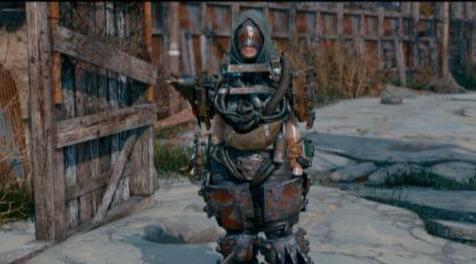
Buttressed Heavy Raider Torso - Bodyslide with Zap for Pipes重型袭击者上衣
非常简单的编辑Buttressed重型袭击者躯干Bodyslide文件包括一个zapper删除头部区域周围的管道,以便您可以更好地看到你的脸或头盔。只需切换Bodyslide文件顶部的zap即可打开或关闭管道。这仅包括Bodyslide文件,因此您需要运行Bodyslide并将盔甲构建到您想要的预设。它最初是用于CBBE身体所以我不知道它是否适用于其他身体,但试试看看。
安装:
使用Vortex下载并安装然后运行Bodyslide并搜索具有zap并构建到您想要的身体的Raider Heavy Torso。
如果手动安装,只需将文件夹解压缩到主要的Fallout 4文件夹,然后运行Bodyslide。
如果你想做你自己的zap滑块编辑,这是我遵循的指南:使用Outfit Studio添加Zaps
感谢并感谢以下精彩的人,他们制作或帮助了原始版本:
- Caliente
- Ousnius
- NifTools people
Very simple edit to the Buttressed Heavy Raider torso Bodyslide files to include a zapper that removes the pipes around the head area so you can better see your face or helmet. Just toggle the zap at the top of the file in Bodyslide to turn on or off the pipes. This only includes the Bodyslide files so you will need to run Bodyslide and build the armor to your desired preset. It is originally for the CBBE body so I do not know if it will work for other bodies, but give it a try and see.
Installation:
Download and install with Vortex then run Bodyslide and search for the Raider Heavy Torso that has a zap and build to your desired body.
If installing manually simply extract the folders to your main Fallout 4 folder and then run Bodyslide.
If you want to do your own zap slider edits this is the guide I followed: Adding Zaps with Outfit Studio
Thanks and credit to the following wonderful people who either made or helped with the original version:
- Caliente
- Ousnius
- NifTools people
资源查找:
最新文章
点击热榜
推荐问答
- [问答]情商课一般几岁孩子去学比较好?
- [问答]怎么看自己孩子情商低不低?孩子情商低的10大特征是真的吗?
- [问答]我想提高情商和说话要看什么书?
- [问答]顾三月情感课程pdf谁有?
- [问答]谁有情感培训课程资源?
- [问答]如何看卖情感课程正规还是不正规?
回复区
昵称:
邮箱:
内容: