上古卷轴5:重置版MOD 速溶药水SE
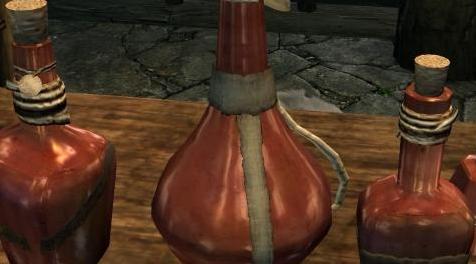
MOD介绍:
这是我对SE的oldrim mod的一个端口
请注意 - 您可以使用简单的文本编辑器自行编辑此批处理文件。如果您只想要额外的现金,我建议您添加几百个“最终治疗药水”。您只需从批处理文件中删除其他行,并包含行player.additem 39BE5 300(其中300是您要添加的数字 - 如果您愿意,可以将其更改为3,000)。
在销售药水时,有一个像Master Trader SE这样的模式可以增加商家拥有的现金数量。这将为您节省大量时间。
说明/说明
厌倦了在天际中跑来跑去试图找到你需要的所有药水成分或药水,或者在寻找控制台代码并逐个添加它们的过程中作弊。它需要永远!
现在你可以通过键入一个控制台命令来欺骗简单的方法 - 非常适合你几次玩Skyrim而你只想要轻松的生活!或者,如果您使用mod管理器设置多个配置文件,并希望快速进展。如果你发现你有太多的药水,你可以把它们卖给商人,赚大钱买Skyrim!
安装
只需将文件复制到您的Skyrim目录(您安装Steam的位置 - 而不是像普通mod文件那样的数据目录)。然后按下波形符键(`)打开控制台,输入命令bat AddPotions
现在你有了大部分药剂,你需要通过它。将所有商品添加到您的广告资源需要一分钟左右的时间。如果需要添加更多,只需再次输入命令即可。如果您不喜欢此mod添加的数量,只需编辑文本文件并包含您需要的每个项目,或添加新项目 - 在命令删除项目之前使用分号(它将被视为评论而不是命令)。
ZIP文件中包含的文件
AddPotions - 以下列数量添加药水......
数量已添加
2铁匠的灵药
2 Enchanter的草案
2 Enchanter的Elixir
2 Enchanter的Philter
2魔法师的药水
1 Falmer Blood Elixir
2真射击的菲尔特
1幻影的菲尔特
5长期不可见的药水
2改变药水
10剂治疗疾病
2药水治疗药水
10剂终极愈合
10药水终极魔法
10种终极耐力药水
使用mod管理器
如果您使用配置文件与Mod Organizer,请不要将文件放在配置文件文件夹中,只放在主Skyrim文件夹中。我不认为任何mod管理器会为你安装这个 - 你必须手动完成!如果有人知道如何让mod管理员这样做,请随意编辑...
兼容性
据我所知,不应该与任何东西冲突 - 这些文件不使用任何资源或脚本,并且不像数据文件夹中的普通mod那样安装,所以它们不应该导致任何问题。它应该算作一个额外的mod你可以拥有而不增加mod组织者可以处理的限制!
配伍禁忌
没有什么我知道的 - 如果这个mod崩溃你的游戏,导致矩阵中的故障或窃取你的女朋友,请让我知道。
如果您觉得我错过了任何物品,请告诉我。
卸载
只需删除文件,不再使用bat命令。或者,删除文件,使用bat命令并思考它为什么不起作用。
随意复制,黑客攻击,利用,编辑,反向工程,侵犯版权(没有)上传到其他网站,或对文件做任何你想做的事情,除了收费或上传到网站将为他们收费。这些文件对任何想要它们的人都是免费的!
学分
Bethesda,Steam,Nexus - 你摇滚!
我!!!
请看我的其他mods ......
Instant Smithing Materials SE适用于沉浸式珠宝
Instant Perks SE
速溶药水SE
Instant Smithing SE
Instant Shouts SE
即时天际拼写SE
超强武器和装甲SE
Instant Perks SE for Ordinator
Instant Perks SE for Ordinator(按类别)
如果您无法让他们工作,请再次阅读说明。这不是太困难。
其他mods的方式 - 请检查我的页面上的新的和令人兴奋的事情,使Skyrimming更容易!
——————————————————————————————————————————————————————————
This is a port of my oldrim mod to SE
Please note - you can edit this batch file yourself with a simple text editor. If you just want extra cash, I recommend just adding several hundred "Potions of Ultimate Healing". You can simply delete the other lines from the batch file and include the line player.additem 39BE5 300 (where 300 is the number you wish to add - you can change this to 3,000 if you wish).
When selling the potions, it's useful to have a mod like Master Trader SE to boost the amount of cash that merchants have. This will save you a LOT of time.
Description / Instructions
Fed up of running around in Skyrim trying to find all the potion ingredients or potions you need, or cheating the hard way looking for console codes and adding them one by one. It takes forever!
Now you can cheat the easy way just by typing one console command - great for when you've played Skyrim several times and you just want an easy life! Or if you set up multiple profiles with mod organizer and want to progress quickly. As an added bonus if you find you have too many potions you can sell them to merchants, make loads of money and buy Skyrim!
Installation
Simply copy the file into your Skyrim directory (where you installed Steam - not the data directory as you would with normal mod files). Then open the console by pressing the tilde key (`) and type in the command bat AddPotions
Now you have most of the potions you will need to get you through. It takes a minute or so to add all of the items to your inventory. If you need to add more, just type the command again. If you don't like the quantities added by this mod, just edit the text file and include however many you need of each item, or add new items - using a semicolon before a command will remove the item (it will just be treated as a comment instead of a command).
FILES INCLUDED IN ZIP FILE
AddPotions - adds potions in the following quantities...
Quantities Added
2 Blacksmith's Elixir
2 Enchanter's Draught
2 Enchanter's Elixir
2 Enchanter's Philter
2 Enchanter's Potion
1 Falmer Blood Elixir
2 Philter Of True Shot
1 Philter Of The Phantom
5 Potion Of Prolonged Invisibility
2 Potion Of Alteration
10 Potion of Cure Disease
2 Potion Of Cure Poison
10 Potion Of Ultimate Healing
10 Potion Of Ultimate Magicka
10 Potion Of Ultimate Stamina
Using mod managers
If you use profiles with Mod Organizer, don't put the file in the profile folder, just the main Skyrim folder. I don't think any mod manager will install this for you - you have to do it manually! If someone knows how to get a mod manager to do this please feel free to edit at will...
Compatibility
Shouldn't clash with anything as far as I know - these files don't use any resources or scripts and aren't installed like normal mods in the data folder so they shouldn't cause any problems. It should also count as an extra mod you can have without adding to the limit that mod organizer can handle!
Incompatibility
Nothing as far as I know - please let me know if this mod crashes your game, causes glitches in the matrix or steals your girlfriend.
Please let me know if there are any items you feel I've missed.
Uninstallation
Simply delete the files and refrain from using the bat command anymore. Alternatively, delete the files, use the bat command and ponder why it's not working.
Feel free to copy, hack, exploit, edit, reverse engineer, infringe copyright (there are none) upload to other sites, or do whatever else you want with the files, with the exception of charging for them or uploading them to a site that will charge for them. These files are free to anyone and everyone who wants them!
CREDITS
Bethesda, Steam, Nexus - you rock!
Me!!!
Please see my other mods...
Instant Smithing Materials SE for Immersive Jewelry
Instant Perks SE
Instant Potions SE
Instant Smithing SE
Instant Shouts SE
Instant Skyrim spells SE
Super Powerful Weapons and Armor SE
Instant Perks SE for Ordinator
Instant Perks SE for Ordinator (by category)
If you can't get them to work, please read the instructions again. It's not too difficult.
Other mods on the way - please check my page for new and exciting things to make Skyrimming easier!!!
资源查找:
最新文章
点击热榜
推荐问答
- [问答]情商课一般几岁孩子去学比较好?
- [问答]怎么看自己孩子情商低不低?孩子情商低的10大特征是真的吗?
- [问答]我想提高情商和说话要看什么书?
- [问答]顾三月情感课程pdf谁有?
- [问答]谁有情感培训课程资源?
- [问答]如何看卖情感课程正规还是不正规?
回复区
昵称:
邮箱:
内容: