侠盗猎车手5MOD Bokeh Cinematic Pack l 4K
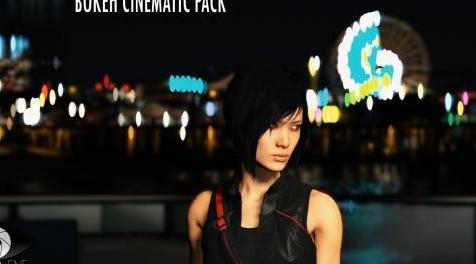
MOD介绍:
大家好!
首先,感谢您使用我的CINEMATIC BOKEH PACK!
在这个包中你有6种形状的散景。
根据所选角度,每个形状看起来都很有趣。
我建议复制并保存原始文件并使用mods文件夹。
你需要OpenIV(gta5-mods.com/tools/openiv)
所以你可以选择安装方式:
1方法 - 替换主文件“graphics.ytd”,“graphics_pc.ytd”和“visualsettings.dat”
2方法 - 替换某些纹理和值。
安装:
第一种方法
1)在这个位置找到“graphics.ytd”,“graphics_pc.ytd”:GTA5 \ mods \ x64a.rpf \ textures \
用我文件夹中的文件替换它们。
然后在此位置替换“graphics.ytd”:GTA5 \ mods \ update \ update.rpf \ x64 \ textures \
接下来,在此位置替换“visualsettings.dat”:GTA5 \ mods \ update \ update.rpf \ common \ data
最后一步 - 在BOKEH SHAPES文件夹中选择形状并转到相同的路径:
1. - GTA5 \ mods \ update \ update.rpf \ x64 \ textures \ graphics.ytd
2. - GTA5 \ mods \ x64a.rpf \ textures \ graphics.ytd
在那个位置,这次替换文件“bokeh_8sided_iris_4x4sheet”,每次你想改变散景的形状
您将仅替换此“bokeh_8sided_iris_4x4sheet”纹理文件。
第二种方法
1)首先在我的文件夹GRAPHICS.YTD中你可以找到2个文件(flare_artefact.dds,flare_artefactx2.dds)。将它们替换为相同的位置:
(打开graphics.ytd找到flare_artefact.dds,点击它右上角找到REPLACE,选择我的文件,然后选择SAVE)
1. - GTA5 \ mods \ update \ update.rpf \ x64 \ textures \ graphics.ytd
2. - GTA5 \ mods \ x64a.rpf \ textures \ graphics.ytd
2)下一步 - 在BOKEH SHAPES文件夹中选择形状并转到相同的路径:
1. - GTA5 \ mods \ update \ update.rpf \ x64 \ textures \ graphics.ytd
2. - GTA5 \ mods \ x64a.rpf \ textures \ graphics.ytd
在那个位置,这次替换文件“bokeh_8sided_iris_4x4sheet”,每次你想改变散景的形状
您将仅替换此“bokeh_8sided_iris_4x4sheet”纹理文件。
3)打开位置:GTA5 \ mods \ update \ update.rpf \ common \ data
然后找到“visualsettings.dat”,将其复制到您的计算机中,打开并向下滚动。查找行v
bokeh.brightnessThresholdMin 4.0
bokeh.brightnessThresholdMax 3.0
bokeh.brightnessExposureMin -3.0
bokeh.brightnessExposureMax 1.0
bokeh.cocThreshold 0.1
bokeh.fadeRangeMin 0.06
bokeh.fadeRangeMax 0.06
bokeh.sizeMultiplier 3.3
bokeh.globalAlpha 1.0
bokeh.alphaCutoff 0.15
bokeh.shapeExposureRangeMin -3.0
bokeh.shapeExposureRangeMax 1.0
用上面的文字替换它们:
如果你想改变Bokeh的大小,那么下次改变这一行的值:“bokeh.sizeMultiplier”
4)最后一步 - 在下一个路径中替换文件“graphics_pc.ytd”:GTA5 \ mods \ x64a.rpf \ textures \
任何问题?请在这个页面上问我或者写信给oneeyeproductioncinematic@gmail.com
谢谢!
Hello everyone!
First of all, thank you for using my CINEMATIC BOKEH PACK !
In this pack you got 6 shapes of Bokeh.
Each shape looks interesting depending on the selected angle.
I recommend make copy and save original files and using the mods folder.
You will need OpenIV (gta5-mods.com/tools/openiv)
So you can choose ways to install:
1 METHOD - replacing main files "graphics.ytd", "graphics_pc.ytd" and "visualsettings.dat"
2 METHOD - replacing certain textures and values.
INSTALL:
FIRST METHOD
1) Find "graphics.ytd", "graphics_pc.ytd" at this location: GTA5\mods\x64a.rpf\textures\
replace them by files from my folder.
Then replace "graphics.ytd" at this location: GTA5\mods\update\update.rpf\x64\textures\
Next, replace "visualsettings.dat" at this location: GTA5\mods\update\update.rpf\common\data
Final step - choose shape in BOKEH SHAPES folder and go to same paths:
1. - GTA5\mods\update\update#rpf\x64\textures\graphics#ytd
2. - GTA5\mods\x64a#rpf\textures\graphics#ytd
At that locations replace file "bokeh_8sided_iris_4x4sheet" this time and every next time you wanna change shape of bokeh
you will replace only this "bokeh_8sided_iris_4x4sheet" texture file.
SECOND METHOD
1) First of all in my folder GRAPHICS.YTD you can find 2 files (flare_artefact.dds, flare_artefactx2.dds). Replace them in the same locations:
(Open graphics.ytd find flare_artefact.dds, click on it in the right corner find REPLACE, choose my file, then choose SAVE)
1. - GTA5\mods\update\update#rpf\x64\textures\graphics#ytd
2. - GTA5\mods\x64a#rpf\textures\graphics#ytd
2) Next step - choose shape in BOKEH SHAPES folder and go to same paths:
1. - GTA5\mods\update\update#rpf\x64\textures\graphics#ytd
2. - GTA5\mods\x64a#rpf\textures\graphics#ytd
At that locations replace file "bokeh_8sided_iris_4x4sheet" this time and every next time you wanna change shape of bokeh
you will replace only this "bokeh_8sided_iris_4x4sheet" texture file.
3) Open location: GTA5\mods\update\update.rpf\common\data
Then find "visualsettings.dat", copy it in your computer, open and scroll down at the end. Find lines v
bokeh.brightnessThresholdMin 4.0
bokeh.brightnessThresholdMax 3.0
bokeh.brightnessExposureMin -3.0
bokeh.brightnessExposureMax 1.0
bokeh.cocThreshold 0.1
bokeh.fadeRangeMin 0.06
bokeh.fadeRangeMax 0.06
bokeh.sizeMultiplier 3.3
bokeh.globalAlpha 1.0
bokeh.alphaCutoff 0.15
bokeh.shapeExposureRangeMin -3.0
bokeh.shapeExposureRangeMax 1.0
Replace them with the above text :
If you wanna change size of Bokeh, then next time change value of this line : "bokeh.sizeMultiplier"
4) Final step - replace file "graphics_pc.ytd" in the next path: GTA5\mods\x64a.rpf\textures\
Any question? Just ask me at this page or write me to oneeyeproductioncinematic@gmail.com
Thank you!
演示截图:


资源查找:
最新文章
点击热榜
推荐问答
- [问答]情商课一般几岁孩子去学比较好?
- [问答]怎么看自己孩子情商低不低?孩子情商低的10大特征是真的吗?
- [问答]我想提高情商和说话要看什么书?
- [问答]顾三月情感课程pdf谁有?
- [问答]谁有情感培训课程资源?
- [问答]如何看卖情感课程正规还是不正规?
实时热榜
回复区
昵称:
邮箱:
内容: