上古卷轴5:重置版MOD 秃鹰重塑汇编
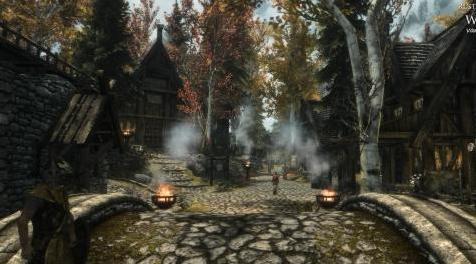
MOD介绍:
一系列ReShade预设,以满足各种口味!
屏幕截图在这里:
Cinematic ReShades
质朴的ReShades
香草增强ReShades
*欢迎您在此Nexus页面上传所有截图
安装
- 下载ReShade - reshade.me/
- 安装并按照说明操作
- 您无需下载任何效果。
- 在ReShade窗口标题上有“安装成功”时关闭重新转发。
- 下载 - >在Skyrim SE主文件夹中解压缩(SkyrimSE.exe所在的位置)。 如果被问到,请覆盖。
- 运行游戏并按shift + f2并从窗口顶部的下拉列表中选择我的预设之一。
- 关闭转换窗口(shift + f2)
- 请享用!
有关完整的概要,请同时查看我的其他ReShade预设:
秃鹰ReShade
轻盈的绽放
——————————————————————————————————————————————————————
A collection of ReShade presets to cater all tastes!
Screenshots are here:
Cinematic ReShades
Rustic ReShades
Vanilla Enhancing ReShades
* all your screenshots are welcome to be uploaded here on this Nexus page
Installation
- Download ReShade - reshade.me/
- Install it and follow the instructions
- You don't need to download any effects.
- Close Reshade when there's "Installation succesfull" on ReShade window title.
- Download -> Unzip in main Skyrim SE folder (where SkyrimSE.exe is). Overwrite if asked.
- Run the game and press shift + f2 and select one of my preset from dropdown located on top of the window.
- Close reshade window (shift+f2)
- Enjoy!
For the complete compendium, please also check my other ReShade presets:
Vulture ReShade
Lightweight Bloom
资源查找:
最新文章
点击热榜
推荐问答
- [问答]情商课一般几岁孩子去学比较好?
- [问答]怎么看自己孩子情商低不低?孩子情商低的10大特征是真的吗?
- [问答]我想提高情商和说话要看什么书?
- [问答]顾三月情感课程pdf谁有?
- [问答]谁有情感培训课程资源?
- [问答]如何看卖情感课程正规还是不正规?
回复区
昵称:
邮箱:
内容: