上古卷轴5:重置版MOD 简单的孤立SKSE共同删除删除脚本
MOD介绍:
注意:
此脚本是vbs(Visual Basic脚本),可以直接从Windows中运行
这个的灵感来自AnyOldName3的类似文件,它做同样的事情,但是是一个从Mod Organizer中运行的python脚本:
Mod Organizer - 孤立的脚本扩展程序保存删除插件
如果你使用mod组织器,肯定去取而不是这个。
描述
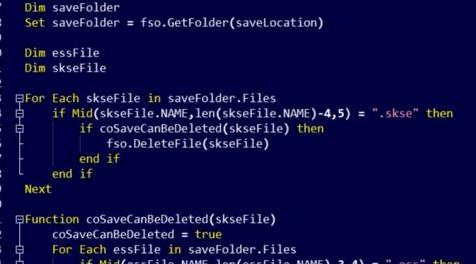
一个简单的VBS脚本,将删除孤立的SKSE共同保存。
运行SKSE并创建保存时,SKSE还会保存一个共同保存文件,该文件具有相同的名称,但扩展名为.skse,其中包含特定于保存的信息。在SKSE的当前版本中,当删除ess保存时,不会删除这些共同保存,因此您可以在保存目录中保留孤立的.skse文件。此脚本将删除与现有ess保存文件无关的所有skse文件。
用法
在使用脚本之前,您必须编辑它以指向您的保存目录。
要做到这一点很简单:
1)右键单击VBS文件,然后单击编辑(这应该在记事本或类似文件中打开)。
2)编辑看起来像这样的第3行:
saveLocation =“D:\ Documents \ My Games \ Skyrim Special Edition \ Saves”
然后用引用Skyrim SE保存的完整路径替换引号内的文本。
小费
要自动执行此过程,您可以设置任务计划程序以根据需要随时运行脚本。
这是一个关于如何做到这一点的简单教程的链接:
在任务计划程序中运行VBS脚本
请享用。
权限:
做任何你喜欢的事
-DayDay
————————————————————————————————————————————————————————
NOTE:
This script is a vbs (Visual Basic Script) and can be run directly from within windows
The inspiration for this came from a similar file by AnyOldName3, that does the same thing but is a python script to be run from within Mod Organiser:
Mod Organizer - Orphaned script extender save deleter plugin
If you use mod organiser, definitely go and get that instead of this.
Description
A simple VBS script that will remove orphaned SKSE co-saves.
When running SKSE and a save is created, instead of just an .ess save file being created, SKSE also saves a co-save file with the same name but the extension .skse that contains skse specific save information. In the current builds of SKSE these co-saves are not removed when a an ess save is deleted so you can be left with orphaned .skse files in your save directory. This script removes any skse files that are not related to an existing ess save file.
Usage
Before using the script you will have to edit it to point to your save directory.
To do this is easy:
1) Right click the VBS file and click Edit (this should open in notepad or similar).
2) Edit the 3rd line that looks like this:
saveLocation = "D:\Documents\My Games\Skyrim Special Edition\Saves"
then replace the text inside the quotes with the full path that your Skyrim SE saves are kept in.
Tip
To automate the process, you can set up Task Scheduler to run the script as often as you like.
Here's a link to a simple tutorial on how to do that:
Run a VBS script in Task Scheduler
Enjoy.
Permissions:
Do whatever you like with it
-DayDay
资源查找:
最新文章
点击热榜
推荐问答
- [问答]情商课一般几岁孩子去学比较好?
- [问答]怎么看自己孩子情商低不低?孩子情商低的10大特征是真的吗?
- [问答]我想提高情商和说话要看什么书?
- [问答]顾三月情感课程pdf谁有?
- [问答]谁有情感培训课程资源?
- [问答]如何看卖情感课程正规还是不正规?
回复区
昵称:
邮箱:
内容: