上古卷轴5:重置版MOD 轻量级Bloom Reshade
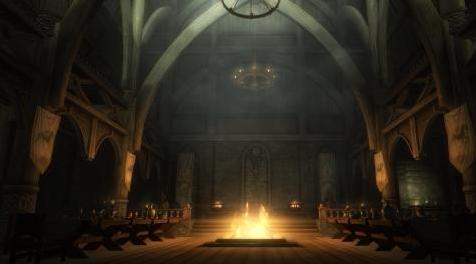
MOD介绍:
我想要一个可以尽可能少地改变游戏的灯光预设,但仍然感觉有点神奇......
我想通过Reshade为游戏添加了绽放,我得到了我想要的东西。
屏幕截图不公正,只需下载并试用即可。
它非常轻巧,性能成本几乎为零。
安装
- 下载ReShade - reshade.me/
- 安装它并按照说明(在被要求时下载Bloom,Curves和MagicBloom效果)
- 在ReShade窗口标题上有“安装成功”时关闭重新转发。
- 下载 - >解压缩 - >将此ini文件放在主要的Skyrim SE文件夹中(SkyrimSE.exe所在的位置)
- 运行游戏并按shift + f2并从窗口顶部的下拉列表中选择我的预设。
- 关闭转换窗口(shift + f2)
兼容性
兼容一切!
——————————————————————————————————————————————————————
I wanted a light preset that will alter the game as less as possible, but still feel a little magic...
I think I got what I wanted by just adding bloom to the game through Reshade.
The screenshots do it no justice, just download and try it.
It's very light, and comes with almost zero performance cost.
Installation
- Download ReShade - reshade.me/
- Install it and follow the instructions (download Bloom, Curves, and MagicBloom effects when asked to)
- Close Reshade when there's "Installation succesfull" on ReShade window title.
- Download -> Unzip -> Put this ini file in main Skyrim SE folder (where SkyrimSE.exe is)
- Run the game and press shift + f2 and select my preset from dropdown located on top of the window.
- Close reshade window (shift+f2)
Compatibility
Compatible with everything!
资源查找:
最新文章
点击热榜
推荐问答
- [问答]情商课一般几岁孩子去学比较好?
- [问答]怎么看自己孩子情商低不低?孩子情商低的10大特征是真的吗?
- [问答]我想提高情商和说话要看什么书?
- [问答]顾三月情感课程pdf谁有?
- [问答]谁有情感培训课程资源?
- [问答]如何看卖情感课程正规还是不正规?
回复区
昵称:
邮箱:
内容: